---
title: Stitching merge rules
description: Stitching merge rules are optional, per‑attribute rules that determine the final value of an attribute when two visitor profiles are stitched.
url: https://docs.tealium.com/administration/early-access/visitor-stitching/stitching-merge-rules/
---
## Requirements
* Tealium AudienceStream enabled
* Visitor stitching enabled
* Account admin permissions
## How stitching merge rules work
Visitor stitching uses event replay to build a merged profile from historical events, but is subject to system limits such as the event retention period and a maximum of 1,500 events. When visitor profiles exceed these limits, older events may not be replayed during stitching, resulting in incomplete historical data for long-lived or high-volume profiles.
Stitching merge rules address such cases by augmenting the stitching process with attribute‑specific logic that doesn't rely on event replay and produces the same durable, consistent outcome every time.
Merge rules compare the attributes from two visitor profiles to determine the final attribute value, which is applied after historical events are replayed on the merged visitor profile. This ensures that your most important attributes retain their intended value even when historical event processing cannot include all past events.
### When merge rules are applied
Stitching merge rules are applied only when two visitors with prior activity are stitched. This is the scenario where event replay may discard older events and a rule is required to resolve the final attribute value.
If either visitor in the merge does not have a previous visit, then stitching merge rules are not applied because event replay of the returning visitor determines the outcome.
## Identify attributes that need a merge rule
Not every attribute needs a stitching merge rule, so the first step is to determine which important attributes benefit most from a stitching merge rule. In general, stitching merge rules are used only for your most important attributes that track lifetime values and those related to data privacy and consent.
The following categories of attributes are good candidates for stitching merge rules:
* **Consent status attributes**
Ensure the correct consent status persists even if the deciding consent event is older than the retention window or displaced by volume.
* **Lifetime metrics**
Maintain accurate counters, tallies, and accumulations.
* **CRM/file‑imported attributes**
Keep authoritative values imported from systems of record (for example, CRM).
### Analyze enrichments
After you identify an attribute that needs a stitching merge rule, the next step is to select the best one based on the logic of its enrichments.
Selecting the appropriate merge rule requires understanding how the attribute is set by its enrichments. Choose a merge rule that applies the same decision logic so the stitched result aligns with the enrichment intent. Using a rule that differs from the intended enrichment logic can result in inconsistent data.
For examples of stitching merge rules best suited for certain enrichments, see [Definitions](#definitions).
## Attribute-specific merge behavior
### Preloaded attributes
Preloaded attributes are system‑managed attributes that exist in all profiles where AudienceStream is enabled. When stitching merge rules are enabled, these attributes receive appropriate, replay‑consistent merge rules automatically and the selections are not editable. This maintains consistency with their built-in enrichments.
For more information, see [preloaded-attributes](https://docs.tealium.com/preloaded-attributes/).
### Funnel
The funnel attribute type supports only one stitching merge rule: **Merge funnel**.
The **Merge funnel** rule combines the funnel steps from each visitor chronologically. If duplicate steps exist, the earlier occurring step is saved and the older one is removed.
### Tally favorite
A tally favorite can only use the **Recalculate (Force)** rule. A tally attribute generates a favorite attribute that contains the tally key with the highest value, so it always needs to be recalculated on the merged visitor.
Tally attributes and their associated favorite attributes follow these behaviors:
* If the tally has a merge rule, the favorite attribute automatically uses the **Recalculate (Force)** rule so its value is recomputed on the stitched visitor after other merge rules run.
* If the tally has no merge rule, the favorite string automatically has no merge rule.
* If a merge rule is removed from the tally, the favorite attribute's merge rule is removed automatically.
### Timeline
The timeline attribute type supports only one stitching merge rule: **Merge timeline**.
The **Merge timeline** rule combines entries from each visitor in chronological order and trims the result to the newest 100 entries if the limit is exceeded.
If the timeline attribute has an enrichment that expires entries older than `X` days, the merge rule expires entries older than `X` days from the time of the merge. If multiple enrichments expire entries, the merge rule uses the lowest value of `X`.
### Visitor ID
When stitching merge rules are enabled, the **Older** rule is automatically applied to each visitor ID attribute. The **Older** rule for visitor ID attributes cannot be changed.
## Use stitching merge rules
Before you can use stitching merge rules, you must enable the feature.
To enable stitching merge rules on a profile:
1. Go to **Admin > Server-Side Settings**.
1. Click the **Stitching Merge Rules** toggle to the on position.
1. Click **Save**.
1. Publish the profile.
When stitching merge rules are enabled, a new setting is available in the attribute edit view. Enable the setting to apply a merge rule to the attribute, then select a merge rule from the list.

## Rules available by attribute
| Rule | Badge | Boolean | Date | Number | Set of Strings | String | Tally | Arrays | Funnel | Timeline | Visitor ID |
|---------------------|:-----:|:--------:|:----:|:------:|:--------------:|:------:|:-----:|:------:| :------:|:--------:|:----------:|
| **And** | ✔ | ✔ | – | – | – | – | – | – | – | – | – |
| **Or** | ✔ | ✔ | – | – | – | – | – | – | – | – | – |
| **Max** | – | – | ✔ | ✔ | – | – | – | – | – | – | – |
| **Min** | – | – | ✔ | ✔ | – | – | – | – | – | – | – |
| **Newer** | ✔ | ✔ | ✔ | ✔ | ✔ | ✔ | ✔ | ✔ | – | – | - |
| **Older** | ✔ | ✔ | ✔ | ✔ | ✔ | ✔ | ✔ | ✔ | – | – | ✔ |
| **Recalculate** | ✔ | ✔ | ✔ | ✔ | ✔ | ✔ | ✔ | ✔ | – | – | – |
| **Recalculate (Force)** | ✔ | ✔ | ✔ | ✔ | ✔ | ✔ | ✔ | ✔ | – | – | – |
| **Sum** | – | – | – | ✔ | – | – | – | – | – | – | – |
| **Union** | – | – | – | – | ✔ | – | ✔ | ✔ | – | – | – |
| **Union Sum** | – | – | – | – | – | – | ✔ | – | – | – | – |
| **Union Max** | – | – | – | – | – | – | ✔ | – | – | – | – |
| **Union Min** | – | – | – | – | – | – | ✔ | – | – | – | – |
| **Merge Funnel** | – | – | – | – | – | – | – | – | ✔ | – | – |
| **Merge Timeline** | – | – | – | – | – | – | – | – | – | ✔ | – |
## Definitions
### And
| Supported data types | Rule behavior |
|----------------------|---------------|
| Badge | Set to `Assigned` only if both are `Assigned`. |
| Boolean | Set to `true` only if both are `true`. |
{class="dt--fixed"}
**Example**
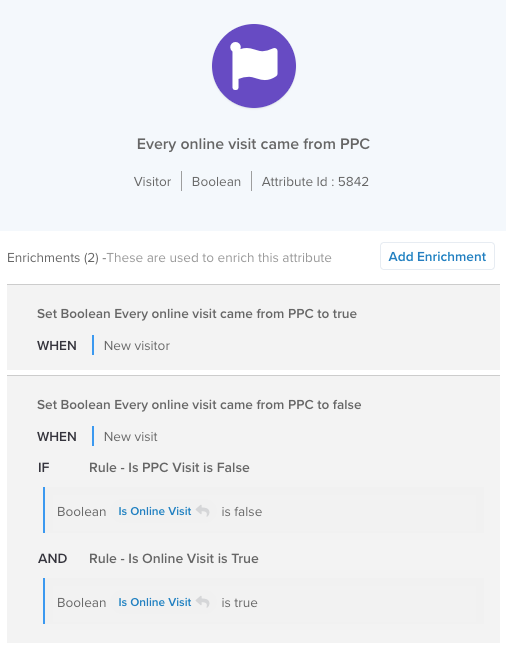
This example attribute is `true` for a visitor if all the visitor's online visits came from PPC. Based on these enrichments, the merged attribute is `true` only if both visitors have the attribute set to `true`. If either visitor has the attribute set to `false`, it means not all the visitor's online visits were from PPC, so the merged attribute value is `false`. Use the **And** rule to achieve the correct merged value.
**Badges**:
| Visitor A | Visitor B | Merged visitor with **And** rule |
| ----- | ----- | ----- |
| `Assigned` | `Assigned` | `Assigned` |
| `Assigned` | `Not Assigned` | `Not Assigned` |
| `Not Assigned` | `Assigned` | `Not Assigned` |
| `Not Assigned` | `Not Assigned` | `Not Assigned` |
**Booleans**:
| Visitor A | Visitor B | Merged visitor with **And** rule |
| ----- | ----- | ----- |
| `True` | `True` | `True` |
| `True` | `False` | `False` |
| `True` | (unset) | `False` |
| `False` | `True` | `False` |
| `False` | `False` | `False` |
| (unset) | `True` | `False` |
| (unset) | (unset) | (unset) |
### Or
| Supported data types | Rule behavior |
|----------------------|---------------|
| Badge | Set to `Assigned` if either is `Assigned`. |
| Boolean | Set to `true` if either is `true`. |
{class="dt--fixed"}
**Example**
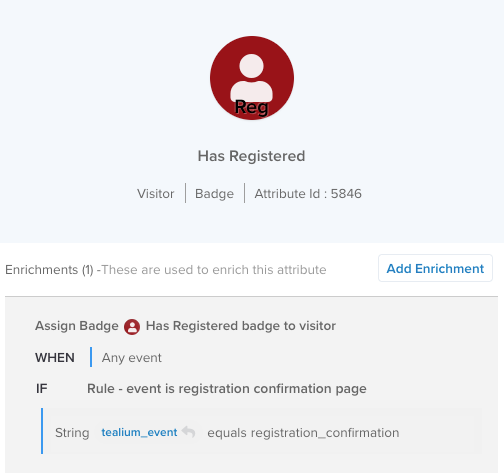
This example badge is assigned if the visitor sees a one-time event, and the badge is never unassigned.
Based on these enrichments, the merged badge is assigned if either visitor has registered, so the **Or** rule is the appropriate choice to determine the correct result.
**Badges**:
| Visitor A | Visitor B | Merged visitor with **Or** rule |
| ----- | ----- | ----- |
| `Assigned` | `Assigned` | `Assigned` |
| `Assigned` | `Not Assigned` | `Assigned` |
| `Not Assigned` | `Assigned` | `Assigned` |
| `Not Assigned` | `Not Assigned` | `Not Assigned` |
**Booleans**:
| Visitor A | Visitor B | Merged visitor with **Or** rule |
| ----- | ----- | ----- |
| `True` | `True` | `True` |
| `True` | `False` | `True` |
| `True` | (unset) | `True` |
| `False` | `True` | `True` |
| `False` | `False` | `False` |
| (unset) | `True` | `True` |
| (unset) | (unset) | (unset) |
### Max
| Supported data types | Rule behavior |
|----------------------|---------------|
| Number | Keep the higher value. |
| Date | Keep the later date. |
{class="dt--fixed"}
**Example**
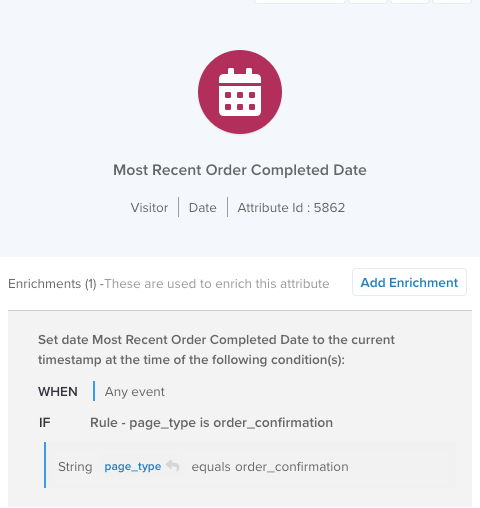
In this example, use the **Max** merge rule to select the more recent of the dates from the merged visitor profiles.
Since this enrichment uses the current timestamp, the **Newer** rule produces the same result because a newer timestamp is always a larger value than an older timestamp.
### Min
| Supported data types | Rule behavior |
|----------------------|---------------|
| Number | Keep the lower value. |
| Date | Keep the earlier date. |
{class="dt--fixed"}
**Example**
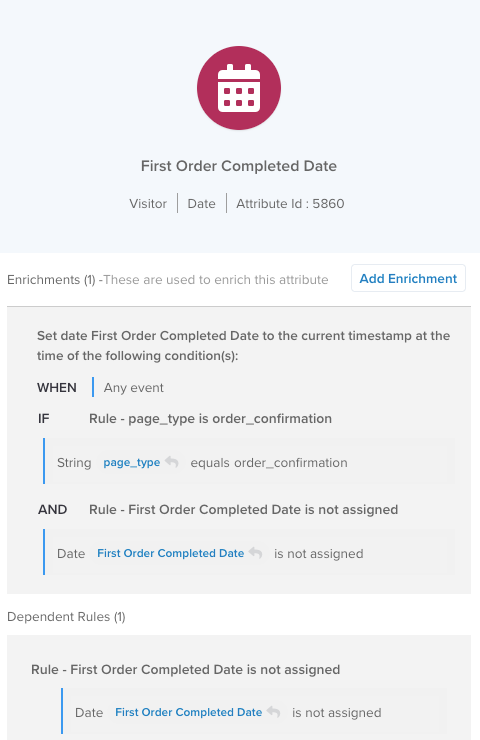
In this example, use the **Min** merge rule to select the earlier of the two dates from the merged visitor profiles.
Since this enrichment uses the current timestamp, the **Older** rule produces the same result because an older timestamp is always a lower value than a newer timestamp.
### Newer
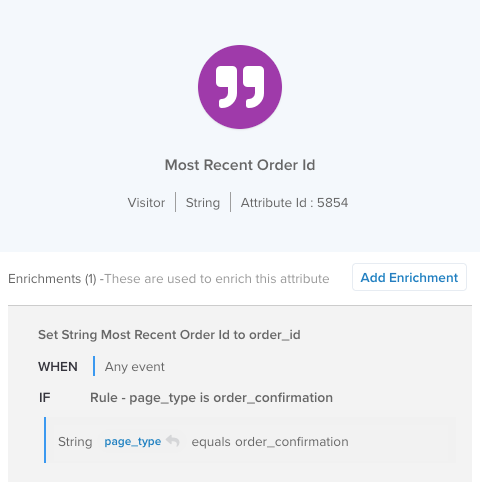
The **Newer** rule chooses the attribute value, including a removed value, updated most recently. This rule is best for attributes with enrichments based on incoming event attributes (as opposed to other visitor attributes).
The **Newer** rule is based on an internal timestamp set when an enrichment updates the value of an attribute. If the internal timestamp is not set for both attributes, the timestamps of the last visit for each visitor are used to determine which was set first.
| Supported data types | Rule behavior |
|-------------|--------------------|
| Badge | Keep the more recently updated state (including unassigned). |
| Boolean
Number | Keep the more recently updated value. |
| Date | Keep the more recently updated value (including removed values). This is based on when this date attribute was last enriched, not the date value stored in the attribute itself. |
| Set of strings | Keep the more recently updated (including removed) set of strings. |
| String | Keep the more recently updated value (including removed values). |
| Tally | Keep the more recently updated (including removed) tally. |
| Array of booleans
Array of numbers
Array of strings | Keep the more recently updated (including removed) array. |
{class="dt--fixed"}
**Example**
### Older
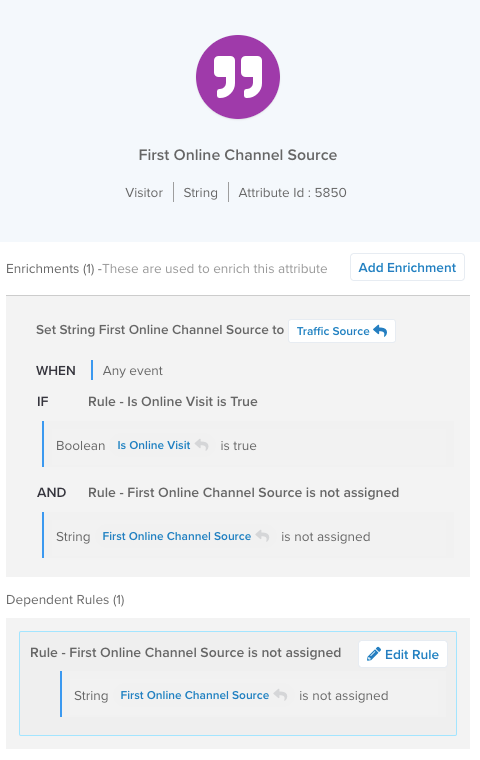
The **Older** rule chooses the attribute value, including a removed value, updated earlier. The **Older** rule is best for attributes with enrichments that only set a value if a value is not already set to ensure that only the first value for the visitor is saved.
The **Older** rule is based on an internal timestamp set when an enrichment updates the value of an attribute. If the internal timestamp is not set for both attributes, the timestamps of the last visit for each visitor are used to determine which was set first.
If an attribute enrichment does not use a self-referencing rule to ensure it's only set once, then using the **Older** rule will not necessarily result in the earliest value set.
| Supported data types | Rule behavior |
|----------------------|---------------|
| Badge | Keep the earlier updated state (including unassigned). |
| Boolean
Number | Keep the earlier updated value. |
| Date | Keep the earlier updated value (including removed values). This is based on when this date attribute was last enriched, not the date value stored in the attribute itself. |
| Set of strings | Keep the earlier updated (including removed) set of strings. |
| String | Keep the earlier updated value (including removed values). |
| Tally | Keep the earlier updated (including removed) tally. |
| Array of booleans
Array of numbers
Array of strings | Keep the earlier updated (including removed) array. |
{class="dt--fixed"}
**Example**
### Recalculate
| Supported data types | Rule behavior |
|----------------------|---------------|
| Badge | Discard previous states and run enrichments on the final merged profile. |
| Boolean
Date
Number | Discard previous values and run enrichments on the final merged profile. |
| Set of strings
String
Tally
Array of booleans
Array of numbers
Array of strings | Start unassigned and run enrichments on the final merged profile. |
{class="dt--fixed"}
The **Recalculate** rule discards the initial merged value of the attribute and reruns the enrichments for the attribute. Discarding the initial merged value ensures that the recalculation starts with an unset value and the value is set only based on the enrichments.
The **Recalculate** rule is best suited for attributes derived from other visitor or visit attributes, such as a number attribute that counts items in a set of strings. In these cases, the source attributes are resolved first, using other merge rules if configured, and the **Recalculate** rule then recomputes the derived value.
**Rule behavior**:
* If an enrichment is set to run on **New Visitor**, **New Visit**, or **End of Visit**, it is run in the merge rule only if the event leading to the merge also caused a **New Visitor**, **New Visit**, or **End of Visit**.
* Enrichment rule conditions that use event attributes are evaluated based on the event that caused the merge.
* Enrichment rule conditions with the **Has Changed** operator evaluate to `true` if the attribute value being checked differs from either profile.
**Example**
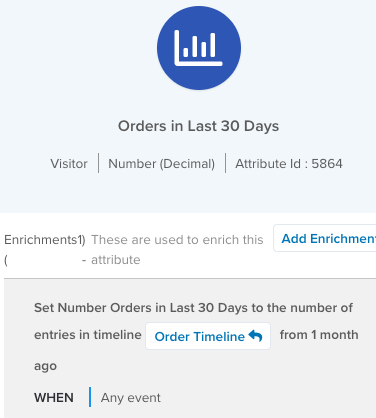
In this example, the attribute value is derived from another visitor attribute, `Orders Timeline`. If the `Orders Timeline` attribute has its own merge rule (**Merge timeline**), that rule runs before this number attribute is evaluated by the **Recalculate** rule.
### Recalculate (Force)
The **Recalculate (Force)** rule is the same as the **Recalculate** rule except that it forces several enrichment conditions to `true`. The **Recalculate (Force)** rule is best for attributes derived from the value of one or more other visitor or visit attributes that also use any of the **New Visitor**, **New Visit**, or **End of Visit** conditions.
Visitor stitching can occur at times that do not coincide with the **New Visitor**, **New Visit**, or **End of Visit** conditions, so this rule forces those enrichments to run to ensure the correct value is set.
**Rule behavior**:
* If an enrichment is set to run on **New Visitor**, **New Visit**, or **End of Visit**, it is forced to run in the merge rule even if the event leading to the merge did not cause a **New Visitor**, **New Visit**, or **End of Visit**.
* Enrichment rule conditions that use event attributes are forced to evaluate to `true`.
* Enrichment rule conditions with the **Has Changed** operator are forced to evaluate to `true`.
| Supported data types | Rule behavior |
|----------------------|---------------|
| Badge | Discard previous states and run enrichments on the final merged profile and force some conditions to `true`. |
| Boolean
Date
Number | Discard previous values and run enrichments on the final merged profile and force some conditions to `true`. |
| Set of strings
String
Tally
Array of booleans
Array of numbers
Array of strings | Start unassigned and run enrichments on the final merged profile and force some conditions to `true`. |
{class="dt--fixed"}
**Example**
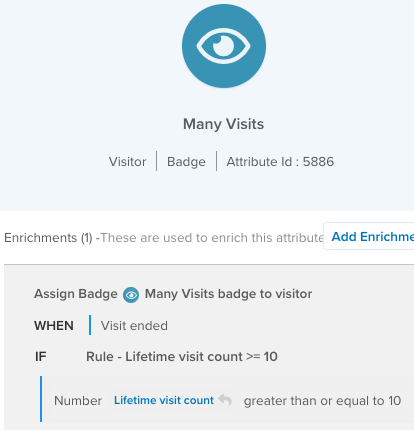
In this example, the attribute is derived from another visitor attribute, `Lifetime visit count`, and assigns a badge when the visitor has made 10 or more visits. However, the enrichment is set to run on `Visit Ended`, which might not be true when the visitor stitching occurs, so using the **Recalculate (Force)** rule forces the enrichment to run anyway.
If `Visit Ended` is not forced to evaluate to `true`, the badge remains unassigned until the end of the visit and the visitor might leave and then rejoin an audience based on this badge. This might be undesirable behavior if leaving or joining the audience causes connector actions to fire.
### Sum
The **Sum** rule keeps the sum of the values of each number attribute. If one of the values is not set, the result is the other value that is set. If neither value is set, the merged value is also not set (as opposed to a value of `0`).
| Supported data types | Rule behavior |
|----------------------|---------------|
| Number | Add values from both visitors. |
{class="dt--fixed"}
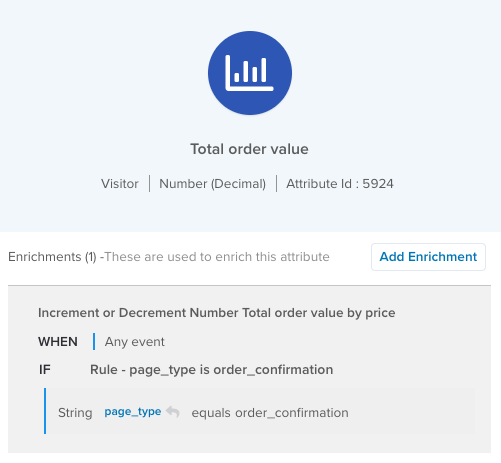
In this example, if Visitor A spent $30 and Visitor B spent $60, then the merged visitor has spent $90.
### Union
The **Union** rule combines values from both attributes, preserving consistent order across arrays. The values in a set of strings are deduplicated.
| Supported data types | Rule behavior |
|----------------------|---------------|
| Set of strings | Combine values from both. |
| Array of booleans
Array of numbers
Array of strings | Combine values from both, preserving consistent order across arrays. |
{class="dt--fixed"}
**Example: Set of strings**
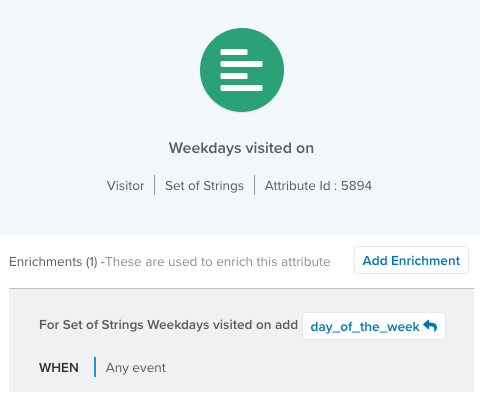
In this example, the **Union** rule combines the entries and removes the duplicate entry for Wednesday because entries in a set of strings must be unique.
Example of **Union** rule for a set of strings attribute:
```json
Visitor-A: {
"Days of week viewed confirmation": ["Monday", "Wednesday"]
}
Visitor-B: {
"Days of week viewed confirmation": ["Wednesday", "Friday"]
}
Merged: {
"Days of week viewed confirmation": ["Monday", "Wednesday", "Friday"]
}
```
**Example: Array**
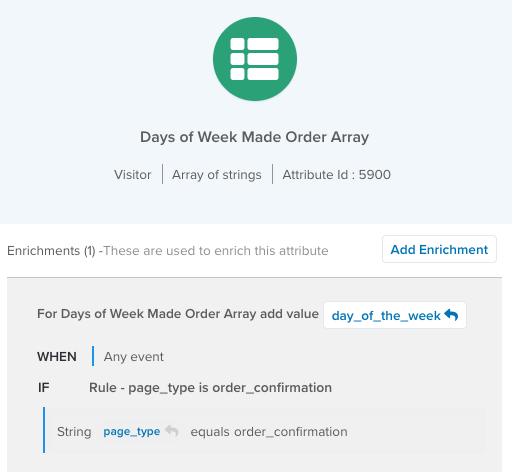
In this example, an array of strings attribute tracks the day of the week each time the visitor sees the order confirmation page. Unlike a set of strings attribute, the merged value of two arrays can contain duplicate values.
Example of a **Union** rule for an array of strings attribute:
```json
Visitor-Older: {
"Days of week viewed confirmation": ["Monday", "Wednesday", "Monday"]
}
Visitor-Active: {
"Days of week viewed confirmation": ["Wednesday", "Friday"]
}
Merged: {
"Days of week viewed confirmation": ["Monday", "Wednesday", "Monday", "Wednesday", "Friday"]
}
```
The merged attribute retains the order of the arrays from the original visitor profiles, with the older visitor entries first and the active visitor entries second.
### Union Max/Min/Sum
The **Union Max/Min/Sum** rules merge tally attributes where the values of any common keys are combined based on the specific rule (**Max**, **Min**, or **Sum**). The merged tally retains all keys that exist in one of the original attributes.
| Rule | Supported data types | Description |
|------|-------------| -------------------- |
| **Union Max** | Tally | Merge keys and keep the higher value for matching keys. |
| **Union Min** | Tally | Merge keys and keep the lower value for matching keys. |
| **Union Sum** | Tally | Merge keys and add values for matching keys. |
**Example: Union Sum**
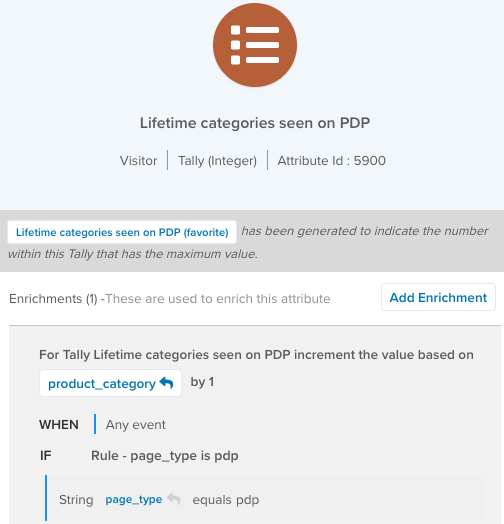
In this example, the tally counts the different product categories the visitor has seen on product details pages. Use the **Union Sum** rule to merge the keys and add the values for matching keys.
```json
Visitor-A: {
"Lifetime count of product categories": {
"Accessories": 1,
"Apparel": 2,
"Books": 1
}
}
Visitor-B: {
"Lifetime count of product categories": {
"Apparel": 4,
"Books": 3,
"Electronics": 5
}
}
Merged: {
"Lifetime count of product categories": {
"Accessories": 1,
"Apparel": 6,
"Books": 4,
"Electronics": 5
}
}
```
**Example: **Union Max**
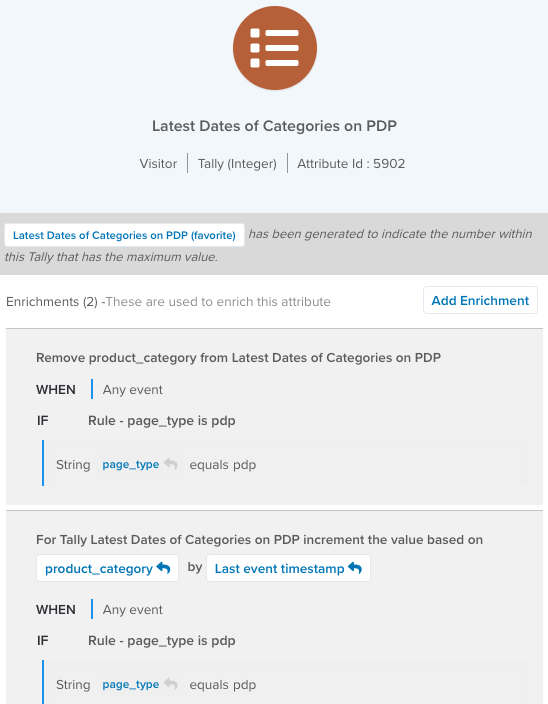
In this example, the tally stores the last date (in milliseconds since the Epoch) that a product category was seen. Use the **Union Max** rule to merge the keys and keep the most recent value for matching keys.
```json
Visitor-A: {
"Dates of last seen product categories": {
"Accessories": 1702454863722,
"Apparel": 1733414869787,
"Books": 1731414884828
}
}
Visitor-B: {
"Dates of last seen product categories": {
"Apparel": 1732424969356,
"Books": 1733414883367,
"Electronics": 1721357252812
}
}
Merged: {
"Dates of last seen product categories": {
"Accessories": 1702454863722,
"Apparel": 1733414869787,
"Books": 1733414883367,
"Electronics": 1721357252812
}
}
```