---
title: Acoustic Digital Analytics Tag Setup Guide
description: This article describes how to set up the Acoustic Digital Analytics tag in your Tealium iQ Tag Management account.
url: https://docs.tealium.com/client-side-tags/acoustic-digital-analytics-tag/
---
## Tag Tips
* You can map values to override values set in E-Commerce Extension (not recommended)
* Mapping toolbox shows 10 custom attributes for each event. Acoustic Digital Analytics supports 50 attributes. To map to a value beyond 10, edit the number in the toolbox directly
* To use Manual Page View tag, map value to Manual Page View Destination URL (other values picked up from standard Page View mappings)
## Tag Configuration
First, go to Tealium's tag marketplace and add the Acoustic Digital Analytics tag (Learn more about [how to add a tag](https://docs.tealium.com/manage-tags/)).
After adding the tag, configure the following settings:
* **Tag Version**: Use the External (default) option to load eluminate.js from the Acoustic-hosted CDN. This ensures you always have the latest library code from Acoustic.
* **Client ID**: First parameter to the cmSetClientID function (for example, `89999999`|`SiteID`). This value can also be set with mapping.
* **Test Client ID**: This is the Client ID used when a match is found in the Test Domains list.
* **Collection Method**: True indicates Client-Managed First-Party cookie. False indicates Acoustic-Managed First-Party or Third-Party as applicable.
* **Collection Domain**: The target domain for Acoustic data collection requests.
* **Cookie Domain**: The domain for Client-Managed cookies (for example,, tealium.com).
* **Test Domains**: Comma-separated list of test domains. This is the complete domain (for example, `dev1.tealium.com`,`qa-serv3.tealium.com`).
* **External Script URL**: Only used by the External Tag Version.
## Data Tags and Mappings
Before you begin mapping data layer variables, be sure to add the [E-Commerce Extension](https://docs.tealium.com/e-commerce-extension/). This automatically maps the required e-commerce variables for events such as Product View, ShopAction5, and ShopAction9.
Acoustic Digital Analytics' Data Tags are functions that organize the data it receives. Custom metrics called "Attributes" are available for each function call. Attributes are stored in numbered variables (generally between 1-100) for most functions and will have a nomenclature of something like `pv_a1…pv_a100` (Page View Attributes 1-100) in the tracking call.
Use the `tealium_event` variable from your data layer to identify which Acoustic Digital Analytics events to associate with your Tealium tracked events.
### Mapping Toolbox
The mapping toolbox is organized according to Acoustic Digital Analytics Data Tags, making it easy to select the destination to which you want to send data. Below is a full list of the variables available in each section.
### Events
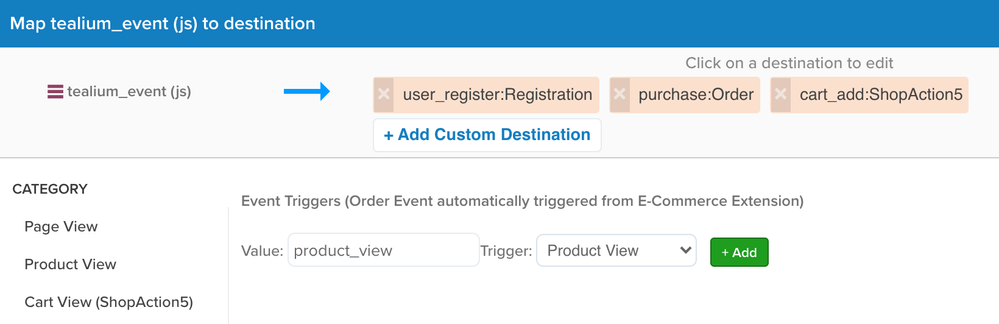
Begin by configuring the **Events** tab. These mappings control when to fire the various Acoustic Digital Analytics Data Tag functions. Use the `tealium_event` variable (or another event variable) to determine which Data Tag function to fire.
To map events:
1. Select the **Events** category.
1. In the **Value** field, enter the value of the Tealium tracked event.
1. From the **Trigger** drop-down, select the matching event.
1. Click **+Add**. Repeat these steps to add addition event mappings.
#### Order
No mapping tab is available for this Data Tag. However, you must configure the E-commerce extension to fire this function on a page. The extension, if configured, automatically maps the `_corder` variable.
**Data Tag:** Order
**Tagging Function:** `cmCreateOrderTag()`
**Description**: This Data Tag captures the final order information such as Registration ID, order ID, order subtotal as well as shipping and handling. The function call should be sent on the purhase confirmation page. Only one Order function should be called per order. When the E-Commerce extension variable `Order ID` ( `_corder` ) is populated, this function will run automatically.
### Page View
**Acoustic Data Tag:** Page View
**Tagging Function:** `cmCreatePageViewTag()`
**Description**: This Data Tag captures page information as the visitor navigates the site. The function should be called on every page where you want to measure a page view.
**Mappings**: Use the Mapping toolkit to map the below destination variables:
* Page ID (`pi`) - alphanumeric identifier of the page
* Page Category (`cg`) - category to which the page belongs
* Search String (`si`) - search keyword used to generate the search results page
* Search Results (`sr`) - Number of results returned by the keyword search
* Attribute variables `pv_a1` through `pv_a10`
* Extra Field variables `pv1` through `pv10`
### Product View
**Data Tag:** Product View
**Tagging Function:** `cmCreateProductViewTag()`
**Description**: This Data Tag captures information about the views received by the product. To track views of multiple related product details, more than one Product View function call may be sent from a single page.
**Mappings**: Use the Mapping toolkit to map the Product Virtual Category (cm_vc) and all Attribute variables (`pr_a1` through `pr_a10`).
The E-Commerce Extension, if configured, automatically maps:
* `_cprod` to Product ID (`pr`), unique identifier of the product
* `_cprodname` to Product Name (`pm`), name of the product being viewed
* `_ccat` to Product Category (`cg`), category to which the product belongs
### Cart View (ShopAction5)
**Data Tag:** ShopAction5 (Cart View)
**Tagging Function:** `cmCreateShopAction5Tag()`
**Description**: This Data Tag captures data about the selected products and which products are present in the shopping cart. The function should be called for each product in the cart (3 items in the cart = 3 Shop Action 5 function calls).
**Mappings**: Use the Mapping toolkit to map all Attribute (`s_a1` through `s_a10`) and Extra Field (`sx1` through `sx10`) variables.
The E-Commerce Extension, if configured, automatically maps:
* `_cprod` to Product ID (`pr`) - unique identifier of the product
* `_cprodname` to Product Name (`pm`) - name of the product viewed in the cart
* `_cquan` to Product Quantity (`qt`) - quantity of the product viewed in the cart
* `_cprice` to Product Price (`bp`) - unit price of the product
* `_ccat` to Product Category (`cg`) - category to which the product belongs
### Order (ShopAction9)
**Data Tag:** Shop Action 9 (Products Ordered)
**Tagging Function:** `cmCreateShopAction9Tag()`
**Description:** This Data Tag captures information about the product purchased by the visitor. The function call should be made on the Receipt or the Confirmation page for each line item in the order. Anytime the Tealium E-Commerce Extension Order ID variable (_corder) is populated, this function will automatically run.
**Mappings**: Use the Mapping toolkit to map all Attribute (`o_a1` through `o_a10`) and Extra Field (`or1` through `sx10`) variables.
The E-Commerce Extension, if configured, automatically maps these ShopAction 9 variables:
* `_ccustid` to ShopAction9 Registration ID (`cd`), unique registration code. If you do not map anything to this destination either through the E-Commerce Extension or manually with the Mapping Toolbox, then Tealium maps the session ID from the `utag_main` cookie to this destination automatically.
* `_corder` to ShopAction9 Order Number (`on`)
* `_csubtotal` to ShopAction9 Order Subtotal (`tr`)
* `_cprod` to ShopAction9 Product ID (`pr`)
* `_cprodname` to ShopAction9 Product Name (`pm`)
* `_cquan` to ShopAction9 Quantity (`qt`)
* `_cprice` to ShopAction9 Product Price (`bp`)
* `_ccat` to ShopAction9 Product Category (`cg`)
and these Order variables,
* `_cship` to Order Shipping Amount (`sg`)
* `_ccity` to Order City (`ct`)
* `_cstate` to Order State (`sa`)
* `_czip` to Order Zip/Postcode (`zp`)
### Registration
**Data Tag:** Registration
**Tagging Function:** `cmCreateRegistrationTag()`
**Description**: This Data Tag tracks registration events on the site and collects the visitor's demographic information (zipcode, city, state, et cetera.) and email address provided as part of the registration. If you don't use the E-Commerce Extension, Tealium uses either the value mapped to ShopAction9 Registration ID or the session ID from the `utag_main` cookie.
**Mappings**: Use the Mapping toolkit to map the Registration Email (`em`) and all Extra Field (`rg1` through `rg10`) variables.
The E-Commerce Extension, if configured, automatically maps:
* `_ccustid` to Registration ID (`cd`). If you don't use the E-Commerce Extension, then Tealium uses either the value mapped to ShopAction9 Registration ID or the session ID from the `utag_main` cookie.
* `_ccity` to Registration City (`ct`)
* `_cstate` to Registration State (`sa`)
* `_czip` to Registartion Zip/Postcode (`zp`)
* `_ccountry` to Registration Country (`cy`)
### Conversion Event
**Data Tag:** Conversion Event
**Tagging Function:** `cmCreateConversionEventTag()`
**Description**: This Data Tag collects the non-monetary details of a conversion event. It is important to note that adding Conversion Event tags on load of high volume pages could inflate Server Call charges.
**Mappings**: Use the Mapping toolkit to map these variables:
* Conversion Event ID (`cid`) - unique identifier for the type of conversion
* Conversion Event Action Type (`cat`) - conversion event's initiation or successful completed
* Conversion Event category ID (`ccid`) - category of Event IDs
* Conversion Event Points (`cpt`) - points assigned to the conversion to measure its value
* Attribute variables `c_a1` through `c_a10`
* Extra Field variables `cx1` through `cx5`
### Element
**Data Tag:** Element
**Tagging Function**: `cmCreateElementTag`
**Description**: This Data Tag tracks visitors' interaction with dynamic elements on your site. Examples of dynamic element include videos, hover-overs, error messages, feature selectors, et cetera.
**Mappings**: Use the Mapping toolkit to map these variables:
* Element ID (`eid`) - unique identifier of the element being tracked
* Element Category (`ecat`) - category to which the element belongs
Make certain that you map a different data source to Conversion Event ID (`cid`) than you do to Element ID (`eid`).
### Manual
This section applies to three different Data Tag functions: Manual Link Click, Manual Page View, and Manual Impression.
**Data Tag:** Manual Link Click
**Tagging Function**: `cmCreateManualLinkClickTag()`
**Description**: This Data Tag captures links clicks which are not automatically tracked. Examples include:
* Links without `HREF=""` attributes or which otherwise use JavaScript to create navigation at time of click.
* Flash, Silverlight or other interactive application elements without HTML anchors.
**Mappings**: Use the Mapping toolkit to map the Manual Link Click/Page View/Impression destination variables:
* Manual Link HREF (`hr`) - href value of the link clicked
* Manual Link Name (`nm`) - name of the link clicked
* Manual Link Page ID (`pi`) - unique alphanumeric value identifying the page
**Data Tag:** Manual Page View
**Tagging Function**: `cmCreateManualPageviewTag()`
**Description**: This Data Tag captures page view events that don't have a page load event (for example, modal pop-ups, et cetera.).
* Manual Page View Destination URL (`ul`) - the destination URL
* Manual Page View Referring URL (`rf`) - the referring URL
**Data Tag:** Manual Impression
**Tagging Function**: `cmCreateManualImpressionTag ()`
**Description**: This Data Tag captures ad impressions from a certain feature like a display ad tag.
* Manual Impression Page ID (`pi`) - the impression's Page ID matching the Link Page ID(`pi`)
* Manual Impression Track Real Estate (`cm_re`) - Real Estate Impression with a valid `cm_re=` value: `version-_-area-_-link`
* Manual Impression Track Site Promotion (`cm_sp`) - Site Promotion Impression with a valid `cm_sp=` value: `group-_-promotion-_-link`
### Config
This tab does not correspond to any Data Tag function. Instead, you can use it to dynamically set the Acoustic Digital Analytics Tag configuration settings connected to a Test site/environment.
* Client ID (`ClientID`) - Acoustic Digital Analytics-assigned ID
* Test Client ID (`TestClientID`) - test site's Client ID
* Test Data Collection Method (`TestDataCollectionMethod`) - test site's Data Collection Method
* Test Data Collection Domain (`TestDataCollectionDomain`) - test site's data collection domain
## Data Mapping Reference
Mapping is the process of sending data from a [data layer variable](https://docs.tealium.com/data-layer-variables/) to the corresponding destination variable of the vendor tag. For instructions on how to map a variable to a tag destination, see [Data Mappings](https://docs.tealium.com/iq-tag-management/data-mappings/manage/).
The available categories are:
### Page View
| Variable | Description |
|:---------------|:------------|
| Page ID | (`pi`) |
| Page Category | (`cg`) |
| Search String | (`se`) |
| Search Results | (`sr`) |
| Attribute 1 | (`pv_a1`) |
| Attribute 2 | (`pv_a2`) |
| Attribute 3 | (`pv_a3`) |
| Attribute 4 | (`pv_a4`) |
| Attribute 5 | (`pv_a5`) |
| Attribute 6 | (`pv_a6`) |
| Attribute 7 | (`pv_a7`) |
| Attribute 8 | (`pv_a8`) |
| Attribute 9 | (`pv_a9`) |
| Attribute 10 | (`pv_a10`) |
| Extra Field 1 | (`pv1`) |
| Extra Field 2 | (`pv2`) |
| Extra Field 3 | (`pv3`) |
| Extra Field 4 | (`pv4`) |
| Extra Field 5 | (`pv5`) |
| Extra Field 6 | (`pv6`) |
| Extra Field 7 | (`pv7`) |
| Extra Field 8 | (`pv8`) |
| Extra Field 9 | (`pv9`) |
| Extra Field 10 | (`pv10`) |
### Product View
| Variable | Description |
|:-------------------------|:------------|
| Product ID | (`pr`) |
| Product Name | (`pm`) |
| Product Category | (`cg`) |
| Product Virtual Category | (`cm_vc`) |
| Attribute 1 | (`pr_a1`) |
| Attribute 2 | (`pr_a2`) |
| Attribute 3 | (`pr_a3`) |
| Attribute 4 | (`pr_a4`) |
| Attribute 5 | (`pr_a5`) |
| Attribute 6 | (`pr_a6`) |
| Attribute 7 | (`pr_a7`) |
| Attribute 8 | (`pr_a8`) |
| Attribute 9 | (`pr_a9`) |
| Attribute 10 | (`pr_a10`) |
### Cart View (ShopAction5)
| Variable | Description |
|:---------------------------|:------------|
| Product ID | (`pr`) |
| Product Name | (`pm`) |
| Product Quantity | (`qt`) |
| Product Price | (`bp`) |
| Product Category | (`cg`) |
| ShopAction5 Attribute 1 | (`s_a1`) |
| ShopAction5 Attribute 2 | (`s_a2`) |
| ShopAction5 Attribute 3 | (`s_a3`) |
| ShopAction5 Attribute 4 | (`s_a4`) |
| ShopAction5 Attribute 5 | (`s_a5`) |
| ShopAction5 Attribute 6 | (`s_a6`) |
| ShopAction5 Attribute 7 | (`s_a7`) |
| ShopAction5 Attribute 8 | (`s_a8`) |
| ShopAction5 Attribute 9 | (`s_a9`) |
| ShopAction5 Attribute 10 | (`s_a10`) |
| ShopAction5 Extra Field 1 | (`sx1`) |
| ShopAction5 Extra Field 2 | (`sx2`) |
| ShopAction5 Extra Field 3 | (`sx3`) |
| ShopAction5 Extra Field 4 | (`sx4`) |
| ShopAction5 Extra Field 5 | (`sx5`) |
| ShopAction5 Extra Field 6 | (`sx6`) |
| ShopAction5 Extra Field 7 | (`sx7`) |
| ShopAction5 Extra Field 8 | (`sx8`) |
| ShopAction5 Extra Field 9 | (`sx9`) |
| ShopAction5 Extra Field 10 | (`sx10`) |
### Order (ShopAction9)
| Variable | Description |
|:----------------------------------|:------------|
| ShopAction9 Registration Id | (`cd`) |
| ShopAction9 Order Number | (`on`) |
| ShopAction9 Order Subtotal | (`tr`) |
| ShopAction9 Product ID (pr) | [Array] |
| ShopAction9 Product Name (pm) | [Array] |
| ShopAction9 Product Quantity (qt) | [Array] |
| ShopAction9 Product Price (bp) | [Array] |
| ShopAction9 Product Category (cg) | [Array] |
| ShopAction9 Attribute 1 | (`s_a1`) |
| ShopAction9 Attribute 2 | (`s_a2`) |
| ShopAction9 Attribute 3 | (`s_a3`) |
| ShopAction9 Attribute 4 | (`s_a4`) |
| ShopAction9 Attribute 5 | (`s_a5`) |
| ShopAction9 Attribute 6 | (`s_a6`) |
| ShopAction9 Attribute 7 | (`s_a7`) |
| ShopAction9 Attribute 8 | (`s_a8`) |
| ShopAction9 Attribute 9 | (`s_a9`) |
| ShopAction9 Attribute 10 | (`s_a10`) |
| ShopAction9 Extra Field 1 | (`sx1`) |
| ShopAction9 Extra Field 2 | (`sx2`) |
| ShopAction9 Extra Field 3 | (`sx3`) |
| ShopAction9 Extra Field 4 | (`sx4`) |
| ShopAction9 Extra Field 5 | (`sx5`) |
| ShopAction9 Extra Field 6 | (`sx6`) |
| ShopAction9 Extra Field 7 | (`sx7`) |
| ShopAction9 Extra Field 8 | (`sx8`) |
| ShopAction9 Extra Field 9 | (`sx9`) |
| ShopAction9 Extra Field 10 | (`sx10`) |
| Order Number | (`on`) |
| Order Subtotal | (`tr`) |
| Order Shipping Amount | (`sg`) |
| Order Registration Id | (`cd`) |
| Order City | (`ct`) |
| Order State | (`sa`) |
| Order Zip/Postcode | (`zp`) |
| Order Attribute 1 | (`o_a1`) |
| Order Attribute 2 | (`o_a2`) |
| Order Attribute 3 | (`o_a3`) |
| Order Attribute 4 | (`o_a4`) |
| Order Attribute 5 | (`o_a5`) |
| Order Attribute 6 | (`o_a6`) |
| Order Attribute 7 | (`o_a7`) |
| Order Attribute 8 | (`o_a8`) |
| Order Attribute 9 | (`o_a9`) |
| Order Attribute 10 | (`o_a10`) |
| Order Extra Field 1 | (`or1`) |
| Order Extra Field 2 | (`or2`) |
| Order Extra Field 3 | (`or3`) |
| Order Extra Field 4 | (`or4`) |
| Order Extra Field 5 | (`or5`) |
| Order Extra Field 6 | (`or6`) |
| Order Extra Field 7 | (`or7`) |
| Order Extra Field 8 | (`or8`) |
| Order Extra Field 9 | (`or9`) |
| Order Extra Field 10 | (`or10`) |
### Registration
| Variable | Description |
|:--------------------------|:------------|
| Registration Id | (`cd`) |
| Registration Email | (`em`) |
| Registration City | (`ct`) |
| Registration State | (`sa`) |
| Registration Zip/Postcode | (`zp`) |
| Registration Country | (`cy`) |
| Registration Attribute 1 | (`rg1`) |
| Registration Attribute 2 | (`rg2`) |
| Registration Attribute 3 | (`rg3`) |
| Registration Attribute 4 | (`rg4`) |
| Registration Attribute 5 | (`rg5`) |
| Registration Attribute 6 | (`rg6`) |
| Registration Attribute 7 | (`rg7`) |
| Registration Attribute 8 | (`rg8`) |
| Registration Attribute 9 | (`rg9`) |
| Registration Attribute 10 | (`rg10`) |
### Conversion Event
| Variable | Description |
|:-------------------------------|:------------|
| Conversion Event Id | (`cid`) |
| Conversion Event Action Type | (`cat`) |
| Conversion Event Category Id | (`ccid`) |
| Conversion Event Points | (`cpt`) |
| Conversion Event Attribute 1 | (`c_a1`) |
| Conversion Event Attribute 2 | (`c_a2`) |
| Conversion Event Attribute 3 | (`c_a3`) |
| Conversion Event Attribute 4 | (`c_a4`) |
| Conversion Event Attribute 5 | (`c_a5`) |
| Conversion Event Attribute 6 | (`c_a6`) |
| Conversion Event Attribute 7 | (`c_a7`) |
| Conversion Event Attribute 8 | (`c_a8`) |
| Conversion Event Attribute 9 | (`c_a9`) |
| Conversion Event Attribute 10 | (`c_a10`) |
| Conversion Event Extra Field 1 | (`cx1`) |
| Conversion Event Extra Field 2 | (`cx2`) |
| Conversion Event Extra Field 3 | (`cx3`) |
| Conversion Event Extra Field 4 | (`cx4`) |
| Conversion Event Extra Field 5 | (`cx5`) |
#### Element
| Variable | Description |
|:---------------------|:------------|
| Element Id | (`eid`) |
| Element Category | (`ecat`) |
| Element Attribute 1 | (`e_a1`) |
| Element Attribute 2 | (`e_a2`) |
| Element Attribute 3 | (`e_a3`) |
| Element Attribute 4 | (`e_a4`) |
| Element Attribute 5 | (`e_a5`) |
| Element Attribute 6 | (`e_a6`) |
| Element Attribute 7 | (`e_a7`) |
| Element Attribute 8 | (`e_a8`) |
| Element Attribute 9 | (`e_a9`) |
| Element Attribute 10 | (`e_a10`) |
### Manual
| Variable | Description |
|:---------------------------------------|:------------|
| Manual Link HREF | (`hr`) |
| Manual Link Name | (`nm`) |
| Manual Link Page Id | (`pi`) |
| Manual Page View Destination URL | (`ul`) |
| Manual Page View Referring URL | (`rf`) |
| Manual Impresssion Page Id | (`pi`) |
| Manual Impression Track Real Estate | (`cm_re`) |
| Manual Impression Track Site Promotion | (`cm_sp`) |
### Error
| Variable | Description |
|:---------------|:------------|
| Page ID | (`pi`) |
| Error Category | (`cg`) |
### Events
| Variable | Description |
|:-----------------|:-------------|
| Registration | Registration |
| Order | Order |
| Cart/ShopAction5 | ShopAction5 |
| Product View | Productview |
| Conversion Event | Conversion |
| Element | Element |
| Error | Error |
### Config
| Variable | Description |
|:---------------------------------------|:-----------------------------|
| Client ID | (`ClientID`) |
| Test Client ID | (`TestClientID`) |
| Test Data Collection Method | (`TestDataCollectionMethod`) |
| Test Data Collection Domain | (`TestDataCollectionDomain`) |
| Advanced Setup Object (`cmSetupOther`) | [Object] |