---
title: Facebook Pixel Tag Setup Guide
description: This article describes how to set up the Facebook Pixel tag in your Tealium iQ Tag Management account.
url: https://docs.tealium.com/client-side-tags/facebook-pixel-tag/
---
For information about the legacy Facebook Pixel, see [Facebook Pixel Setup Guide (Legacy)](https://docs.tealium.com/facebook-pixel-legacy/).
## How it works
* Purchase tracking occurs automatically when an order ID is populated.
* You may enter a comma-separated list of Pixel IDs in the Pixel ID field.
* **Generate Event ID**: Set to `true` to generate the `event_id` parameter in the Facebook Pixel and to make these event IDs available as server-side attributes.
* Requires the latest version of the Tealium Collect tag.
* Must be set to `true` if you plan to map a custom variable to `event_id`.
* For more information, see [Conversions API for Web](#conversions-api-for-web).
* The template automatically attempts to calculate the `num_items` value if a product quantity array is present.
* Use mapping to:
* Toggle `trackSingle` (`false` by default) — when enabled, sends events only to explicitly mapped pixel IDs using `fbq('trackSingle')`; when disabled, broadcasts events to all initialized pixel IDs using `fbq('track')`
* Toggle `disablePushState` (`false` by default)
* Dynamically set the tag configurations
* Override the E-Commerce extension values
* Supports the following E-Commerce extension parameters:
* Order ID
* Sub Total
* Currency
* List of Product IDs
* List of Product Categories
* List of Product Prices
* List of Product Quantities
* List of Product Names
The Facebook Pixel tag automatically hashes user data. This functionality cannot be changed.
### Conversions API for Web
This feature requires an active [Tealium Collect tag](https://docs.tealium.com/tealium-collect-tag/).
To support Facebook Conversions API for Web, set **Generate Event ID** to `true`. When **Generate Event ID** is enabled, this tag generates a unique event ID for each event tracked and sends it as an attribute to Tealium EventStream for use in the Facebook Conversions connector and passes it to the Facebook Pixel in the `event_id` parameter. This event ID attribute may be mapped in the connector to synchronize the web-based tag with server-side integration.
The tag sends event IDs using generated event attributes using the following naming convention:
```nohl
fb_event_id_{FACEBOOK_EVENT}_{TAG_UID}
```
For example, a purchase event from tag #32 would send the following attribute and value:
```json
{
"fb_event_id_Purchase_32": "028b2ade7478..."
}
```
A page view event from the same tag would send the following attribute and value:
```json
{
"fb_event_id_PageView_32": "084b1cda7461..."
}
```
#### Deduplication
To ensure proper event deduplication, the event ID from the Facebook Pixel tag must be included in the payload sent by the Tealium Collect tag. To do this, use the following steps:
* From the **Tag Timing** drop-down, select **Prioritized**.
* Set the **Bundle Flag** toggle to `On`.
* Use the [Load Order Manager screen](https://docs.tealium.com/load-order-manager/) to fire the Facebook Pixel tag before the Tealium Collect tag. We recommend that you fire the Tealium Collect tag last.
For information on using these event ID attributes, see [Facebook Conversions connector: Deduplication for web events](https://docs.tealium.com/facebook-conversions-connector/#deduplication-for-web-events).
#### Legacy event IDs
In older versions of the Facebook Pixel tag, event ID attributes were generated in the format `fb_event_id_{FACEBOOK_EVENT}`, such as `fb_event_id_Purchase`. While these older attribute names will continue to be generated by the tag, they are considered legacy because they don't support multiple Facebook tags on the same page.
The latest version of the Facebook Pixel tag supports multiple Facebook tags firing on a page by including the tag UID in the generated attribute name. If you are still using the legacy format of the event ID attributes, we recommend updating to the latest version of the tag and referencing the new event ID attributes.
## Tag configuration
Go to the tag marketplace to add a new tag. For more information about how to add a tag, see [Manage tags](https://docs.tealium.com/manage-tags/).
After adding the tag, configure the following settings:
* **Pixel ID**
* Your Facebook Pixel ID.
* The Pixel ID appears as a long series of numbers in the code snippet.
* You may enter multiple Pixel IDs using a comma-separated list, without spaces.
* For example: `fbq("init", "12345678901234");`
* **Advanced Matching**
* Enable and pass data to the Facebook Advanced Matching service.
* For example: `fbq("init", "12345678901234", {em:"6dd8b7d7..."});`
* If you enable **Advanced Matching** and then map parameters with Personally-Identifiable Information (PII), we strongly recommend that you disable **Automatic Advanced Matching** in the **Meta Events Manager** and only map parameters manually. **Automatic Advanced Matching** may map additional PII parameters that are outside of your needs and scope, causing a security and privacy issue. For more information, see [Set up automatic advanced matching for your website or mobile app](https://www.facebook.com/business/help/1993001664341800?id=1205376682832142) at Facebook.
* **Generate Event ID**
* Requires the Tealium Collect tag to send event IDs server-side.
* Automatically generate an event ID for every Facebook tracking event.
* Event ID attributes follow the naming convention: `fb_event_id_{FACEBOOK_EVENT}_{TAG_UID}`
* For example: `"fb_event_id_Purchase_32" : "028b2ade7478..."`
* **Auto Page View Event**: Set to `True` to automatically track Page View events.
## Event mapping
Facebook Pixel events are configured through data mappings by selecting a variable that maps to an event and entering a trigger. The trigger initiates the event when the variable is equal to a specific value, as demonstrated in the following use case.
### Use Case: Purchase Event
To set up a purchase event:
1. Select `tealium_event` from the variable drop-down list and click **Select a Destination**.
1. In the **Category** section, select **Events**.
1. Set the **When mapped variable equals** field to `Purchase`, which is the value `tealium_event` must equal to trigger a purchase.
1. In the **Trigger event** drop-down list, select `Purchase`, which is the event that is triggered when `tealium_event` equals purchase.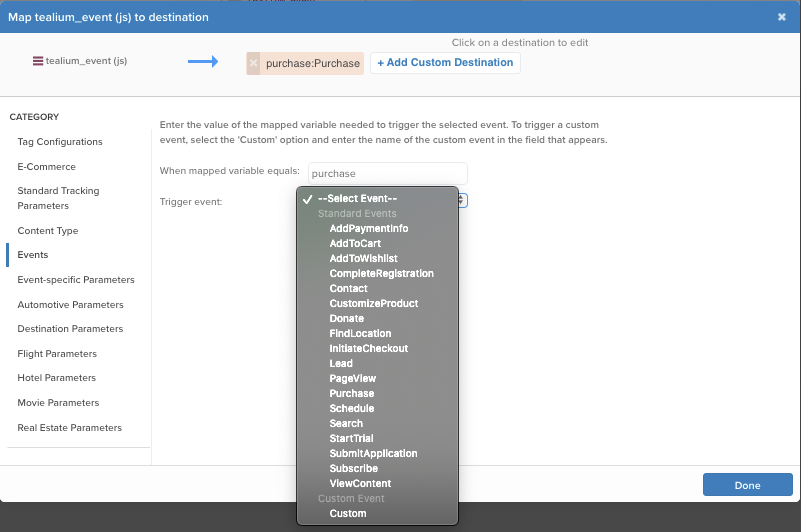If additional data needs to be sent with the purchase event that is not already covered by the built-in E-Commerce extension mappings, use **Custom Parameters** to map additional purchase data.
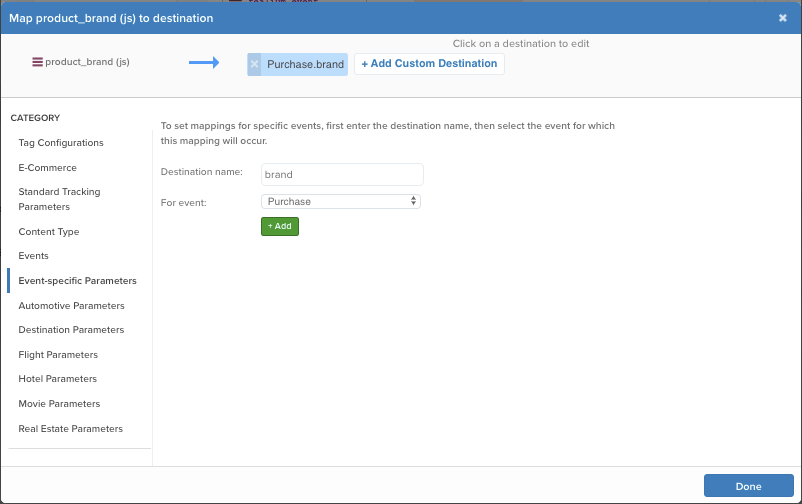
The following example passes the product brand with the purchase event:
1. Select `product_brand` from the variable drop-down list and click **Select a Destination**.
1. In the **Category** section, select **Event specific Parameters**.
1. Set the **Destination** field to the name `brand` for the custom parameter.
1. In the **For event** drop-down list, select the event `Purchase` which the custom parameter collects with.
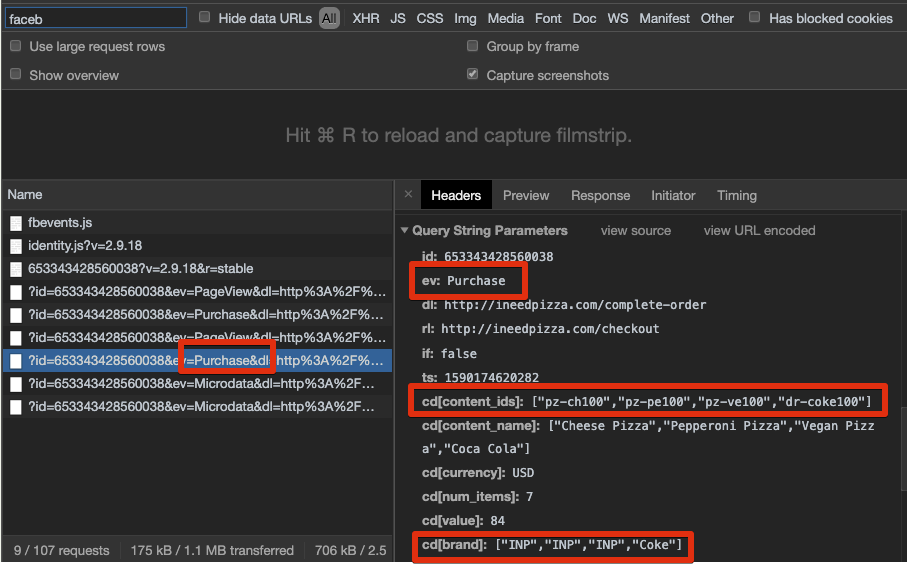
Test the mappings by using the [Facebook Pixel Helper](https://developers.facebook.com/docs/facebook-pixel/support/pixel-helper/) or the Developer Tools offered by your browser.
1. Use the **Network Panel** and filtering for Facebook to display all the network requests containing Facebook as a keyword.
1. Confirm the purchase event was successful by looking at the name of the request.
1. Open the request and scroll down to **Query String Parameters** to see the values of the data mappings that were configured: `purchase` , `product_id` , and `product_brand`.
## Data mappings
Data mappings follow a hierarchy in which specific mappings, such as Event-Specific Parameters, take precedence over more general mappings. For example, if you map a variable to the **Currency** destination in the **Standard Tracking Parameters** tab and to the **Currency** destination for the **ViewContent** event, the **ViewContent** mapping takes precedence over the general mapping, but only for the **ViewContent** event. For all other events, the Standard Tracking mapping is used.
Mapping is the process of sending data from a [data layer variable](https://docs.tealium.com/data-layer-variables/) to the corresponding destination variable of the vendor tag. For instructions on how to map a variable to a tag destination, see [Data Mappings](https://docs.tealium.com/iq-tag-management/data-mappings/manage/).
The available categories are:
### Tag configurations
| Variable | Destination | Type | Description |
|------------------------|----------------------------------|-----------------------------|-------------------------------------------------------------------------------------------------------------------------------------------------------------------------------------------------------------------------------|
| `pixel_id` | Pixel ID | String | - Your Facebook Pixel ID.
- The Pixel ID appears as a long series of numbers in the code snippet.
- You may enter multiple Pixel IDs using a comma-separated list, without spaces.
- For example: `fbq("init", "12345678901234");`
|
| `autoConfig` | Toggle Automatic Configuration | Boolean | - Enable or disable automatic configuration.
|
| `auto_page_view` | Toggle Automatic PageView | Boolean | - Enable or disable automatic PageView tracking, which triggers a PageView event with a page load.
- Default value is `true`.
|
| `advanced_matching` | Toggle Advanced Matching | Boolean | - Enable or disable collection of Advanced Matching data.
- Default value is `true`.
|
| `generate_event_id` | Generate Event IDs | Boolean | - Enable or disable generation of unique Event IDs for each Facebook tracking event.
- You must also enable **Generate Event ID** in the tag configuration page to enable generating an `event_id` .
- Requires the most recent version of the `utag.js` file to generate the IDs.
- Default value is `false`.
|
| `calc_items` | Automatically Calculate Number of Items | Boolean | - Enable or disable automatic determination of the number of items for an event.
- Uses the data mapped to Product Quantities to determine the number.
- Default value is `true`.
|
| `track_single` | Toggle trackSingle Usage | Boolean | - Enable or disable the use of `trackSingle` for Facebook tracking events.
- Default value is `false`.
- When set to `true`, uses `fbq('trackSingle')` to send events only to explicitly mapped pixel IDs.
- When set to `false`, uses `fbq('track')` to broadcast events to all initialized pixel IDs. Use this setting for multi-pixel setups to prevent duplicate events.
|
| `disablePushState` | Toggle disablePushState Usage | Boolean | - Enable or disable the `disablePushState` setting, which controls whether or not to prevent the triggering of multiple PageViews on the same page (for Single Page Apps).
|
| `useContentsObject` | Toggle Use Contents Object | Boolean | - Enable or disable building and sending the Facebook Pixel contents array (array of objects like `{id, quantity, item_price}`) for applicable events instead of relying only on `content_ids`.
- Default value is `false`.
|
| `event_id` | Event ID | String | |
#### Advanced Matching
| Variable | Destination | Type | Description |
|---------------------|--------------------|--------|---------------------------------------------------------------------------------------------------|
| `am.em` | Email | String | - Email address.
- The tag automatically converts this value to lowercase.
- This value can be plain text, or normalized and SHA-256 hashed.
|
| `am.fn` | First Name | String | First name. |
| `am.ln` | Last Name | String | Last name. |
| `am.ph` | Phone Number | String | Telephone number. |
| `am.ge` | Gender | String | - Gender.
- The tag automatically converts this value to lowercase.
- This value must be `m` or `f`.
|
| `am.db` | Date of Birth | String | - Date of birth.
- The tag automatically converts this value to lowercase.
- This value must be eight characters long.
|
| `am.ct` | City | String | City. |
| `am.st` | State | String | State. |
| `am.zp` | Zip | String | - Zip Code.
- The tag automatically converts this value to lowercase.
- This value must be five characters or fewer.
|
| `am.external_id` | External ID | String | External ID. |
### E-Commerce
Since the Facebook Pixel tag is e-commerce enabled, it automatically uses the default [E-Commerce Extension](https://docs.tealium.com/e-commerce-extension/) mappings. Manually mapping in this category is not needed unless you want to override any extension mappings or an e-commerce variable is not offered in the extension.
| Variable | Destination | Description | Overrides E-Commerce Extension Variable |
|----------------------|----------------------|-----------------------------------------------------------------------------------------------|--------------------------------|
| `order_id` | Order ID | Unique identifier assigned to the final order. | `_corder` |
| `order_subtotal` | Sub Total | Sub total amount of the final order. | `_csubtotal` |
| `order_currency` | Currency |Currency used in the payment. | `_ccurrency` |
| `delivery_category` | Delivery Category | Delivery category.|
| `product_id` | List of Product IDs. | Unique identifier of each product in the product array. | `_cprod` |
| `product_name` | List of Product Names | Name of each product in the product array. | `_cprodname` |
| `product_quantity` | List of Product Quantities | Quantity of products in the product array.| `_cquan` |
| `product_category` | List of Categories | Category of each product in the product array. | `_ccat` |
| `product_unit_price` | List of Prices | Unit price of each product in the product array. | `_cprice` |
### Standard Tracking Parameters
| Variable | Destination | Type | Description |
|-----------------------|-----------------------|-----------------------------|---------------------------------------------------------------------------------------------------------------------------------------------------------------------------------------------------------------------------------|
| `currency` | Currency | String | The currency for the value of the event. |
| `content_category` | Content Category | Array or String | Category of the page or product. |
| `content_name` | Content Name | Array or String | Name of the page or product. |
| `content_ids` | Content IDs | Array of Integers or Strings| The product IDs or SKUs associated with the event. |
| `content_type` | Content Type | String | - The product type associated with the content IDs, which matches the types given in your Facebook product feed.
- In most cases, this value is either `product` or `product_group`.
- Dynamic Ads have other legitimate values for each business vertical.
|
| `contents` | Contents | Array of JSON Objects | An array of JSON objects that contains quantity and content IDs. |
| `predicted_ltv` | Predicted Lifetime Value | Number | Predicted lifetime value of a subscriber as defined by the advertiser, expressed as an exact value. |
| `search_string` | Search String | String |The string entered by the visitor for a `Search` event. |
| `status` | Status | String | The status of the registration for a `completeRegistration` event. |
| `num_items` | Number of Items | Integer | - The number of items for the event.
- The number of items is automatically calculated based on the values in the data mapped for quantity.
- Disable the automatic calculation by setting `calc_items` (`u.data.calc_items` ) to `false` with data mapping or an extension.
|
| `value` | Value | Number |The value of a user performing this event to the business |
#### Content Type
Set the `content_type` parameter by mapping to it directly in either the **Standard Tracking Parameters** tab, or the **Event-specific Parameter** mappings.
The **Content Type** tab lets you conditionally set the `content_type` parameter to any of the following supported values:
* `destination`
* `flight`
* `home_listing`
* `hotel`
* `product`
* `product_group`
* `vehicle`
If the mapped variable equals the value you enter in the field, then the value is set to the type you select from the drop-down list. In most cases, the values `product` or `product_group` are used, and that value must match the `content_type` you specify for the products in your product feed uploaded to Facebook. Other values are most commonly used with Dynamic Ads.
|Variable| Type | Description|
|---| ---| ---|
|`destination`| String | Destination. |
|`flight`| String | Flight. |
|`home_listing`| String | Home listing. |
|`hotel`| String | Hotel. |
|`product`| String | Product. |
|`product_group`| String | Product group. |
|`vehicle`| String | Vehicle. |
### Events
|Event Name| Description|
|---| ---|
|`AddPaymentInfo`| Add payment information. |
|`AddToCart`| Add to cart. |
|`AddToWishlist`| Add to wish list. |
|`CompleteRegistration`| Complete registration. |
|`Contact`| Contact. |
|`CustomizeProduct`| Customize product. |
|`Donate`| Donate. |
|`FindLocation`| Find location. |
|`InitiateCheckout`| Initiate checkout. |
|`Lead`| Lead. |
|`PageView`| Page view. |
|`Purchase`| Purchase. |
|`Schedule`| Schedule. |
|`Search`| Search. |
|`StartTrial`| Start trial. |
|`SubmitApplication`| Submit application. |
|`Subscribe`| Subscribe. |
|`ViewContent`| View content. |
|`Custom`| Enter the name of your custom event in the field provided. |
### Event-specific Parameters
To map a parameter for a specific event only:
1. Select the name of the parameter from the drop-down list.
1. Enter the name of the parameter you want to set.
1. Select the name of the event for which you want to set that parameter.
* If you are mapping a parameter for a custom event, you must enter the name of the custom event in the field that appears.
* If you want to enter a custom parameter name, select the **Custom** option from the parameter drop-down list and enter the name of the custom parameter in the field that displays.
* If you want to specify a custom event for the event-specific mapping to occur, select the **Custom** option from the events drop-down list and enter the name of the custom event in the field that displays.
|Variable| Description|
|---| ---|
|`AddPaymentInfo`| Add payment information. |
|`AddToCart`| Add to cart. |
|`AddToWishlist`| Add to wish list. |
|`CompleteRegistration`| Complete registration. |
|`Contact`| Contact. |
|`content_type` | Content Type. |
|`CustomizeProduct`| Customize product. |
|`Donate`| Donate. |
|`FindLocation`| Find location. |
|`InitiateCheckout`| Initiate checkout. |
|`Lead`| Lead. |
|`PageView`| Page view. |
|`Purchase`| Purchase. |
|`Schedule`| Schedule. |
|`Search`| Search. |
|`StartTrial`| Start trial. |
|`SubmitApplication`| Submit application. |
|`Subscribe`| Subscribe. |
|`ViewContent`| View content. |
|`Custom`| Custom. |
### Automotive Parameters
| Variable | Destination | Type | Description |
|------------------------|------------------------|--------|-----------------------------------------|
| `body_style` | Body Style | String | Body style. |
| `condition_of_vehicle` | Condition of Vehicle | String | Condition of vehicle. |
| `country` | Country | String | Country. |
| `drivetrain` | Drivetrain | String | Drive train. |
| `exterior_color` | Exterior Color | String | Exterior color. |
| `fuel_type` | Fuel Type | String | Fuel type. |
| `interior_color` | Interior Color | String | Interior color. |
| `lead_type` | Lead Type | String | Lead type. |
| `make` | Make | String | Make. |
| `model` | Model | String | Model. |
| `postal_code` | Postal Code | String | Postal code. |
| `preferred_price_range`| Preferred Price Range | Array | An array of the minimum and maximum preferred prices. |
| `price` | Price | Number | Price. |
| `registration_type` | Registration Type | String | Registration type. |
| `search_type` | Search Type | String | Search type. |
| `state_of_vehicle` | State of Vehicle | String | State of vehicle. |
| `transmission` | Transmission | String | Transmission. |
| `trim` | Trim | String | Trim. |
| `viewcontent_type` | ViewContent Type | String | View content type . |
| `vin` | VIN | String | Vehicle identification number. |
| `year` | Year | Number | Vehicle year. |
### Destination Parameters
|Variable| Type | Description|
|---| ---|---|
|`city`| String |City. |
|`country`| String |Country. |
|`num_adults`| Number | Number of adults. |
|`num_children`| Number | Number of children. |
|`region`| String | Region. |
| `suggested_destinations` | Array | An array of the suggested destinations. |
|`travel_start`| Date | Travel start date. |
|`travel_end`| Date | Travel end date. |
### Flight Parameters
|Variable| Type | Description|
|---| ---|---|
|`departing_arrival_date`| String | Departing flight arrival date. |
|`departing_departure_date`| String | Departing flight departure date. |
|`destination_ids`| Array | Destination IDs. |
|`num_adults`| Number | Number of adults. |
|`num_children`| Number | Number of children. |
|`num_infants`| Number | Number of infants. |
|`preferred_num_stops`| Number | Preferred number of stops. |
|`price`| Number | Price. |
|`returning_arrival_date`| Date | Return flight arrival date. |
|`returning_departure_date`| Date | Return flight departure date. |
|`travel_class`| String | Travel class. |
|`user_score`| Number | User score. |
### Hotel Parameters
|Variable| Type | Description|
|---| ---|---|
|`checkin_date`| Date | Check-in date.|
|`checkout_date`| Date | Check-out date. |
|`city`| String |City. |
|`country`| String | Country. |
| `destination_ids` | Array | Destination IDs.|
|`hotel_score`| Number | Hotel score. |
|`num_adults`| Number | Number of adults. |
|`num_children`| Number | Number of children. |
|`preferred_neighborhoods`| Array | An array of the preferred neighborhoods. |
|`preferred_price_range`| Array | An array of the minimum and maximum price range. |
|`preferred_star_ratings`| String | Preferred star ratings. |
|`region`| String | Region. |
|`user_score`| Number |User score. |
### Movie Parameters
|Variable| Type | Description|
|---| ---|---|
|`movieref`| String | Movie referrer. |
### Real Estate Parameters
|Variable| Type | Description|
|---| ---|---|
|`availability`| String | Availability. |
|`city`| String | City.|
|`country`| String | Country.|
|`lease_start_date`| Date | Lease start date. |
|`lease_end_date`| Date | Lease end date. |
|`listing_type`| String | Listing type. |
|`neighborhood`| String | Neighborhood. |
|`preferred_baths_range`| Array | An array of the minimum and maximum bathrooms range. |
|`preferred_beds_range`| Array | An array of the minimum and maximum bedrooms range. |
|`preferred_price_range`| Array | An array of the minimum and maximum preferred prices. |
|`property_type`| String | Property type. |
|`region`| String | Region. |
### Cookie Consent
|Variable| Description|
|---| ---|
|`grant`| Grant cookie consent. |
|`revoke`| Revoke cookie consent. |
### Limited Data Use
|Variable| Type | Description|
|---| ---|---|
| `lmt_data.use_ldu` (Use LDU) | Boolean | - If `true`, use Facebook’s Limited Data Use option.
- If `false`, do not use Facebook’s Limited Data Use option.
|
| `lmt_data.ldu_types.geolocate` (LDU should Geolocate) | Boolean | - If `true`, the LDU geolocates the user.
- If `false`, the LDU does not geolocate the user. If **Use LDU** is enabled, then **LDU should Geolocate** is also enabled by default.
|
| `lmt_data.ldu_types.california` (LDU is California) | Boolean | - If `true`, sets the state and country California-specific values inside the template. Only enable this option if the user is located in California and needs to be processed with Limited Data Use.
- If `false`, does not set the user’s state and country California-specific values inside the template.
|
### Store Data
| Variable | Type/Values | Description |
|:---------|:-----|:------------|
| `store_data.store_page_id` | Number | Facebook store page ID. |
| `store_data.brand_page_id` | Number | Facebook brand page ID. |
| `store_data.store_code` | String | Facebook store code. |
## Vendor Documentation
See the following vendor documentation for more information:
* [Facebook Pixel Developer Documentation](https://developers.facebook.com/docs/facebook-pixel/using-the-pixel).
* [Migrating from Deprecated Pixels](https://developers.facebook.com/docs/facebook-pixel/pixel-migration)
* [Reference: Standard and Custom Events](https://developers.facebook.com/docs/meta-pixel/reference#events)
* [The Facebook Pixel FAQ](https://www.facebook.com/business/help/651294705016616)
* [Advertiser Help Center: Using Facebook Pixel with Tealium](https://www.facebook.com/business/help/978910435507261)
* [Conversion Tracking with the Pixel](https://developers.facebook.com/docs/facebook-pixel/pixel-with-ads/conversion-tracking#advanced_match)