---
title: Firebase Remote Command Tag Setup Guide (Mobile)
url: https://docs.tealium.com/client-side-tags/firebase-remote-command-tag/
---
## Overview
Implementing the Firebase Tag in Tealium iQ requires three components, each involving changes to both the native code and Tealium. First, add the Firebase SDK to your app. Next, integrate remote commands into the native code using the Tealium SDK. Finally, add the Firebase Tag in Tealium iQ. All three steps are required for Firebase to receive data.
## Tag tips
* The `initiateconversionmeasurement` method (iOS only) supports the following four parameters, but you can pass only one:
* `param_email_address`
* `param_phone_number`
* `param_hashed_email_address`
* `param_hashed_phone_number`
* Normalize hashed parameters as described in the [Firebase documentation](https://firebase.google.com/docs/guides).
## Native code configuration
* Step 1 – Add the Firebase SDK to the Native App.
* Step 2 – Add the Tealium SDK to the Native App.
* Step 3 – Include the Remote Command Classes in the Native App.
For all libraries, you must register the Firebase Analytics Remote Command before the library can be used. This should be done when you initialize the library. [Follow the guide](https://docs.tealium.com/platforms/remote-commands/integrations/firebase/) to implement the remote command based on the mobile platform being used.
## Tealium iQ configuration
### Step 1 – Add the Firebase tag
The Firebase Tag is a special tag that contains an implementation of the API required to trigger custom native code blocks you have registered with the Tealium mobile libraries. This tag is available in the tag marketplace and communicates with "Step 3" of the native app configuration.
### How it works
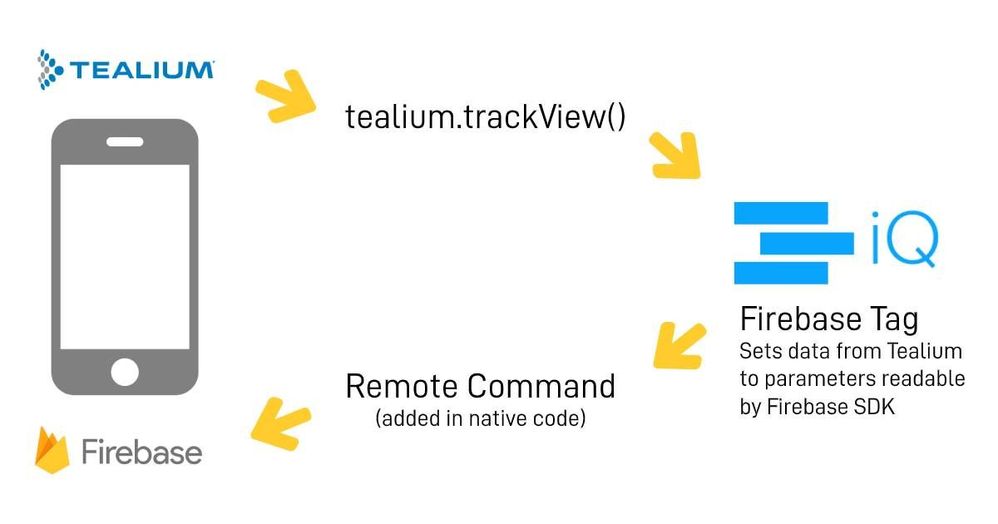
The Tealium event (view or event) is triggered by the native code, which is then ingested by the `utag.js` file in the webview. The Firebase tag and associated extensions review the event and send a Firebase event to the remote command that was added to the native code. The remote command takes the request from the tag and formats and sends the event so that it can be collected by the Firebase tag.
### Step 2 – Set the Tag Configuration
The only option for configuration is whether to enable debug mode. Your developers should determine whether this option needs to be enabled. The default setting is "False".
### Step 3 – Add Mappings
#### Setup
The following mappings are required for this tag:
* Session Timeout (seconds)
* Session Minimum (seconds)
* Firebase Log Level
* Screen Name
* Command Name
* Firebase Event
These can be set as static values or can be set dynamically using extensions.
|Variable| Description|
|---| ---|
|`firebase_session_timeout_seconds`| |
|`firebase_session_minimum_seconds`| |
|`firebase_analytics_enabled`| |
|`firebase_log_level`| |
|`firebase_event_name`| |
|`firebase_event_params`| |
|`firebase_screen_name`| |
|`firebase_screen_class`| |
|`firebase_property_name`| |
|`firebase_property_value`| |
|`firebase_user_id`| |
|`command_name`| |
#### Automatic events
Some of the events that will be used are automatically collected by the Firebase SDK and do not need to be set up using the Tealium Firebase Tag. For a list of these events, [click here](https://support.google.com/firebase/answer/6317485?hl=en).
#### Standard events
The event name is the event occurring in the app that needs to be captured (cart events, search events, payment events, etc.) Below is a list of standard events available through the Firebase SDK. If your event is not available in the list, it can be sent using a `logEvent` custom event.
* `config`
* `event_add_payment_info`
* `event_add_to_cart`
* `event_add_to_wishlist`
* `event_app_open`
* `event_begin_checkout`
* `event_campaign_details`
* `event_checkout_progress`
* `event_earn_virtual_currency`
* `event_ecommerce_purchase`
* `event_generate_lead`
* `event_join_group`
* `event_level_end`
* `event_level_start`
* `event_level_up`
* `event_login`
* `event_post_score`
* `event_present_offer`
* `event_purchase_refund`
* `event_remove_cart`
* `event_search`
* `event_select_content`
* `event_set_checkout_option`
* `event_share`
* `event_signup`
* `event_spend_virtual_currency`
* `event_tutorial_begin`
* `event_tutorial_complete`
* `event_unlock_achievement`
* `event_view_item`
* `event_view_item_list`
* `event_view_search_results`
* `logEvent`
* `resetData`
* `setScreenName`
* `setUserId`
* `setUserProperty`
* `initiateconversionmeasurement` (iOS only)
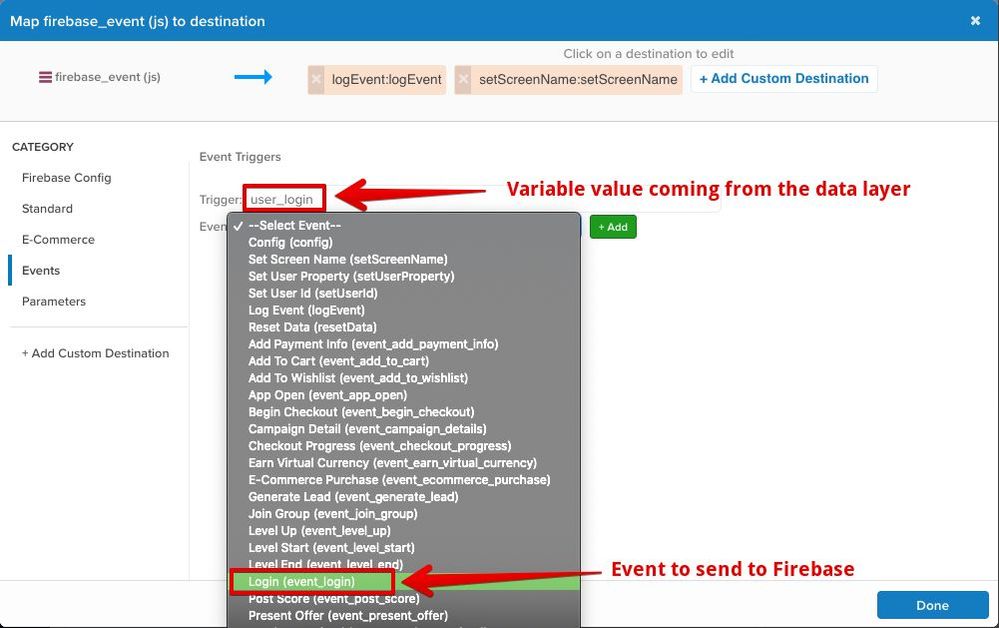
Firebase events are mapped as they would be in any other tag. Values can come in either from the data layer or set through an extension and then mapped to the tag in the following manner:
#### Custom events
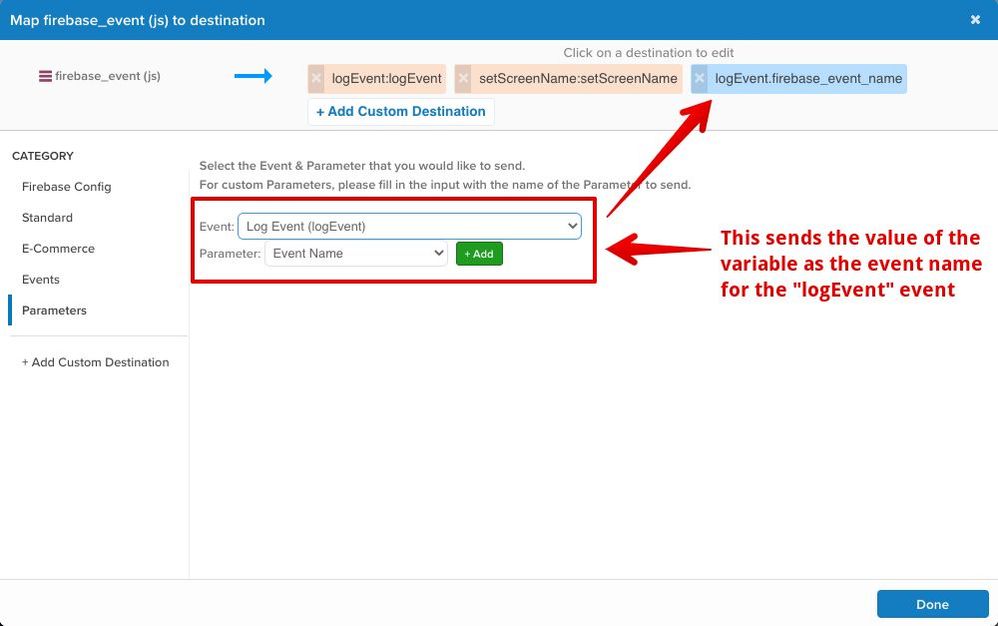
If the event you want to send is not included in the list of default events, you’ll need to send a `logEvent` event with a custom value attached for the event name.
1. Map your variable value to the `logEvent` event.
1. Add a parameter to send the event name with your `logEvent` event.
****
#### Standard parameters
Event parameters are sent along with the event and can be mapped to the parameters in the list below. Parameters can be mapped in two ways:
* As a standard parameter sent with any event
* As an event parameter sent only with specified events
| Variable | Type/Values | Description |
|:---------|:-----|:------------|
| `param_achievement_id` | `String` | Achievement ID. |
| `param_ad_network_click_id` | `String` | Ad network click ID. |
| `param_affiliation` | `String` | Affiliation. |
| `param_cp1` | `String` | CP1.|
| `param_campaign` | `String` | Campaign. |
| `param_character` | `String` | Character. |
| `param_content` | `String` | Content. |
| `param_content_type` | `String` | Content type. |
| `param_coupon` | `String` | Coupon. |
| `param_creative_name` | `String` | Creative name. |
| `param_creative_slot` | `String` | Creative slot. |
| `param_currency` | `String` | Currency. |
| `param_destination` | `String` | Destination. |
| `param_end_date` | `String` | End date. |
| `param_flight_number` | `String` | Flight number. |
| `param_group_id` | `String` | Group ID. |
| `param_index` | `String` | Index. |
| `param_item_brand` | `String` | Item brand. |
| `param_item_category` | `String` | Item category. |
| `param_item_id` | `String` | Item ID. |
| `param_item_list` | `String` | Item list. |
| `param_item_name` | `String` | Item name. |
| `param_item_variant` | `String` | Item variant. |
| `param_level` | `Long` | Level. |
| `param_location` | `Long` | Location. |
| `param_medium` | `String` | Medium. |
| `param_number_nights` | `Long` | Number Of nights. |
| `param_number_pax` | `Long` | Number Of passengers. |
| `param_number_rooms` | `Long` | Number Of rooms. |
| `param_origin` | `String` | Origin. |
| `param_price` | `Double` | Price. |
| `param_quantity` | `Long` | Quantity. |
| `param_screen_name` | `String` | Screen name. |
| `param_screen_class` | `String` | Screen class. |
| `param_score` | `Long` | Score. |
| `param_search_term` | `String` | Search term. |
| `param_shipping` | `Double` | Shipping. |
| `param_method` | `String` | Method. |
| `param_source` | `String` | Source. |
| `param_travel_class` | `String` | Travel class. |
| `param_virtual_currency_name` | `String` | Virtual currency name. |
| `param_start_date` | `String` | Start date. |
| `param_term` | `String` | Term. |
| `param_tax` | `Double` | Tax. |
| `param_transaction_id` | `String` | Transaction ID. |
| `param_value` | `Long or Double` | Value. |
| `param_level_name` | `String` | Level name. |
| `param_success` | `String` | Success. |
| `param_ad_format` | `String` | Ad format. |
| `param_ad_platform` | `String` | Ad platform. |
| `param_ad_source` | `String` | Ad source. |
| `param_ad_unit_name` | `String` | Ad unit name. |
| `param_campaign_id` | `String` | Campaign ID. |
| `param_creative_format` | `String` | Creative format. |
| `param_discount` | `String` | Discount. |
| `param_extend_session` | `String` | Extend session. |
| `param_item_category2` | `String` | Item Category2. |
| `param_item_category3` | `String` | Item Category3. |
| `param_item_category4` | `String` | Item Category4. |
| `param_item_category5` | `String` | Item Category5. |
| `param_item_list_id` | `String` | Item list ID. |
| `param_item_list_name` | `String` | Item list name. |
| `param_items` | `Array` | Items. |
| `param_level_name` | `String` | Level name. |
| `param_location_id` | `String` | Location ID |
| `param_marketing_tactic` | `String` | Marketing tactic. |
| `param_payment_type` | `String` | Payment type. |
| `param_promotion_id` | `String` | Promotion ID. |
| `param_promotion_name` | `String` | Promotion name. |
| `param_shipping_tier` | `String` | Shipping tier. |
| `param_source_platform` | `String` | Source platform. |
| `param_travel_class` | `String` | Travel class. |
| `param_virtual_currency_name` | `String` | Virtual currency name. |
| `param_user_signup_method` | `String` | User signup method. |
| `param_user_allow_ad_personalization_signals` | `String` | User allow ad personalization signals. |
| `param_email_address` | `String` | Email address. |
| `param_phone_number` | `String` | Phone number. |
| `param_hashed_email_address` | `String` | Hashed email address. |
| `param_hashed_phone_number` | `String` | Hashed phone number. |
#### E-Commerce
| Variable | Type/Values | Description |
|:---------|:-----|:------------|
| `order_id` | `String` | Order `ID` (Overrides `_corder`). |
| `order_total` | `Long or Double` | Order total (Overrides `_ctotal`). |
| `order_shipping` | `Double` | Shipping amount (Overrides `_cship`). |
| `order_tax` | `Double` | Tax amount (Overrides `_ctax`). |
| `order_currency` | `String` | Currency (Overrides `_ccurrency`). |
| `order_coupon_code` | `String` | Promo code (Overrides `_cpromo`). |
| `product_id` | `Array` | List of product IDs (Overrides `_cprod`). |
| `product_name` | `Array` | List of names (Overrides `_cprodname`). |
| `product_brand` | `Array` | List of brands (Overrides `_cbrand`). |
| `product_category` | `Array` | List of categories (Overrides `_ccat`). |
| `product_quantity` | `Array` | List of quantities (Overrides `_cquan`). |
| `product_unit_price` | `Array` | List of prices (Overrides `_cprice`). |
| `param_item_list` | `Array` | List of presentation lists. |
| `param_item_variant` | `Array` | List of variants. |
| `param_index` | `Array` | List of indexes. |
#### Consent settings
| Variable | Type/Values | Description |
|:---------|:-----|:------------|
| `ad_storage` | `String` | Ad storage. |
| `analytics_storage` | `String` | Analytics storage. |
| `ad_user_data` | `String` | Ad user data. |
| `ad_personalization` | `String` | Ad personalization. |
#### Events
To map events, refer to [Create an Event Mapping](https://docs.tealium.com/iq-tag-management/data-mappings/manage/#add-an-event-mapping)
| Event | Description |
|:------|:------------|
| `config` | Config. |
| `setScreenName` | Set screen name. |
| `setUserProperty` | Set user property. |
| `setUserId` | Set user ID. |
| `logEvent` | Log event. |
| `resetData` | Reset data. |
| `event_add_payment_info` | Add payment info. |
| `event_add_to_cart` | Add to cart. |
| `event_add_to_wishlist` | Add to wish list. |
| `event_app_open` | App open. |
| `event_begin_checkout` | Begin checkout. |
| `event_campaign_details` | Campaign detail. |
| `event_earn_virtual_currency` | Earn virtual currency. |
| `event_generate_lead` | Generate lead. |
| `event_join_group` | Join group. |
| `event_level_up` | Level up. |
| `event_level_start` | Level start. |
| `event_level_end` | Level end. |
| `event_login` | Login. |
| `event_post_score` | Post score. |
| `event_remove_cart` | Remove from cart. |
| `event_screen_view` | Screen view. |
| `event_search` | Search. |
| `event_select_content` | Select content. |
| `event_share` | Share. |
| `event_signup` | Sign up. |
| `event_spend_virtual_currency` | Spend virtual currency. |
| `event_tutorial_begin` | Tutorial begin. |
| `event_tutorial_complete` | Tutorial end. |
| `event_unlock_achievement` | Unlock achievement. |
| `event_view_item` | View item. |
| `event_view_item_list` | View item list. |
| `event_view_search_results` | View search results. |
| `event_ad_impression` | Ad impression. |
| `event_add_shipping_info` | Add shipping info. |
| `purchase` | Purchase. |
| `event_refund` | Refund. |
| `event_select_item` | Select item. |
| `event_select_promotion` | Select promotion. |
| `event_view_cart` | View cart. |
| `event_view_promotion` | View promotion. |
| `initiateconversionmeasurement` | Initiate conversion measurement. |
| `resetdata` | Reset data. |
| `setConsent` | Set consent. |
#### Parameters
To map events, refer to [Create an Event Mapping](https://docs.tealium.com/iq-tag-management/data-mappings/manage/#add-an-event-mapping)
| Event | Description |
|:------|:------------|
| `param_ad_format` | Ad format. |
| `param_ad_platform` | Ad platform. |
| `param_ad_source` | Ad source. |
| `param_ad_unit_name` | Ad unit name. |
| `param_campaign_id` | Campaign ID. |
| `param_creative_format` | Creative format. |
| `param_discount` | Discount. |
| `param_extend_session` | Extend session. |
| `param_item_category2` | Item Category2. |
| `param_item_category3` | Item Category3. |
| `param_item_category4` | Item Category4. |
| `param_item_category5` | Item Category5. |
| `param_item_list_id` | Item list ID. |
| `param_item_list_name` | Item list name. |
| `param_items` | Items. |
| `param_level_name` | Level name. |
| `param_location_id` | Location ID. |
| `param_marketing_tactic` | Marketing tactic. |
| `param_payment_type` | Payment type. |
| `param_promotion_id` | Promotion ID. |
| `param_promotion_name` | Promotion name. |
| `param_shipping_tier` | Shipping tier. |
| `param_source_platform` | Source platform. |
| `param_travel_class` | Travel class. |
| `param_virtual_currency_name` | Virtual currency name. |
| `param_user_signup_method` | User signup method. |
| `param_email_address` | Email address. |
| `param_phone_number` | Phone number. |
| `param_hashed_email_address` | Hashed email address. |
| `param_hashed_phone_number` | Hashed phone number. |
| `param_user_allow_ad_personalization_signals` | User allow ad personalization signals. |
| `ad_storage` | Ad storage. |
| `analytics_storage` | Analytics storage. |
| `ad_user_data` | Ad user data. |
| `ad_personalization` | Ad personalization. |
#### Custom parameters
If your parameter is not available in the above tables, a custom parameter will need to be sent with the event. When adding custom parameters to any event, note that they are sent along with the event (either standard or custom) and must be in a JSON format. The value of the mapped variable must be set using a Javascript extension. Multiple events can be formatted as shown in the following figure:
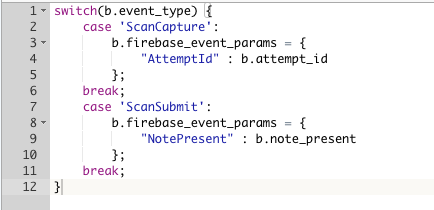
The mapping to send custom parameters would be configured as shown.

## Tips
Below are some items to keep in mind when setting up the Firebase Remote Command Tag.
* The config command is automatically sent on the first load if it is not found in the event list.
* If the appropriate data is provided (variable mapped to **user ID**), the `event_login` and `event_signup` events will automatically send `setUserId` and `setUserProperty` events.
* If the appropriate data is provided (variable mapped to **screen name**), the `event_view_item_list`, `event_view_item`, `event_ecommerce_purchase`, and `event_begin_checkout` can automatically send a `setScreenName` event.
* Use only the singular parameters or the e-commerce arrays, not both.
## Notes About Firebase
Firebase is not the same as Google Analytics and has different terminology and a completely different setup. The variables/mappings do not translate one for one, therefore, custom dimensions are not included in Firebase. Parameters take the place of custom dimensions and should be used accordingly. If you need a custom parameter, they can be configured within Firebase.
A/B testing parameters are stored in Firebase and are not accessible to Tealium. If the A/B testing data needs to be used within Tealium, the data can be exported from Firebase for FREE using BigQuery. The data can then be imported into Tealium server-side products for use in connectors/audiences.
## Resources
[Tealium Firebase Remote Command Integration](https://docs.tealium.com/platforms/remote-commands/integrations/firebase/)
[Firebase Remote Command Example – iOS (Github)](https://github.com/Tealium/tealium-ios-firebase-remote-command)
[Firebase Remote Command Example – Android (Github)](https://github.com/Tealium/tealium-android-firebase-remote-command)
[Google Firebase Guide](https://firebase.google.com/docs/guides)
[Automatically Collected Events – Firebase](https://support.google.com/firebase/answer/6317485?hl=en)