---
title: Setting Up Google Universal Analytics Cross-Domain Tracking
description: Cross domain tracking is the ability to track a user’s session across separate domains to create a complete view of a user’s actions.
url: https://docs.tealium.com/client-side-tags/google-universal-analytics-cross-domain-tracking/
---
As of July 1, 2023, Google Universal Analytics properties stopped processing hits. This tag has been deprecated and no longer available in the tag marketplace. For the current tag, see [Google Analytics 4](https://docs.tealium.com/google-analytics-4-ga4-tag/).
For example, if you have two domains interlinking to each other `www.example.com` and `www.another-domain.com`, Google Universal Analytics, by default, would count a single user who visited both properties as two separate users with two separate sessions. By enabling cross-domain tracking, the user will be represented as a single user between both domains.
----
### Tag Configuration
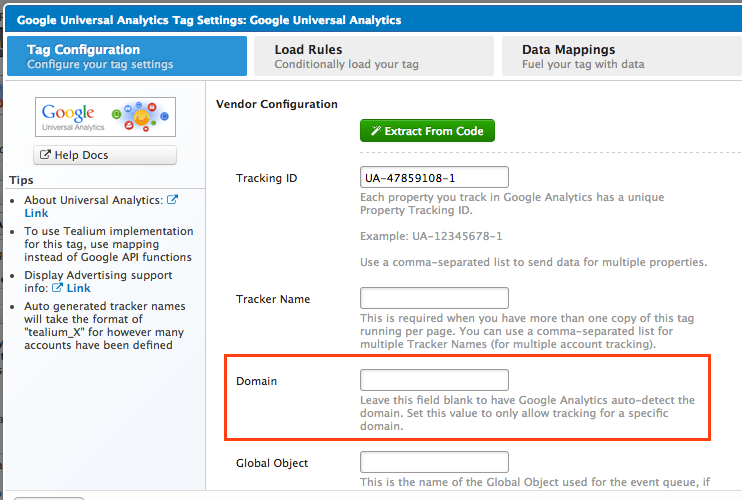
Google Universal Analytics is already enabled to track across multiple subdomains. For example: `test.example.com`, `example.com`, `store.example.com`. If you have specific subdomains to be tracked enter them in the **Domain** field..
### Cross-Domain Setting
1. In the Google Universal Analytics tag configuration, toggle the **Cross-Domain Tracking** drop-down to **On**.
1. In the **Cross-Tracking Domains** field, add a comma-separated list of the domains you want to enable cross-domain tracking for.
Do not insert a space after the commas.

1. Save and publish your changes.
### Validation
To ensure that your domains are tracking users correctly, navigate to one of your domains and click a link that takes you to your second domain. You should see the Google Universal Analytics cookie value appended in the URL and would read as `_ga=` with a long string of numbers.
In the screenshot below, I navigated to `www.example.com` and clicked a link that lead me to `www.another-domain.com`. Notice how the `_ga` tracking code is now in the URL:

This confirms that cross-domain tracking is working on expected from the browser.