---
title: About consent integrations
description: This article provides an overview of client-side consent integrations.
url: https://docs.tealium.com/consent/client-side/consent-integrations/about/
---
The Consent Enforcement Framework is a core feature of client-side consent integrations that enforces consent signals captured outside Tealium iQ Tag Management. This feature blocks tracking when customer consent is not given or is ambiguous.
Consent integrations supports both opt-in (GDPR-style) and opt-out (CCPA-style) enforcement patterns for supported consent management platforms (CMPs). Integrations can use templates to support most CMPs or custom solutions.
## Requirements
Consent integrations requires `utag.js` version 4.49 or later.
## Support for earlier versions
To enable support in earlier versions of `utag.js`, edit the **uTag Loader** template and add `##UTCM##` under the `##UTGEN##` publish engine flag.

For more information about how to update the **uTag Loader** template, see [Update a template](https://docs.tealium.com/manage-templates/#update-a-template).
## Consent concepts
The following terms describe concepts used in the consent integrations framework:
* **Purpose**: A specific data use purpose to which your website users can consent or decline.
* **Purpose group**: A group of purposes representing an enforcement policy to which tags are assigned.
* **Exemption**: A scenario where no enforcement is necessary and no tags need to be blocked based on consent decisions. Enforcement exemptions differ from the behavior when no consent integration enforcement rules apply. Unless there's an explicit exemption, or matching consent integration and the appropriate consent decision, no tags are allowed to fire.
* **Enforcement rule**: Rules that determine when to enforce a consent integration or exemption.
* **Consent decision**: An array of purposes the user has consented to, with a `type` attribute indicating whether the user has made an active decision (`explicit`) or not (`implicit`).
* **Implicit decision**: A decision inferred from a user's behavior. By visiting a site, a user consents to the necessary tags as described in the site’s privacy policy. A user can object to the sale of their data, but by default this is enabled (there is an implicit 'it's OK, to share/sell my data' decision).
* **Explicit decision**: A clear and precise consent decision by a user about what tracking they consent to.
* **Integration**: A set of features and configurations (pre-loaded or custom) that capture a consent decision from a CMP.
## How it works
Consent integrations enforces consent decisions from your CMP by blocking tags that do not have consent. When an integration is active, you must assign tags to purposes within a purpose group before they can be triggered. A user must consent to a purpose before tags assigned to that purpose can fire.
Each consent integration instructs the underlying framework how to communicate with a single CMP. Only one integration can be active at a time. However, you can use **Enforcement Rules** to conditionally apply multiple active integrations without conflict, if needed.
Tags that inject CMPs into the page are incompatible with consent integrations. Integrations require a signal from the CMP before tags load. To integrate your CMP with consent integrations, use a Pre Loader or DOM Ready extension, or add the CMP to the page outside Tealium iQ.
You can set up an integration with a supported CMP in the Tealium iQ dashboard, or create a custom integration by editing the **Custom template**.
## Supported integrations
See [Supported Vendor Integrations](https://docs.tealium.com/vendor-specific-configuration/) for a full list of currently supported integrations.
## Tag refire
Each tag has a **Tag Refire** switch in the **Map Tags** screen:
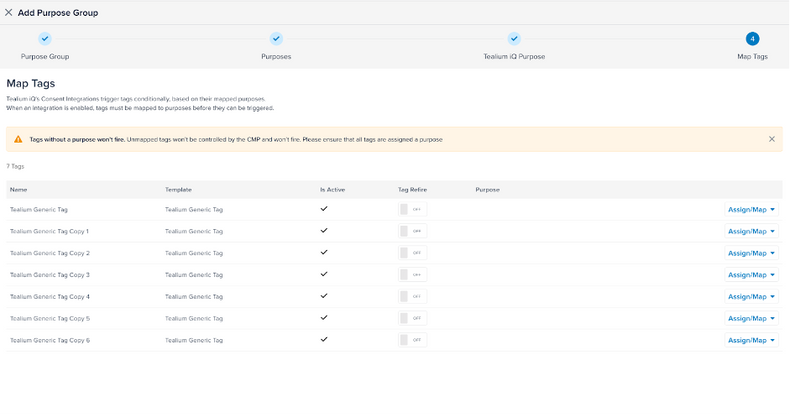
If you enable this option, the tag can fire twice for each user action; once for an implicit decision and again for an explicit decision. Tags are not triggered if the mapped purposes are not consented to.
Most tags don't require refiring. Enabling this option can result in duplicate events or double tracking. Use caution when enabling this feature.
For information about server-side refiring, see [Server-side event refiring](#server-side-event-refiring).
## Consent decision data
Consent integrations adds consent decision data to the data layer for each event. This data includes both client-side variables and server-side attributes.
These variables are automatically sent by the Tealium Collect tag. They are not directly available in extensions unless accessed using the `tealiumCmpIntegration.GetCurrentConsentDecision()` method.
### Client-side variables
| Variable | Description |
|----------|-------------|
| `tci.consent_type` | The consent type: `implicit` or `explicit`. |
| `tci.purposes_with_consent_all` | Array of all processed and unprocessed consented purposes. |
| `tci.purposes_with_consent_processed` | Array of processed consented purposes. |
| `tci.purposes_with_consent_unprocessed` | Array of unprocessed consented purposes. |
**Example client-side data:**
```json
{
"tci.consent_type": "implicit",
"tci.purposes_with_consent_all": ["C0001", "C0002", "C0003"],
"tci.purposes_with_consent_processed": ["C0001", "C0002"],
"tci.purposes_with_consent_unprocessed": ["C0003"]
}
```
### Accessing the consent decision in extensions
To access the current consent decision object in an extension, use the `tealiumCmpIntegration.GetCurrentConsentDecision()` method.
The following command adds the current consent decision to the `b` object:
```js
b.current_consent_decision = tealiumCmpIntegration.getCurrentConsentDecision()
```
### Server-side attributes
Tealium Collect sends consent attributes as part of each event payload. These attributes are sent regardless of which server-side tools you use.
| Attribute | Description |
| --------------------------------------- | --------------------------- |
| `tci.purposes_with_consent_unprocessed` | Array of purposes not yet processed after a consent update. Use when **Tag Refire** is enabled to avoid duplicates. | |
| `tci.purposes_with_consent_all` | Array of all consented purposes, even if already processed. Use when **Tag Refire** is disabled. |
**Example server-side payload:**
```json
{
"event_name": "page_view",
"tci.purposes_with_consent_unprocessed": ["C0003"],
"tci.purposes_with_consent_all": ["C0001", "C0002", "C0003"]
}
```
### Server-side event refiring
For accounts using server-side connectors, enabling **Tag Refire** for the Tealium Collect tag ensures that changes in consent (from `implicit` to `explicit`) trigger server-side processing again.
To enable server-side refiring:
1. Enable **Tag Refire** for the Tealium Collect tag in the **Map Tags** screen. This automatically sets the `refiringAllowed` option, which allows the tag to fire again when the consent decision changes.
1. In your connector action, add a condition to check the `tci.purposes_with_consent_unprocessed` attribute. This ensures that only unprocessed purposes are handled and prevents duplicate events.
### Full consent event example
This is an example of a complete event object with consent decision variables:
```json
{
"event_name": "page_view",
"tci.consent_type": "implicit",
"tci.purposes_with_consent_all": ["C0001", "C0002", "C0003"],
"tci.purposes_with_consent_processed": ["C0001", "C0002"],
"tci.purposes_with_consent_unprocessed": ["C0003"]
}
```
In this example:
* The consent type is `implicit`.
* Three purposes were consented.
* Two purposes have already been processed.
* One remains unprocessed and is eligible for server-side handling.
## Using the JavaScript console
When active, you can interact with a consent integration in the browser console on pages where `utag.js` is loaded. Using the JavaScript console lets you get the current consent decision that is retrieved from the CMP on every event. The consent decision is never cached, which ensures that it is always up to date.
For more information, see [Validate and debug consent integrations](https://docs.tealium.com/validate-and-debug-consent-integrations/).
## Consent register
Consent integrations can use the Tealium consent register to emit events when consent settings are loaded or updated. These changes are available globally on the page, making it easier for you to manage consent decisions across your website. For more information, see [Tealium consent register](https://docs.tealium.com/consent-register/).
The consent register requires the consent integrations framework template version 1.2.0 or later. To update this template, see [Update a template](https://docs.tealium.com/manage-templates/#update-a-template).