---
title: How the consent preferences manager works
description: The Consent Preferences Manager makes it easy to deploy a tracking preferences option to your website. Customers are able to specify which categories of tags they want to allow. This tools offers full access to customize the code that generates the preferences pop-up and the ability to translate content for your global customers.
url: https://docs.tealium.com/consent/client-side/consent-management/consent-preferences-dialog/about/
---
## How it works
The Consent Preferences Manager works together with the [Consent Prompt Manager]() to present tracking options to your customers and replaces the functionality previously offered by the [Privacy Manager extension]().
In newer versions of `cmGeneral`, the Consent Preferences Manager requires the Explicit Consent Prompt Manager because they share an enforcement rule. If the Explicit Consent Prompt is disabled, the Consent Preferences Manager won't work as expected. To use the Consent Preferences Manager without the Explicit Consent Prompt, see [Use the Consent Preferences Manager without showing the Explicit Consent Prompt](#use-the-consent-preferences-manager-without-showing-the-explicit-consent-prompt) section below.
The consent preferences manager groups tags in categories based on their function and purpose, such as `Analytics`, `Display Ads`, or `Email Marketing`. These categories are presented to the customer and displayed as toggle buttons to allow or disallow that tracking to occur. For example, if a user opts out of the `Marketing` category, tags categorized in the marketing category are suppressed. If needed, customers can still access their preference selections about the types of tracking they allow by using the consent preferences popup.
The Consent Preferences Manager automatically suppresses tags in opted-out categories from loading.
Preferences popup example:
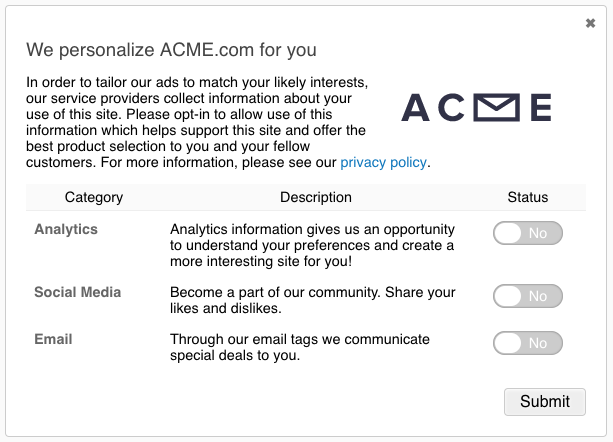
The iQ Tag Management Consent Preferences Manager simplifies the creation and deployment of a tracking preferences prompt to your website using your existing installation. After published, add a simple JavaScript function call to your page code to trigger the popup.
## Use the Consent Preferences Manager without showing the Explicit Consent Prompt
In recent versions of `cmGeneral`, the Consent Preferences Manager requires the Explicit Consent Prompt Manager because they share an enforcement rule.
To use the Consent Preferences Manager without showing the Explicit Consent Prompt, add the following code to a JavaScript Code extension scoped to **Before Load Rules** and set it to run once:
```javascript
// SCOPE: Before Load Rules (run once)
utag.gdpr.consent_prompt.noShow = true;
function checkForLoadedConsent() {
var foundDecision = window.tealiumConsentRegister && window.tealiumConsentRegister.currentDecision;
return !!foundDecision;
}
function checkForImplicitDecision() {
var foundDecision = checkForLoadedConsent();
var foundExplicitDecision = window.tealiumConsentRegister && window.tealiumConsentRegister.currentDecision &&
window.tealiumConsentRegister.currentDecision.type === 'explicit';
return foundDecision && !foundExplicitDecision;
}
function showPreferences() {
return utag && utag.gdpr && utag.gdpr.showConsentPreferences && utag.gdpr.showConsentPreferences();
}
// If the decision is only implicit, pop up the Preferences Modal to prompt a decision
if (!checkForLoadedConsent()) {
window.addEventListener('consent_loaded', (event) => {
if (checkForImplicitDecision() && utag.gdpr.getEnforcementMode() === 'opt-in')
showPreferences();
});
} else if (checkForImplicitDecision() && utag.gdpr.getEnforcementMode() === 'opt-in') {
showPreferences();
}
```
## EventStream consent categories
Changes in consent preferences are also honored by Tealium EventStream connectors. The consent category of a connector action is displayed on the **Action** configuration screen:

When a customer sets consent category preferences, they are included in subsequent server-side requests. Only connector actions in the categories that the customer has opted into are triggered.
#### Example
You have two connectors configured, one for `Analytics` and one for `Personalization`. A customer grants partial consent in the preference form by allowing `Analytics` tracking but not allowing `Personalization`.
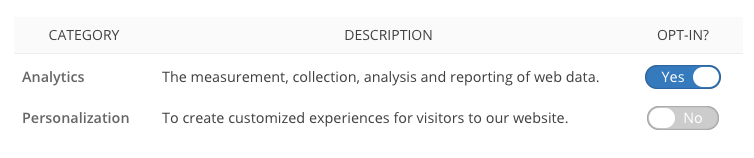
Only connector actions in the `Analytics` category are triggered. Any connector action categorized as `Personalization` is suppressed.
## AudienceStream consent category
Tealium AudienceStream is categorized in the `CDP` consent category. In order for attributes and connectors to be processed in AudienceStream, the visitor must be opted into the `CDP` category.
## DataAccess consent category
EventStore and EventDB are categorized in the `Big Data` consent category. To store event data in EventStore and EventDB, the visitor must be opted into the `Big Data` category.
AudienceDB is categorized in the `CDP` consent category. To store audience data in AudienceDB, the visitor must be opted into the `CDP` category.
## Features
The Consent Preferences Manager offers the following features:
* Display Templates
* Customizable Style and Layout
* Multi-Language Support
* Tag Categories
All of the configuration is bundled with your existing installation of the JavaScript library (utag.js).
After you activate and configure the preferences prompt, the changes are released in your next publish.
## Global settings
The Consent Preferences Manager is configurable for multiple profiles simultaneously when using global settings. This lets you configure the preferences pop-up at the account level and have each profile inherit the global configuration. Learn more about [global consent content]().