---
title: Tealium consent register
description: This article provides an overview of Tealium consent register.
url: https://docs.tealium.com/consent/client-side/consent-register/
---
Tealium consent register is used by client-side [consent integrations](https://docs.tealium.com/about-consent-integrations/) and [consent manager](https://docs.tealium.com/about-consent-management/) to expose consent signals across your website code. It also gives the Google consent mode tag direct access to those signals, enabling appropriate reactions.
## Key features
* **Universal consent events**: The latest consent manager (from `cmGeneral` template v3.1.0) and consent integrations (from framework template v1.2.0) use the consent register to emit events when consent settings are loaded or updated. These changes are accessible globally on the page in the `window.tealiumConsentRegister` object. For more information, see [MDN Web Docs: Introduction to events](https://developer.mozilla.org/en-US/docs/Learn/JavaScript/Building_blocks/Events).
* **Support for all consent signals**: Emits and retains both `implicit` and `explicit` consent signals.
* **Event listening**: Any tag or script on the page can listen for `consent_loaded` and `consent_changed` events. This enables responsive actions based on consent status changes. For more information, see [MDN Web Docs: EventTarget addEventListener() method](https://developer.mozilla.org/en-US/docs/Web/API/EventTarget/addEventListener).
* **Solid foundation for expansion**: Consent register introduces a robust new system that offers advanced customers significant customization options and will streamline the addition of new features in the future.
## How it works
The consent register improves consent management by allowing consent decisions to be shared across your website's code. This allows functionalities like Google consent mode to access these decisions for appropriate actions. It acts as a standardization layer for consent signals, and makes those standardized consent signals easily available on your webpage.
## Google consent mode
For essential background and context, see [Google consent mode](https://docs.tealium.com/google-consent-mode/). It's important to consult with your leadership and legal team regarding the appropriate timing and method for integrating Google tags into your page.
### Prerequisites
* Deactivate any existing consent mode features from your CMP to prevent conflicts.
* Update to the latest version of either the consent integrations framework or the consent manager `cmGeneral` template, based on your use case.
* Add a JavaScript extension for consent mode mappings. For details, see [consent purpose mapping](https://docs.tealium.com/google-consent-mode/#consent-purpose-mapping).
* Install the [Google consent mode tag](https://docs.tealium.com/google-consent-mode-tag/). No additional mappings are required when using the variable names from the consent purpose mapping extension.
* Categorize the consent mode tag (and all related Google tags) appropriately. Ensure that they are always allowed to fire if you're implementing advanced consent mode, or only allowed to fire with appropriate consent, depending on the approach your organization is taking.
## Advanced use cases
### Access consent decisions
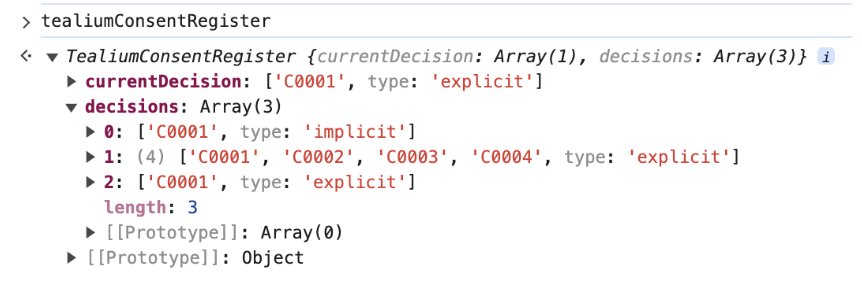
The `window.tealiumConsentRegister.currentDecision` object enables direct access to the current consent decision on the webpage. This streamlines the implementation of custom actions such as:
* Sending opt-out events to vendors to enable removal from audiences and complete downstream deactivation.
* Adding an extra layer of consent logging on top of what your CMP offers using a Tealium iQ extension.
* Tracking consent changes, enabling access to the current decision through a JavaScript API call.
For consent integrations and consent manager, the purpose IDs in the array will be different for each specific configuration.
```
// get the current decision
var currentDecision = window.tealiumConsentRegister.currentDecision
// get all decisions registered since the current page loaded
var allDecisionsOnThisPage = window.tealiumConsentRegister.decisions
```
**Consent integrations example using OneTrust**
In this example, we start in the opt-in model (implicit decision), then opt in and opt out for illustration.
### Monitor consent changes
The consent register emits events when `implicit` or `explicit` consent signals are first detected on the page, when the consent decision is updated.
```
// Set example event listeners to surface consent changes
// Can be implemented to run once per page code - You an use Pre Loader or DOM Ready, depending on the use case
window.addEventListener('consent_loaded', (event) => {
console.log('Consent loaded:', event.detail.decision);
});
window.addEventListener('consent_updated', (event) => {
console.log('Consent updated:', event.detail.decision);
});
```
**Consent manager example of a European user opting in on initial landing**

For transparency, these decisions always includes an `always_on` category, since `omitted` tags are always allowed.
### Check if a tag is allowed to fire
The `isTagAllowed` method lets you check if a specific Tealium iQ tag is permitted to fire based on the current consent settings and user decision. The primary use case for this method is fallback behavior when consent is revoked for a tag previously allowed to fire.
```javascript
window.tealiumConsentRegister.isTagAllowed(tagId);
```
* `tagId` (integer or string): The UID of the tag to check, shown on the tag in Tealium iQ. This method accepts a number or a string that can be converted to a number (for example, "7").
* Returns a boolean: `true` if the tag has the required consent, `false` if the tag is not allowed, doesn’t exist, or consent isn't granted.
If neither condition applies, or if the `tagId` doesn't exist, the method returns `false`.
#### Opt-out handling
You can integrate the `isTagAllowed` method into Tealium iQ tag templates by editing the template or using a tag-scoped extension. Set a callback to handle vendor-specific opt-out actions when consent is revoked. If a tag was previously allowed but later blocked due to a consent change, the callback can:
* Trigger an opt-out request to the vendor.
* Remove the vendor’s object from the page to stop further data transmission.
* Delete vendor-specific cookies.
* Perform other relevant cleanup actions.
Add these callbacks in a tag-scoped extension or directly in the tag template.
#### Example integration within a tag (tag-scoped extension, hardcoded UID)
```javascript
// Make sure to only add the callback once (use a new tag-scoped boolean)
if (!u.consent_callback_initialized) {
u.consent_callback_initialized = true;
window.addEventListener('consent_updated', (event) => {
var exists = window.tealiumConsentRegister &&
typeof window.tealiumConsentRegister.isTagAllowed === "function";
if (exists && !window.tealiumConsentRegister.isTagAllowed(7)) {
console.log("Opt-out signal triggered for tag 7.");
// Implement appropriate, vendor-specific opt-out logic here,
// deduplicating if needed
}
});
}
```
#### Example integration within a tag (template code, dynamic UID)
The string `##UTID##` is a dynamic placeholder that represents the tag's unique ID. This value is automatically replaced by Tealium with the actual tag ID at runtime. You do not need to manually replace `##UTID##` with your own value.
```javascript
// Make sure to only add the callback once (use a new tag-scoped boolean)
if (!u.consent_callback_initialized) {
u.consent_callback_initialized = true;
window.addEventListener('consent_updated', (event) => {
var exists = window.tealiumConsentRegister &&
typeof window.tealiumConsentRegister.isTagAllowed === "function";
if (exists && !window.tealiumConsentRegister.isTagAllowed("##UTID##")) {
console.log("Opt-out signal triggered for tag " + "##UTID##");
// Implement appropriate, vendor-specific opt-out logic here,
// deduplicating if needed
}
});
}
```
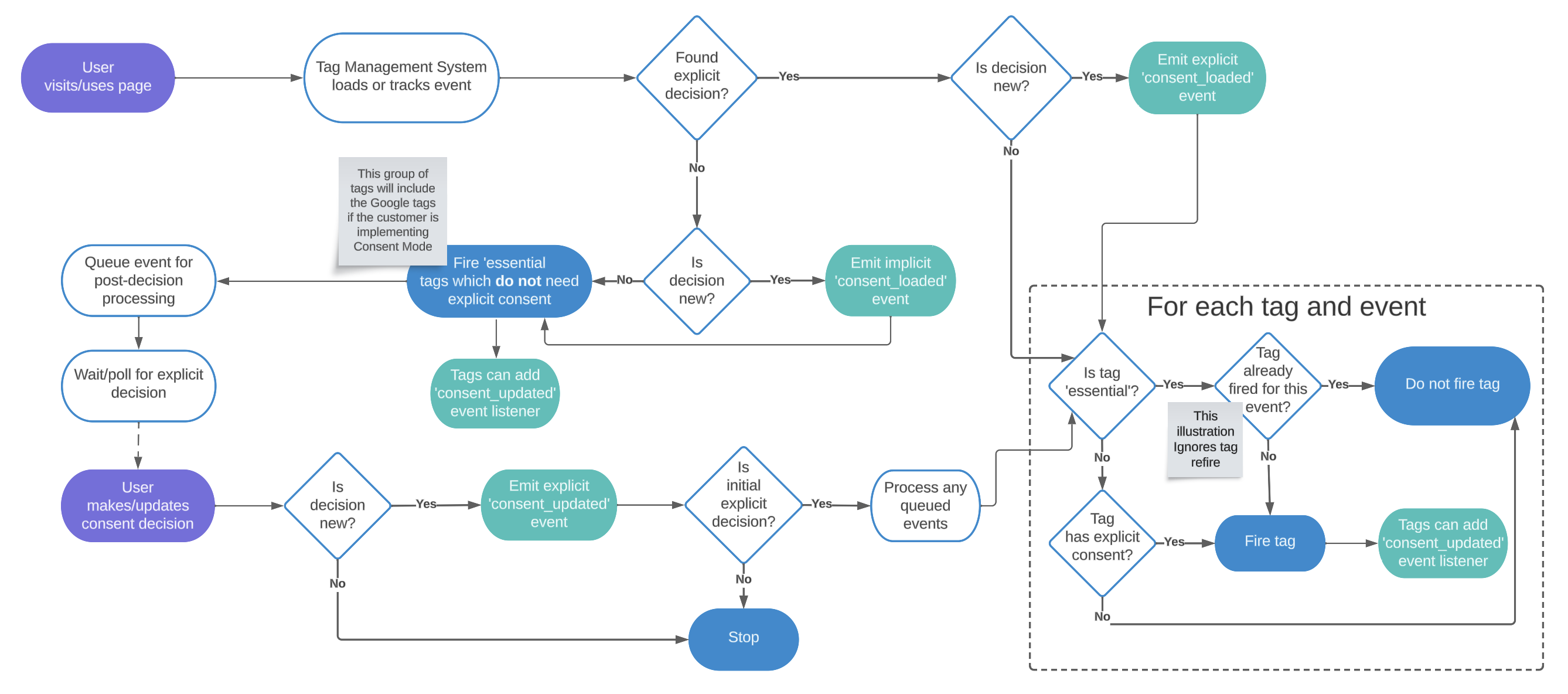
## Consent events and listeners flow diagram
A simplified overview of the flows to illustrate the new events and listeners.
## Suppress the consent register
To suppress the consent register, set the `suppressConsentRegister` flag in a Pre Loader extension.
Add the following code in a Pre Loader-scoped JavaScript Code Extension:
```javascript
window.tealiumCmpIntegration = window.tealiumCmpIntegration || {};
window.tealiumCmpIntegration.suppressConsentRegister = true;
```
Use this setting cautiously, as it will suppress **all** consent register functionalities.