---
title: Server-side consent management
description: The consent preferences manager helps you deploy a tracking preferences option to your website. The consent decision provided by the consent manager is automatically enforced by select server-side products.
url: https://docs.tealium.com/consent/server-side/consent-management/
---
Server-side consent management for event-level activations has been replaced by consent orchestration. For more details, see [About consent orchestration](https://docs.tealium.com/about-consent-orchestration/).
Automatic enforcement of consent management is optional for all profiles and disabled by default for new profiles. For more information, see [Disabling automatic enforcement](#disabling-automatic-enforcement).
There are a few restrictions to the automatic enforcement of server-side consent management. This article describes the current per-product behaviors and restrictions, and how to effectively disable automatic enforcement.
## How it works
The consent preferences manager groups tags in categories based on their function and purpose. These categories are presented to the visitor and displayed as toggle buttons to allow or disallow that tracking to occur.
The following consent categories are currently available:
* Analytics
* Affiliates
* Display Ads
* Search
* Email
* Personalization
* Social
* Big Data
* Misc
* Cookiematch
* CDP
* Mobile
* Engagement
* Monitoring
* CRM
The Tealium Collect tag sets the `consent_categories` array to events. If the `consent_categories` array is defined on an incoming event, the categories in the array will be enforced as detailed below. If that array is not set, then a consent policy cannot be enforced and all server-side products are enabled.
### EventStream connector actions
Consent preferences are enforced by Tealium EventStream connectors. The consent category of a connector action is displayed on the action configuration screen in the **Details**:
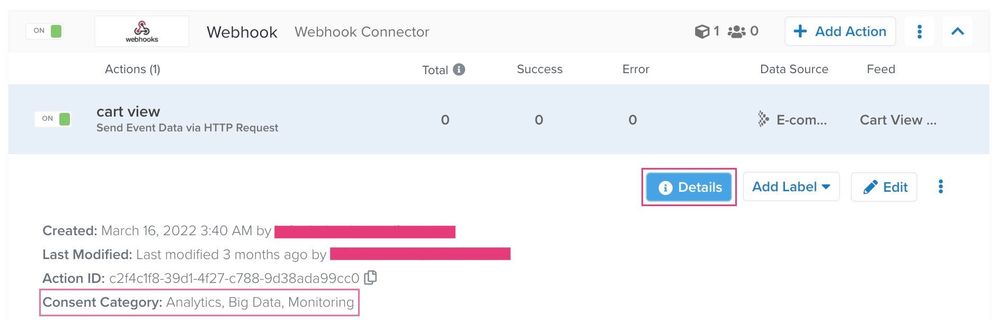
#### EventStream connector actions consent categories
Each connector action in EventStream has at least one consent category assigned. This consent category cannot be changed. When the `consent_categories` array is defined, an action fires only if all of the relevant categories are present, with the exception of [consent change events](https://docs.tealium.com/consent-change-event-specifications/#consent-change-events). These events (`decline_consent`, `grant_full_consent`, and `grant_partial_consent`) will be sent/stored, regardless of the contents of the `consent_categories` array.
**Example 1**
The Facebook Connector is governed by the **Analytics**, **Display Ads**, and **Social** consent categories. Facebook connector actions will only fire when the visitor has opted in to all three categories.
**Example 2**
You have two connectors configured, one for **Analytics** and one for **Personalization**. A visitor grants partial consent in the preference form by allowing **Analytics** tracking but not allowing **Personalization**.
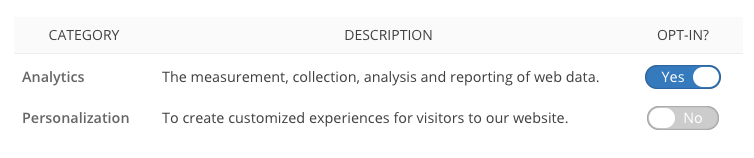
Only connector actions in the **Analytics** category are triggered. Any connector action in the **Personalization** category is suppressed.
### AudienceStream processing
Tealium AudienceStream is categorized in the **CDP** consent category. To allow attributes and connectors to be processed in AudienceStream, the visitor must opt in to the **CDP** category. However, for events like `decline_consent`, `grant_full_consent`, and `grant_partial_consent`, AudienceStream will process data even if **CDP** consent isn't given. Bypassing **CDP** consent allows for specific actions, such as triggering a Leave Audience connector action to remove a visitor from a remarketing list or other third party systems. For more information, see [consent event specifications](https://docs.tealium.com/consent-change-event-specifications/).
The consent category assigned to AudienceStream cannot be changed.
### AudienceStream connector actions
Audience connectors do not support consent category enforcement at the connector action level. To customize consent enforcement in your AudienceStream connectors you must add consent conditions to the audience rules.
### DataAccess
DataAccess products only log events and profiles with **Big Data** consent in the `consent_categories` array. Tealium EventStore and Tealium EventDB are categorized in the **Big Data** consent category. To allow event data to be stored in EventStore and EventDB, the visitor must opt in to the **Big Data** category.
However, there are exceptions for event logging:
* [Consent change events](https://docs.tealium.com/consent-change-event-specifications/#consent-change-events).
* Events used by the **Data Governance Package**
* Tealium AudienceStore and Tealium AudienceDB
To allow visitor profiles to be stored in AudienceStore and AudienceDB, the visitor must opt in to the **CDP** category.
For all DataAccess products (EventStore, AudienceStore, EventDB, and AudienceDB), [Consent change events](https://docs.tealium.com/consent-change-event-specifications/#consent-change-events) are sent/stored regardless of the contents of the `consent_categories` array to support consent logging.
## Disabling automatic enforcement
Automatic enforcement is disabled by default for new profiles. Enabling consent orchestration disables and replaces legacy event-level server-side enforcement. To disable automatic enforcement on existing profiles, see [Server-side account settings](https://docs.tealium.com/server-side-account-settings/#consent-enforcement). For more information, see [About consent orchestration](https://docs.tealium.com/about-consent-orchestration/).
The built-in enforcement based on `consent_categories` can sometimes cause unwanted blocking of consented data. To override that logic, follow these steps:
1. Use a JavaScript Code extension scoped to the Tealium Collect tag to copy the opt-in categories to a new array, such as `consent_categories_granted`:
```javascript
b.consent_categories_granted = b.consent_categories
delete b.consent_categories
```
1. Remove the `consent_categories` array to allow server-side products to operate unrestricted.
1. Manually add conditions based on `consent_categories_granted` to each event feed and audience.
This will disable all automatic enforcement and consent-based blocking. To avoid tracking without end-user permission, ensure you are extremely cautious with your configuration when using this workaround.
After disabling automatic enforcement, follow the steps in [Manual server-side consent enforcement](https://docs.tealium.com/manual-enforcement/) to configure consent conditions manually.