---
title: Best practices for selecting user identifiers
description: This guide provides best practices about selecting user identifiers for visitor ID attributes to optimize visitor stitching.
url: https://docs.tealium.com/guides/user-identifier-guide/
---
## About user identifiers
A user identifier is a data layer variable in your Tealium installation that uniquely identifies a user across devices, platforms, and browsers.
User identifiers are used to set visitor ID attributes in visitor profiles. Visitor stitching uses visitor ID attributes to combine visitor profiles from multiple devices and browsers that have matching visitor ID values.
The following figure shows an example of a visitor ID attribute named `Hashed email address` that is populated by the user identifier `hashed_email_address` (event attribute):
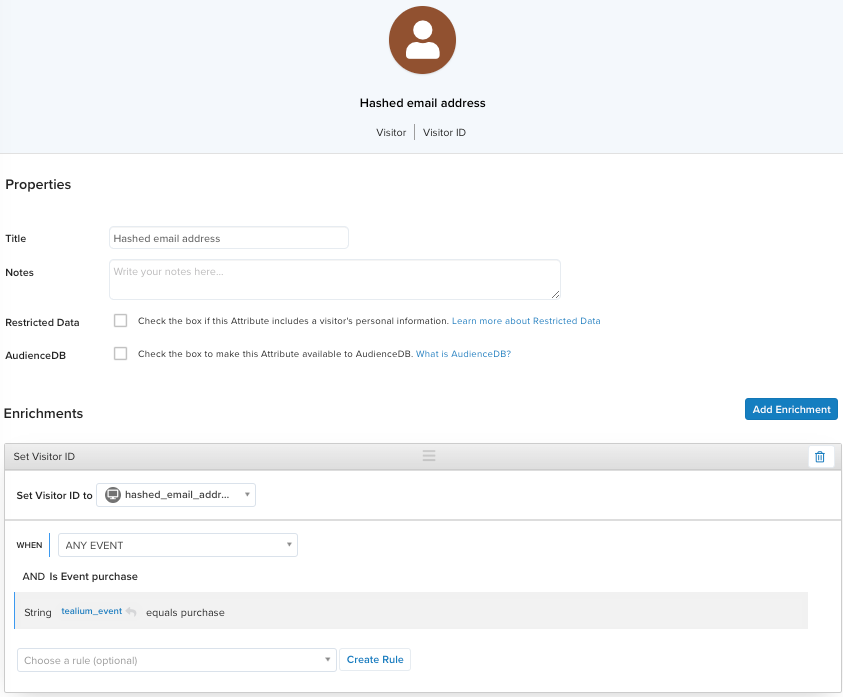
User identifiers are not automatically created or set by Tealium. These attributes must be configured based on your use case.
### Requirements
User identifiers must meet the following requirements:
* Must be unique for each visitor.
* Must be a minimum of 6 characters in length and contain at least 3 unique characters.
* Must have consistent casing across platforms, devices, and browsers.
* Must persist across all data sources.
If a user identifier is not unique, the visitor stitching process might incorrectly combine two unrelated profiles, which cannot be undone.
For more information, see [About visitor stitching]() and [Visitor ID attributes]().
## How to choose user identifiers
To select a user identifier, list the identifiers you currently collect for visitors to your website, app, or store. Then determine the following for each identifier:
* Is the value unique for each visitor?
* Is it available from all data sources?
Choose an identifier that is common to all areas of your business, and has a unique value for each visitor. For example, an email address or phone number could come from your website, a mobile app, or from an in-person interaction at your business.
An identifier should also be available from all data sources so that visits from different sources, such as online and in-store purchases, can be stitched together.
### Examples of good user identifiers

The following are good user identifiers:
* Hashed email address
* Hashed phone number
* The Trade Desk Unified ID
* Customer ID
* Patient ID
* Member ID
* Account ID
* Student ID
For more information about hashing user identifiers, see [Hash values that contain PII]().
### Examples of bad user identifiers
The following IDs are not suitable user identifiers:
* Marketing activation IDs - IDs for marketing actions or campaigns, not users. For example, an Adobe Marketing Cloud ID or a Google Client ID.
* Vendor IDs - An ID for software or for a service vendor.
* Device IDs - May be used by multiple users.
* Anonymous IDs - Change when a user logs in from a different device or browser.
Marketing activation IDs and vendor IDs do not make good user identifiers, but they can be useful when stored as visitor attributes for use in connector actions.
### Maximum number of user identifiers
The best practice is to configure a maximum of two visitor ID attributes.
If more than two visitor IDs are used, certain stitching scenarios may result in creating two separate profiles instead of combining them.
It's also important to only set one user identifier in an event. Setting more than one user identifier in a single event can also lead to unexpected stitching results.
After you enable visitor stitching, we recommend consulting the Tealium Customer Success team before adding additional visitor ID attributes.
## Preparing user identifiers
Use the following best practices to validate and normalize user identifiers before they are assigned to a visitor ID attribute. These preprocessing techniques can be implemented in your own code or by using extensions and enrichments.
### Validate email addresses
If you are using email address as a user identifier, it's a best practice to verify that the value is a valid email address, such as checking for the `@` symbol or using a regular expression. If the value for a user identifier is undefined, or another invalid value, you do not want to use it to set a visitor ID attribute. Doing so will cause unrelated profiles to be stitched together.
The following figure shows an example of the configuration of the Set Data Values extension that uses a regular expression to validate an email address:
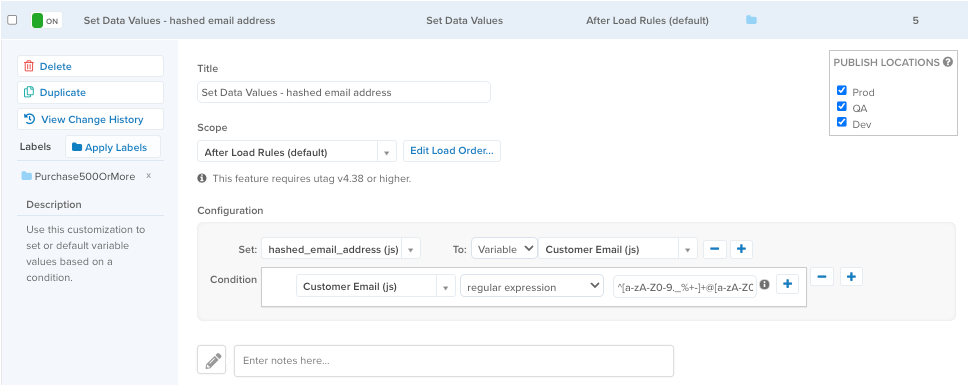
This example uses the following regular expression to validate the email address before setting the value:
```none
^[a-zA-Z0-9._%+-]+@[a-zA-Z0-9.-]+\.[a-zA-Z]{2,}$
```
### Normalize email addresses
String attributes, such as email addresses, from different data sources may use different case conventions. For example, some may use capital letters in the value, others may use all lowercase. It's a best practice to normalize these values (changed to all lowercase) using the [Lower-Casing extension]().
For example, the following email addresses would not be considered the same unless they were normalized to lowercase:
* `abby.adams@acme.com`
* `Abby.Adams@acme.com`
* `ABBY.ADAMS@ACME.com`
For information about how to set a value for a user identifier and normalize the value, see [Set the value of a user identifier]().
### Normalize phone numbers
If you are using a phone number as a user identifier, it's a best practice to normalize the values to contain digits only. The characters included in a phone number vary, depending on the country, as follows:
* Groups of digits may be separated by spaces, dashes, periods, or combinations of these characters.
* Area or city codes may be enclosed in parentheses and the number of digits may vary.
* The number of digits in the phone number can also vary, and can also be different for landlines and mobile devices.
* Country codes usually begin with a `+` followed by 1 to 4 digits. There may be a dash separating the first and second digits. Some countries enclose the country code in parentheses.
The following table shows examples of how the various formats for phone numbers should be normalized:
| Country | Number | Normalized |
|-------------------|-----------------------|-------------|
| Brazil | +55 (11) 91234-5678 | 5511912345678 |
| France | +33 6 12.34.56.78 | 33612345678 |
| Japan | +81 90-1234-5678 | 819012345678 |
| Ukraine | +380 (50) 987-65-43 | 380509876543 |
| United Kingdom (landline) | +44 20 1234 5678 | 442012345678 |
| United Kingdom (mobile) | +44 7723 45678 | 44772345678 |
| United States | +1 (123) 456-7890 | 11234567890
### Hash values that contain PII
User identifiers that contain personally identifiable information (PII), such as email addresses and phone numbers, should be hashed to protect user privacy. A hash function, such as SHA256, converts a text value containing sensitive information into an anonymous and unique, fixed-length string of characters, while retaining its uniqueness.
User identifiers should be normalized before being hashed.
For information about using the Crypto extension, see [Set the value of a user identifier]() and [Crypto extension]().
#### Crypto extension example
The following example hashes a data layer variable named `customer_email`:
```
> utag_data.customer_email
< "test@tealium.com"
```
With the Crypto extension configured to convert `customer_email` using the SHA-1 cryptographic hash function, the new value becomes:
```
> utag_data.customer_email
< "05fcf31275aa13408ace62e84dac60ae4b805a65"
```
To preserve `customer_email` and create a hashed value, use a second variable named `customer_email_hash`. First, use the [Set Data Values extension]() to initialize the hash variable `customer_email_hash` to the value in `customer_email`, and then hash it in the Crypto extension. This ensures you preserve the original value after creating the new hashed value:
```
> utag_data.customer_email
< "test@tealium.com"
> utag_data.customer_email_hash
< "05fcf31275aa13408ace62e84dac60ae4b805a65"
```
## Set the value of a user identifier
The following figure shows an example of setting a data layer variable, which will be used as a user identifier, using three extensions to set the value, lowercase the value, and hash the value.
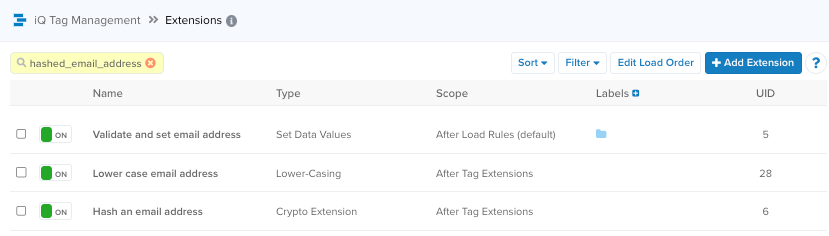
For more information, see [Set Data Values extension]() and [Crypto extension]().
## Set a visitor ID on a qualifying event
A visitor ID should only be set during a qualifying event. A qualifying event occurs when a customer provides a reliable means of identification, such as creating an account or completing a purchase.
For example, when a user provides an email address when making a purchase, that email address would be lower-cased and hashed, as described in [Verify and normalize email addresses]() and [Hash user identifiers that contain PII](). You would use an enrichment to set a visitor ID attribute to the value of the user identifier when a purchase event occurs.
The following figure shows an example of a visitor ID attribute with an enrichment that sets the value when a purchase event occurs:

## Additional resources
* [About visitor stitching]()
* [Visitor stitching guidelines]()
* [Visitor ID attribute]()