---
title: Tealium cookies
description: This article provides an overview of the cookies used by Tealium iQ Tag Management and the various methods by which additional cookies can be created and modified.
url: https://docs.tealium.com/iq-tag-management/data-layer/cookies/
---
## Built-in cookies
The Tealium Universal Tag (`utag.js`) maintains several first-party cookies for internal use. These variables can be added to your data layer using the [Tealium Built-In Data Bundle](https://docs.tealium.com/data-bundles/).
The following table lists the cookies created and maintained by `utag.js`:
| Cookie Variable | Description |
|------------------- | ----------- |
| `utag_main_ses_id` | The Unix/Epoch timestamp of the session start, in milliseconds.|
| `utag_main_v_id` | A unique, partially random identifier to ensure compliance with data privacy and consent rules. In version 4.50 and later, not set by default. The Tealium Collect tag writes this cookie when needed. For more information, see [`utag.js` version 4.50](https://docs.tealium.com/platforms/javascript/version-4-50/).|
| `utag_main__st` | The Unix/Epoch timestamp of the session timeout, in milliseconds. The value is updated on new events.|
| `utag_main__se`| The number of events during the current session. |
| `utag_main__ss` | A boolean that indicates if the page viewed is the first in a session. A value of `1` means that the current page is the first page viewed in the session and a value of `0` means the current page is not the first page viewed in the session.|
| `utag_main__pn` | The number of pages viewed during the current session.|
| `utag_main__sn` | The number of sessions for this visitor.|
### Version 4.50 and later
[Versions 4.50 and later](https://docs.tealium.com/platforms/javascript/version-4-50/) of `utag.js` create and manage standalone cookies using the `utag_main_` prefix. This means that `utag.js` stores each value separately in a cookie that has a name beginning with `utag_main_`.
In the browser console, these separate cookies look like this:
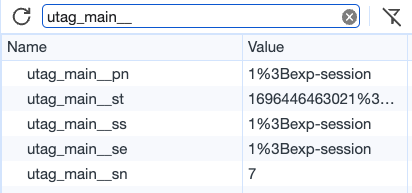
You can override this default behavior and force `utag.js` to store all `utag_main` cookies in a single multi-value cookie using the [`split_cookie`](https://docs.tealium.com/platforms/javascript/settings/#split_cookie) setting. With the default standalone cookie behavior, use the [`split_cookie_allowlist`](https://docs.tealium.com/platforms/javascript/settings/#split_cookie_allowlist) setting to limit which cookies can be set.
Starting with version 4.50 of `utag.js`, the `v_id` variable of `utag_main` is set by the Tealium Collect tag to ensure that it complies with data privacy and consent purposes. To override this behavior and generate this cookie for all visitors, enable the [`always_set_v_id`](https://docs.tealium.com/platforms/javascript/settings/#always_set_v_id) setting.
### Version 4.49 and earlier
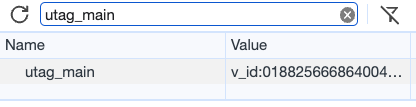
Versions 4.49 and earlier of `utag.js` create and maintain a single multi-value cookie named `utag_main` with several delimited key-value pairs.
In the browser console, this single multi-value cookie looks like this:
## Cookie functions
`utag.js` uses two cookie functions that provide an easy method to read and write cookies. For more information, see [cookie functions](https://docs.tealium.com/platforms/javascript/api/cookie-functions/).
Use the [`split_cookie_allowlist`](https://docs.tealium.com/platforms/javascript/settings/#split_cookie_allowlist) setting to restrict which cookies can be set. This setting ensures that tags and custom functions don't set undeclared cookies. It also prevents [`utag.loader.SC`](https://docs.tealium.com/platforms/javascript/api/cookie-functions/#utagloadersc) from writing undeclared cookies.
## Cookies from extensions
### Persist Data Value
The **Persist Data Value** extension can be used to set cookies from the iQ Tag Management interface. Cookies can be set with or without the `utag_main` prefix.
For more information, see the [Persist Data Value extension](https://docs.tealium.com/persist-data-value-extension/).
### Split Segmentation
The **Split Segmentation** extension is used to create visitor segments, usually for A/B testing. The extension stores the segment name in a cookie.
For more information, see the [Split Segmentation extension](https://docs.tealium.com/split-segmentation-extension/).
### Privacy Manager
The **Privacy Manager** extension uses a cookie named `OPTOUTMULTI` to save the privacy settings for a visitor for the next time they visit your site.
For more information, see the [Privacy Manager extension](https://docs.tealium.com/privacy-manager-extension/).
## Cookies from tags
Some tags in the tag marketplace use [cookie functions](https://docs.tealium.com/platforms/javascript/api/cookie-functions/) to persist anonymous identifiers or other information.
### Tealium Collect tag cookies
The Tealium Collect tag generates the following cookies:
| Cookie Variable | Description |
|------------------- | ----------- |
| `utag_main_v_id` | A unique, partially random identifier to ensure compliance with data privacy and consent rules. In version 4.50 and later, not set by default. The Tealium Collect tag writes this cookie when needed. For more information, see [`utag.js` Release Notes version 4.50](https://docs.tealium.com/platforms/javascript/version-4-50/).|
|`utag_main_dc_group`| A random number to use with the **Sample Size** setting to determine which events are sampled. |
| `utag_main_dc_visit` | The number of sessions for which the Tealium Collect tag has fired.|
| `utag_main_dc_event` | The number of events for which the Tealium Collect tag has fired.|
| `utag_main_dc_region` | The AudienceStream region where the visit session is stored, collected from the HTTP response header. This cookie is used for determining the endpoints for [data layer enrichment](https://docs.tealium.com/data-layer-enrichment/). |
For more information, see [Tealium Collect tag](https://docs.tealium.com/tealium-collect-tag/).
### Cookies from third-party tags
Some third-party tags generate cookies that store identifiers or other data.
These cookies are not controlled by Tealium, and are not limited by the [`split_cookie_allowlist`](https://docs.tealium.com/platforms/javascript/settings/#split_cookie_allowlist) setting, or any other feature of Tealium iQ Tag Management.
## Cookies from the consent manager
The consent manager uses a cookie named `CONSENTMGR` to save the consent settings of a visitor.
Learn more about [consent management](https://docs.tealium.com/about-consent-management/).
To change the name of the `CONSENTMGR` cookie, first verify that you are using version 2.0.1 or later of the `cmGeneral` template, then use a JavaScript Code extension scoped to **All Tags - Before Load Rules** with the following code:
```js
utag.gdpr.cmcookiens = 'NEW_COOKIE_NAME';
```
To change the retention period of the consent cookie, use the [`consentPeriod`](https://docs.tealium.com/platforms/javascript/settings/#consentperiod) setting.
## Cookies from CookieConsent
The [CookieConsent consent integration](https://docs.tealium.com/cookieconsent-consent-integration/) uses a cookie named `cc_cookie` and the cookie duration is 182 days.
## Cookies from Web Companion
[Web Companion](https://docs.tealium.com/web-companion/) uses a cookie to save the publish environment (Prod, QA, Dev, or Custom) you were viewing when you last visited your site. Viewing the default publish environment for your site does not set a cookie.
The last viewed publish environment is saved in the following cookie, where `{account}` and `{profile}` are replaced with your account and profile: `utag_env_{account}_{profile}`
If you clear your browser's cookies, Web Companion does not save which publish environment you were viewing, requiring you to re-select the environment to view.