---
title: Data layer variable types
description: This article describes how to use the various data layer variable types available in Tealium iQ Tag Management.
url: https://docs.tealium.com/iq-tag-management/data-layer/data-layer-variables/
---
The data layer screen organizes variables by type. The types are based on the source of the data.
The supported types are:
* **UDO Variables**: Variables from the Universal Data Object (`utag_data`).
* **Querystring Parameters**: Variables from the URL query string.
* **First-Party Cookies**: Variables stored as cookies.
* **JavaScript Variables**: Variables that already exist in your site code.
* **Meta Data Elements**: Variables from `` tags.
* **DOM Variable**: Built-in DOM variables.
* **Local Storage Variable**: Data stored locally between sessions.
* **Session Storage Variable**: Data stored locally that expires between sessions.
* **AudienceStream Attributes**: Variables imported by [data layer enrichment](https://docs.tealium.com/about-data-layer-enrichment/) from AudienceStream. This variable type is only available to customers with AudienceStream.
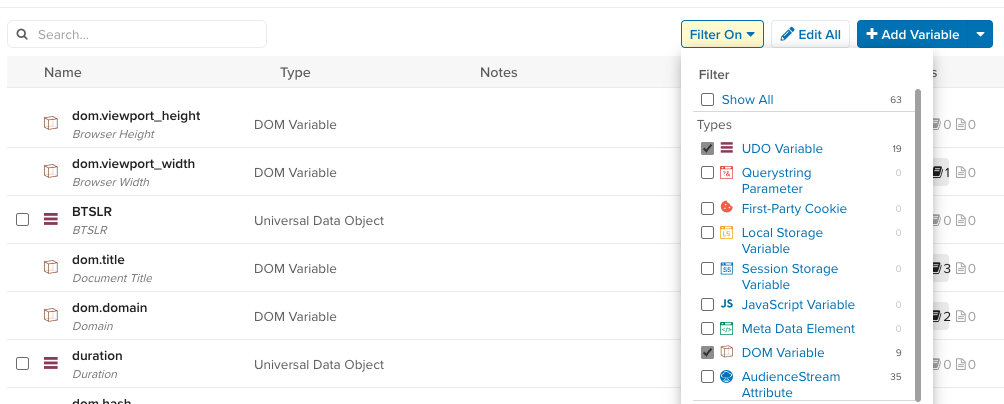
These data layer variables are for use in your Tealium iQ configuration. For more information on creating the data layer code for your site, see [Data Layer](https://docs.tealium.com/quick-start-web/#data-layer) and [Universal Data Object]().
## UDO variable
The UDO type is for variables defined in your [Universal Data Object](https://docs.tealium.com/platforms/javascript/about-utag-data/), also referred to as `utag_data`. The UDO is implemented in the code of your site or app. Most of your variables will be this type.
#### Example
The following JavaScript snippet demonstrates how the `language` variable is defined in the page code:
```js
var utag_data = {
language : "en"
};
```
* Variable name: `language`
* Referenced in a JavaScript extension: `b["language"]`
## Query string parameters
The query string type is for parameters from the URL. The query string consists of everything after the `?` character in the URL. A query string parameter is a key-value pair in the format `key=value` where `key` is the parameter name.
#### Example
The following URL demonstrates how the `sortOrder` variable is defined:
```none
http://example.com/path/page.html?pg=4&sortOrder=price
```
* Variable name in iQ: `sortOrder`
* Referenced in a JavaScript extension: `b["qp.sortOrder"]`
## First-party cookies
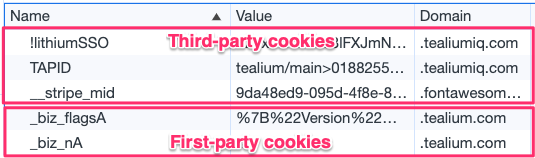
The first-party cookie type is for cookies that are set on your domain. The cookie must be a first-party cookie, which means it is set by the same domain where it's used.
To store data in a cookie, create a first-party cookie variable and then use the [Persist Data Value extension]() to set it.
Look in the browser console to inspect cookies. For example, on this documentation site (`docs.tealium.com`), only cookies in the domain `.tealium.com` are considered first-party. Cookies set in a different domain are considered third-party.
#### Example
The following configuration demonstrates how the `_aff` variable is defined in the browser cookie:
* Browser cookie name: `_aff`
* Variable name in iQ: `_aff`
* Referenced in a JavaScript extension: `b["cp._aff"]`
By default, `utag.js` creates and maintains several cookies that might be useful in your configuration.
For more information, see [Tealium built-in cookies](https://docs.tealium.com/tealium-cookies/#built-in-cookies).
### Versions 4.49 or earlier
Versions 4.49 and earlier of `utag.js` create and maintain a single multi-value cookie named `utag_main` with several delimited key-value pairs.
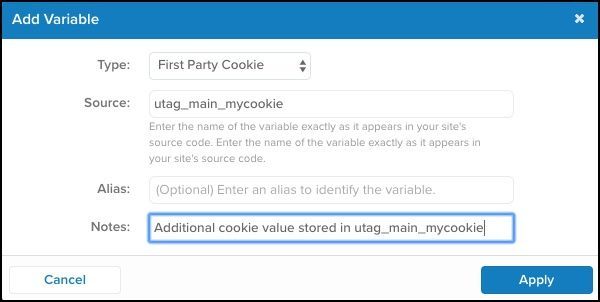
To create a custom cookie using `utag_main`, create a first-party cookie variable with the prefix `utag_main_` (for example, `utag_main_mycookie`). This keeps cookies associated with your Tealium installation separated from the global cookie namespace. This approach helps to avoid name collisions and makes it clear which cookies come from your tag manager.
## JavaScript variables
The JavaScript type references a JavaScript variable on your web page (other than the `utag_data` object). The variable name can only contain letters, numbers, underscores, dollar signs, array brackets, and periods. Use dot notation to reference an object property (`object.propertyName`).
#### Example
The following JavaScript snippet demonstrates how the `myApp.page.name` variable is defined in the page code:
```js
var myApp = { page : { name : "Home Page" } };
```
* Variable name in iQ: `myApp.page.name`
* Referenced in a JavaScript extension: `b["js_page.myApp.page.name"]`
## Meta data elements
The meta data type references the content of a `` tag in the page.
#### Example
The following meta tag demonstrates how the `author` variable is defined in the page code:
```html
```
* Variable name in iQ: `author`
* Referenced in a JavaScript extension: `b["meta.author"]`
## DOM variables
The DOM type references properties from the `window` and `document` objects. These variables are set automatically in the page.
JavaScript page variable: `location.hostname`
Referenced in a JavaScript extension: `b["dom.hostname"]`
For more information, see [standard page data](https://docs.tealium.com/platforms/javascript/built-in-variables/).
## Local and session storage
(New in [`utag.js` 4.49](https://docs.tealium.com/release-notes/?filter=tealium-universal-tag#tealium-universal-tag-2022-09-01))
The local storage and session storage types reference data from the browser's local storage or session storage:
* Local storage is saved across browser sessions. This data does not expire.
* Session storage expires when the page session ends.
For more information about the differences between these storage types and their uses, see [Window.localStorage](https://developer.mozilla.org/en-US/docs/Web/API/Window/localStorage) and [Window.sessionStorage](https://developer.mozilla.org/en-US/docs/Web/API/Window/sessionStorage) from MDN Web Docs.
To set a value in local storage or session storage, use the [Advanced JavaScript Code extension](https://docs.tealium.com/advanced-javascript-code-extension/) with custom JavaScript code similar to the following:
```js
localStorage.setItem("key", value);
sessionStorage.setItem("key", value);
```
You cannot use [Persist Data Value](https://docs.tealium.com/persist-data-value-extension/) or [Set Data Values](https://docs.tealium.com/set-data-values-extension/) extensions to set values in your browser for local or session storage.
Session and local storage can only access data within the same subdomain. For example, data accessed on `www.example.com` cannot be accessed on `store.example.com`. For more information, see [Same Origin Policy](https://developer.mozilla.org/en-US/docs/Web/Security/Same-origin_policy#cross-origin_data_storage_access).
Reference these variables with JavaScript in an extension:
* Local storage: `b["ls.my_local_storage_var"]`
* Session storage: `b["ss.my_session_storage_var"]`
If you added local storage or session storage variables as the UDO type with the `ls.` or `ss.` prefix before March 1, 2023, those variables will not be converted to the new local storage and session storage variable types.
#### Example
Your system stores the variable `last_category_viewed` in local storage:
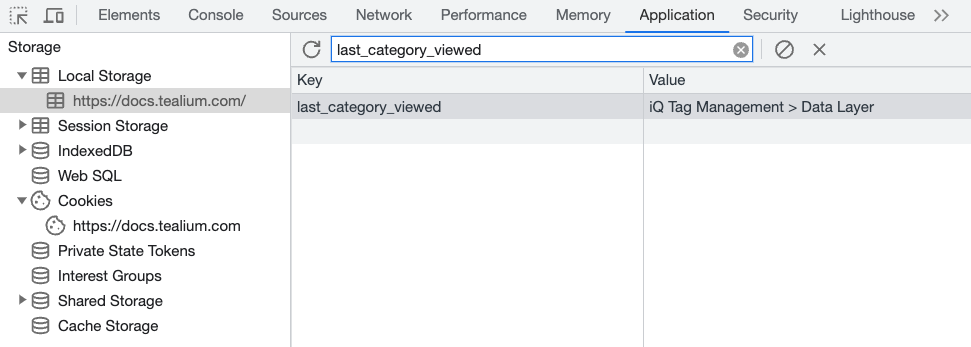
You can access this value from the page as:
```js
localStorage.getItem("last_category_viewed").
```
To add this variable to your configuration, create a data layer variable with **Type** set to **Local Storage Variable** and the **Source** set to `last_category_viewed`:
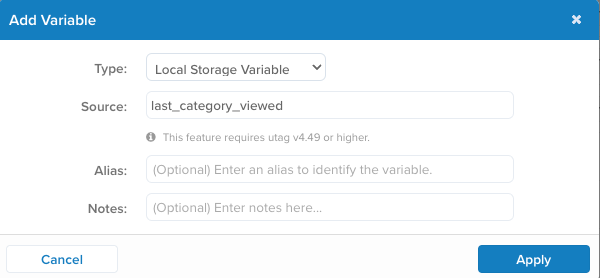
To set a value, use the [Advanced JavaScript Code Extension](https://docs.tealium.com/advanced-javascript-code-extension/) with custom JavaScript code similar to the following:
```js
localStorage.setItem("last_category_viewed", "Apparel")
```
### Versions 4.48 or earlier
In `utag.js` versions 4.48 and earlier, you must manually add a local or session storage variable as **UDO** type with the following name format:
* Local storage: `ls.VARIABLE_NAME`
* Session storage: `ss.VARIABLE_NAME`
To use these storage variables:
1. Go to **Tag Management > Data Layer > +Add Variable**.
1. Select **UDO Variable**.
1. Enter the source variable name.