---
title: Link Tracking Extension
description: The Link Tracking extension provides a general link tracking solution for your web pages.
url: https://docs.tealium.com/iq-tag-management/extensions/extensions-list/link-tracking-extension/
---
## How it works
The Link Tracking extension provides a general link tracking solution for your web pages.
We recommend using the [jQuery onHandler Extension]() for more granular control of your event tracking.
## Using the extension
Before you begin, familiarize yourself with [how extensions work]().
The Link Tracking extension runs in the DOM Ready scope. This cannot be changed.
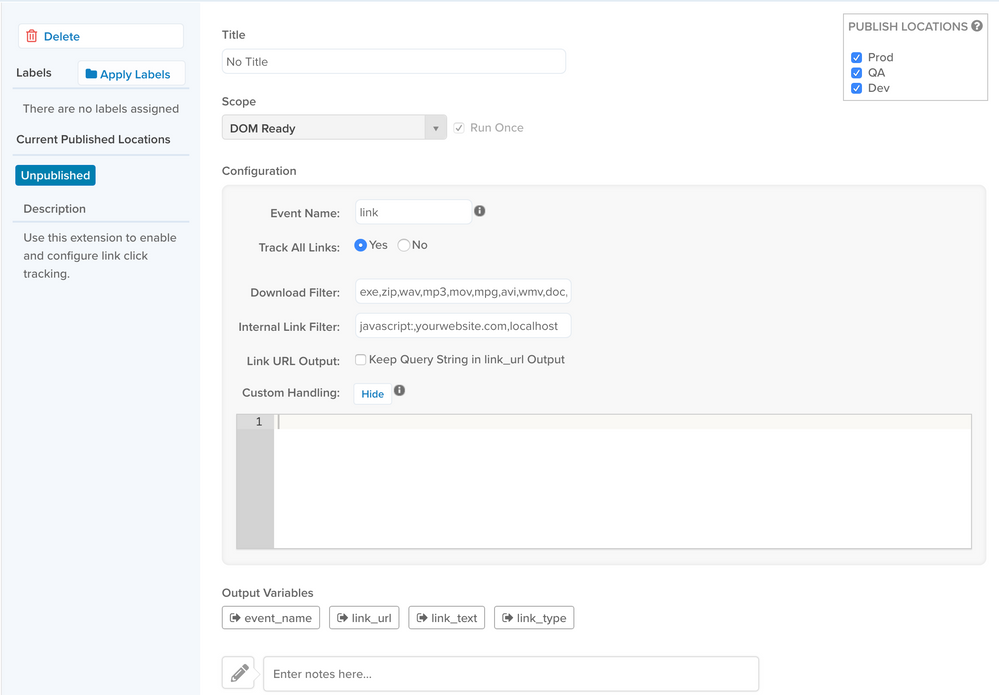
Once the extension is added, the following configuration options are available:
* **Event Name**: Enter a title to describe the type of links you want to track.
* **Track All Links**: Choose your preference for the **Track All Links**. This defaults to **Yes**.
* To track all the links, leave the default selection as is.
* To track specific links based on a condition, select **No**. The **Inclusion Filters** appear below. From the first drop-down, choose either **Link URL** or **Link Text**. From the second drop-down select the evaluating statement. In the text field below, enter the value that corresponds to the link type you selected from the first drop-down.
* **Download Filter**: This field is pre-populated with file formats that are downloaded from the link. Entries may be edited based on your preference. Use commas to separate multiple entries.
* **Internal Link Filter**: (Deprecated) Leave this field blank.
* **Link URL Output**: (Deprecated) Checking the box keeps the query string parameters on the `link_url` parameter.
* **Custom Handling**: Gives you the option to include custom code using the objects, `link` and `obj`, generated by Tealium's code.
## Output variables
* `event_name`: This is the value you specify in the **Event Name** field.
* `link_url`: This is the web address that links to a webpage or file. For example, `www.example.com`.
* `link_text`: This is the text string displayed for the URL. For example **Click here**.
* `link_type`: The download type if the link downloads a file, or link type if the link re-directs to another URL.