---
title: Tealium Events Extension
description: The Tealium Events extension defines standard conditions for the most commonly tracked events.
url: https://docs.tealium.com/iq-tag-management/extensions/extensions-list/tealium-events-extension/
---
This extension adds the `tealium_event` variable to your data layer, where it can help simplify tag mappings, load rules, or other conditions. It can also be passed to Tealium EventStream through the Tealium Collect tag.
## Prerequisites
* utag v4.38 or later
## How it works
This extension introduces standardized event names into your solution, along with a new variable in your data layer called `tealium_event`. It covers the standard e-commerce customer journey and includes familiar events such as **Add to Cart**, **Product Detail Page View**, and **Purchase Complete**. Since these events are typically represented in the data layer using `page_type` and `event_name`, this extension acts as a translation between your current page/event tracking conditions and the new standardized Tealium event names.
Each event may be assigned to a custom condition that matches your data layer implementation. When an event condition evaluates to true, `tealium_event` is set to the pre-defined event value. For example, when the condition for **Add to Cart** evaluates to `true`, `tealium_event` is set to `cart_add`. See the Standard Events section below.
## Using the extension
Before you begin, familiarize yourself with [how extensions work]().
Once the extension is added, you may customize event conditions according to your implementation needs. The list of events are not changeable, but the event conditions are changeable. To customize an event condition:
1. Click an event, and then click **Edit**.
1. Adjust the condition logic as needed.
1. Click **Apply.**
### Removing conditions
To prevent an event from being set, remove the condition and click **Apply**. This changes the event from being `Set` to `Not Set` and is no longer be evaluated in your configuration.
In this example, the condition for the Email Signup event has been removed, resulting in the event to be `Not Set`.


## Standard events
Below is a table of standard events and default conditions in the extension. Events are listed in alphabetical order and are evaluated sequentially. The default conditions match our [standard data layer recommendations](https://docs.tealium.com/retail/), but they are customizable to match your exact implementation.
|Event| `tealium_event`| Default Condition|
|---| ---| ---|
|Add to Cart| `cart_add`| `event_name="cart_add"`|
|Category Page View| `category_view`| `page_type="category"`|
|Checkout| `checkout`| `page_type="checkout"`|
|Email Signup| `email_signup`| `event_name="email_signup"`|
|Empty cart| `cart_empty`| `event_name="cart_empty"`|
|Page View| `page_view`| `page_type="generic"`|
|Product Detail Page View| `product_view`| `page_type="product"`|
|Purchase Complete| `purchase`| `page_type="purchase"`|
|Remove from Cart| `cart_remove`| `event_name="cart_remove"`|
|Search Page View| `search`| `page_type="search" `|
|Shopping Cart View| `cart_view`| `page_type="cart" `|
|Social Share| `social_share`| `event_name="social_share"`|
|User Log in| `user_login`| `event_name="user_login"`|
|User Log out| `user_logout`| `event_name="user_logout"`|
|User Register| `user_register`| `event_name="user_register"`|
The `tealium_event` value is always set for the condition that last evaluated to `true`. If more than one event condition evaluates to `true`, the event lower in the list is set.
## Custom events
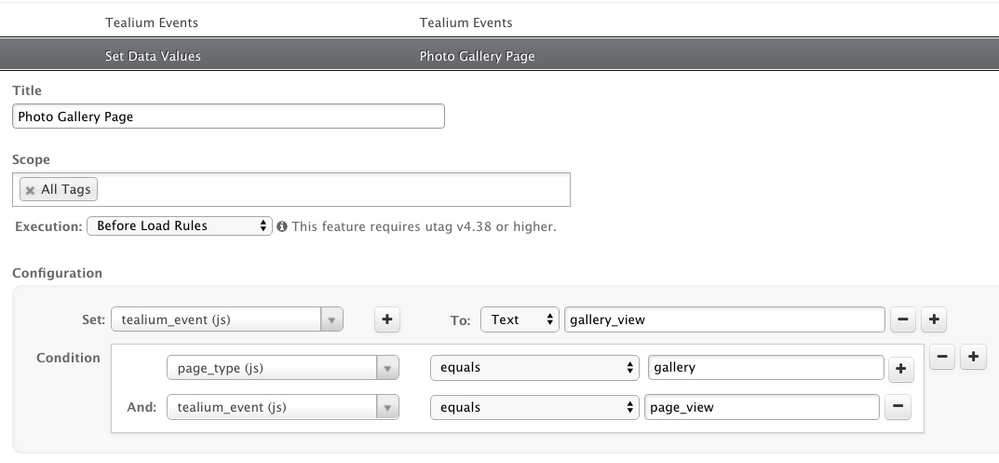
The Tealium Events extension provides a list of predefined events. A custom event uses a value defined by you and assigned to the variable `tealium_event`. Define these custom events directly in your data layer or by using the [Set Data Values extension]().
Position custom events defined in an extension after the Tealium Events extension.
To define a custom event using an extension:
1. Add a Set Data Values extension.
1. Drag the new extension below the existing Tealium Events extension to ensure it runs after it.
1. In the **Set** drop-down list select `tealium_event` .
1. In the text field type the name of your custom event.
1. Add a condition to identify your custom event.
Example of custom event using the Set Data Values extension:
## Examples
The goal of the extension is to standardize the event name value into the `tealium_event` variable used in your configuration. Here are some uses for this variable:
#### Event mappings in tags
Simplify tag configurations that support page and event mappings by using a single variable, `tealium_event`, to configure these events.
#### Load rules
Load rules use `tealium_event` to simplify their conditions.
#### Customer Data Hub
If you have the [Tealium Collect tag](https://docs.tealium.com/tealium-collect-tag/) all the variables in your data layer are passed along to Tealium EventStream, including `tealium_event`. This variable is made available as an [imported event attribute](https://docs.tealium.com/add-enrichment/) to be used in enrichments, rules, and feeds.