---
title: Tealium Custom Container Tag
description: The Tealium Custom Container is a tag that provides a JavaScript template with a code framework for implementing any kind of JavaScript tag.
url: https://docs.tealium.com/iq-tag-management/tags/tealium-custom-container-tag/
---
In most cases where the Custom Container tag might be used, the [Tealium Generic Tag]() is a simpler solution that satisfies most tagging needs. The Custom Container is only needed for advanced tags and will require writing JavaScript code to complete.
## Prerequisites
* [About Tag Templates]()
* [Manage Templates permission](https://docs.tealium.com/about-user-permissions/)
## How it works
The Tealium Custom Container tag uses the same code template as official integrations found in the tag marketplace. Tags built with the Custom Container can leverage native functionality of iQ such as built-in E-Commerce extension variables, data mappings, event tracking, and other extensions.
While it is best practice to use a pre-built tag from the [tag marketplace](), if the tag you want is not available then you have a few options for adding the tag. The majority of tags can be implemented using either the [Tealium Generic Tag]() or the [Tealium Pixel Container tag]().
Implementing the Tealium Custom Container tag requires writing JavaScript code to modify the tag template. You should be comfortable with reading unfamiliar JavaScript code and customizing it for your needs.
## Template overview
First, go to the tag marketplace and add the Custom Container Tag.
The Custom Container does not have configuration fields, but it does support the use of load rules, data mappings, and extensions.
### Data mappings
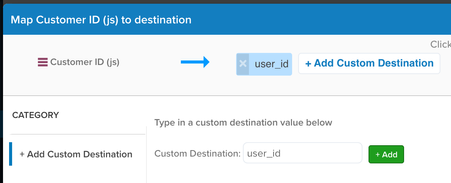
Configure data mappings just as you would for other tags. Data mappings are stored in the tag template variable `u.data`. The Custom Container tag only supports custom data mappings and name you choose in the mapping toolbox is the same you will use in the tag template code to reference the value.
For example, if you map `customer_id` to a custom destination named `user_id` , then in the tag template, wherever you need to use this value, reference it as `u.data['user_id']`.
### Code structure
Most of the work to set up the Custom Container tag will take place in the tag template, the underlying code of the tag. The following steps assume you are familiar with [how to manage tag templates]() and that you have the necessary permissions.
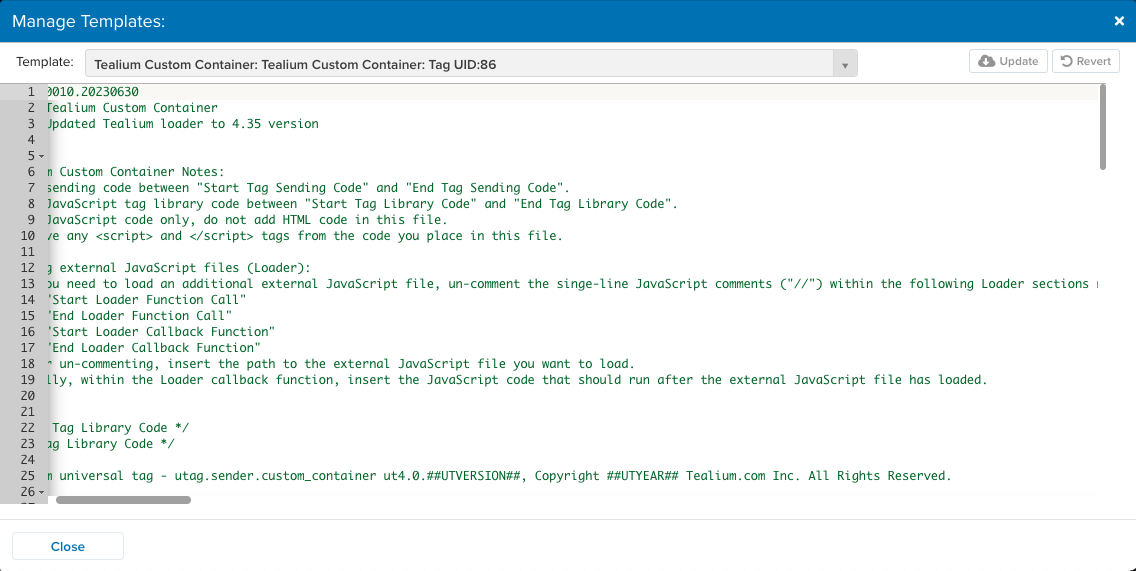
The following table lists the different sections of code, each of which begins with `/* Start */` and `/* End */` comments within the template.
|**Template Code**| **Description**| **Notes**|
|-----------------| ---------------| ---------|
|Tag Library Code| Experienced users may add static library functions, or a third-party URL to instantiate and load library code.| Lines 21-22. This section is empty by default.|
|Tag-Scoped Extensions Code| `##UTGEN##` is a placeholder area where the publish engine later inserts the code for Tealium iQ extensions, scoped to the tag.| Lines 56-59. Do not edit this section.|
|Mapping Code| This section makes a one-to-one mapping between the selected values and items that have been mapped into the template as part of the `u.data` object.| Lines 62-71. The default code works for majority of use cases. Test any changes thoroughly. |
|Tag Sending Code| The vendor's tag requires specific data to be processed or formatted first before the vendor URL is called. | Lines 74-78. Changes typically include URL modifications, changing a datapoint value to meet vendor specifications, formatting data into query string parameters, etc.|
|Loader Callback Function| Some tags may require data be sent after their JavaScript file has been loaded, these data changes should be done within the loader callback to ensure proper timing. If the tag requires any changes or formatting for the data this can also be done in the loader callback function. The same `u.data` values available before a file is loaded will be available in the callback. | Lines 81-93. Uncomment the `// ` comments to enable use of the loader callback function, which lets you load external JavaScript files. Within the loader callback function, insert the JavaScript code to run after the external JavaScript file has loaded. The line `u.initialized=true;` prevents the JavaScript file from being loaded a second time if there is a `utag.view` or `utag.link` call, as most tags requiring an external JavaScript files should not have it loaded again. |
|Loader Callback Tag Sending Code| The JavaScript code that runs after the external JavaScript file has loaded. | Lines 86-90.|
|Loader Function Call| Lets you load several types of files by the tag you are implementing, such as external JavaScript files. Uncomment the `//` lines, as needed. | Lines 96-108. Uncomment line 100 for the loader to call for `iframe` image requests. Uncomment line 101 for the loader to call for `script` to load the path to an external JavaScript file. Uncomment the `if-else` code to load the callback of the `u` object is not initialized and to prevent the requested files from running twice. If your tag does not need a callback, set `"cb":u.loader_cb` to `"cb":null` instead. `c.join(u.data.qsp_delim)` is a query string sample, where `c` is a key-value array, and `base_url` has the '?' pre-appended. |
### Template variables
The following table describes the variables found in the custom container template.
|**Code**| **Description**|
|-----------------| ---------------|
|`tv`| Template version, in the format: `version.YYYYMMDD`. Formatting and content of this comment is important as various systems, such as Tag Status Checker, use them for template control and verification|
|`tc `| Template comments, that describe modifications to the file.|
|`u`| The first thing created is the `u` object, which will contain all of the properties and functions necessary to construct whatever the vendor tag/service requires.|
|`id`| Property of the `u` object that is set to the tag’s UID.|
|`utag.o[] .sender`| Global object that gets an entry (object) with property.|
|`utag.ut`| Modern templates depend on this object, and some old versions of `utag.js` don’t create. This object is referenced, or created if missing.|
|`utag.js`| A match is created from the version of this file as it's executing. The input is in the format similar to `ut4.45.201805212154`, grabbing the substring between the two dots (between `ut4.` and the subsequent `.`).|
|`utag.ut.loader`| A function that is referenced for use by the template. If the loader function is undefined, doesn’t see a legitimate match (as determined above), or the second substring of the match is less than the number specified, the template’s definition of the loader function is used. This function is responsible for making the necessary image, iframe, or script request. The exact resource is configured later in the template when the function is invoked. If, for some reason, the loader function comes in undefined, a definition is provided as a fallback.|
|`utag.ut.typeOf`| A function, with a similar check to `utag.ut.loader`, that provides similar functionality to the `typeOf` operator, but does not return ‘object’ for `null`, and returns a more descriptive value for various data types, both basic and abstract, using the `toString()` function.|
|`u.ev`| This object is created, containing a lookup of which Tealium events ( `view` or `link`) the template will respond to. This check occurs at the beginning of the `u.send` function.|
|`##UTGEN##`| The first publish engine marker, where the publish engine inserts the code for Tealium iQ extensions scoped to the tag.|
|`u.map`| Object containing the look ups for the parameter and events mappings.|
|`u.extend`| Array containing the extension function definitions. Occasionally an extension is added with the purpose of returning false as a way to stop the tag from executing fully.|
|`u.callBack`| The callback made by the script/image/iframe request, and will in turn invoke `u.loader_cb`|
|`u.loader_cb`| Callback function invoked by `u.callBack`.|
|`u.send`| Function that accepts two arguments, `a` and `b`, with various `u.send`-specific parameters defined:
`a` - The type of event string such as `view` or `link`.
`b` - The data layer (copy) passed to the template file.
`c` - The `for` loop counter that executes extensions.
`d` - The `u.map` object key iterator for the `for…in` loop.
`e` - The array that contains the split on `,` of a particular mapping. This allows checking against multiple mappings
`f` - The `for` loop iterator of the `e` array that sets mapped values into the `u.data` object.
`g` - (reserved/do not use)
`h` - The array that contains the split on `:` for event mapping.
|
|`u.data`| Object populated with configurations from Tealium iQ. `##UTVARconfig_##` is the marker for the publish engine to insert those values. The `` corresponds to the ID of the object in the `configFields` array in `utui.config.before-min.js/utui.config.js`|
|`u.data.base_url`| The base URL variable. This is the URL to load the vendor file without dynamic values or the fully dynamic URL.|
|`utag.DB`| Debug statements to indicate execution of the tag.|
### E-Commerce variables
When using values from the [E-Commerce extension]() we strongly recommend that you make a template specific variable with a copy of each value. Modifying the original values, for vendor specific formatting, may have adverse affects on your other tags.
```js
u.data.order_id = u.data.order_id || b._corder || "";
if (u.data.product_id.length === 0 && b._cprod !== undefined) {
u.data.product_id = b._cprod.slice(0);
}
```
### Tealium event variable
Using the `tealium_event` variable can be helpful when different events require different handling. You can create an `if` or `switch` statement to determine which vendor tracking calls to make based on the Tealium tracking call received. `tealium_event` defaults to either "view" or "link" when no other event is set.
## Examples
### Example 1: Load and track purchases
The following code was provided by a vendor, and needs to be incorporated into the tag template. The code is separated into two major parts, commented as Part A and Part B. This code demonstrates a common pattern used in JavaScript tags where an external JavaScript file is loaded (Part A) and then a vendor object variable is set with dynamic values to trigger a tracking call (Part B).
In the tag template code this convention is accomplished using the following two functions:
* `u.loader` - Called once per page load to load the vendor's external JavaScript library.
* `u.loader_cb` - Called upon completion of u.loader and upon subsequent tracking calls on the page.
This example also shows how to use the built-in E-Commerce variables.
#### Original script
```html
// Part A
// Part B
```
#### Set the base URL
In Part A, a JavaScript URL is being loaded with a custom query string parameter named `cid`. The `cid` value needs to be dynamic. To load an external JavaScript file in the Customer Container, set the `base_url` value within the `u.data` object on line 51. This value is used later in the code by the `u.loader` function.
```js
47 u.data = {
48 /* Initialize default tag parameter values here */
49 /* Examples: */
50 /* "account_id" : "1234567" */
51 "base_url" : "https://services.xg4ken.com/js/kenshoo.js?",
52 "cid" : ""
53 /* A value mapped to "account_id" or "base_url" in TiQ will replace these default values. */
54 };
```
#### Loader callback function
Once the external file is loaded using `u.loader`, we want the callback function to run. Update the section **Loader Callback Function** by uncommenting lines 84-85 and 91. This callback function, `u.loader_cb`, is called after the external file is loaded.
The following snippet shows the completed section in the tag template:
```js
81 /* Start Loader Callback Function */
82 /* Un-comment the single line JavaScript comments ("//") to use the Loader callback function. */
83
84 u.loader_cb = function () {
85 u.initialized = true;
86 /* Start Loader Callback Tag Sending Code */
87
88 // Insert your post-Loader tag sending code here.
89
90 /* End Loader Callback Tag Sending Code */
91 };
92 /* End Loader Callback Function */
```
#### Loader function call
The following snippet shows the completed section in the tag template. Uncomment line 101 as shown in this example:
```js
96 /* Start Loader Function Call */
97 /* Un-comment the single-line JavaScript comments ("//") to use Loader. */
98
99 if (!u.initialized) {
100 //u.loader({"type" : "iframe", "src" : u.data.base_url + c.join(u.data.qsp_delim), "cb" : u.loader_cb, "loc" : "body", "id" : 'utag_##UTID##' });
101 u.loader({"type" : "script", "src" : u.data.base_url, "cb" : u.loader_cb, "loc" : "script", "id" : 'utag_##UTID##' });
102 } else {
103 u.loader_cb();
104 }
105
106 //u.loader({"type" : "img", "src" : u.data.base_url + c.join(u.data.qsp_delim) });
107
108 /* End Loader Function Call */
```
#### Tag sending code
This code runs when the Custom Container tag loads. It's where you initialize the data needed to run the tag. In this case, we append the dynamic `cid` parameter to the base URL (this requires a mapping to `cid` or to have put a default value in the `u.data` variable to load the correct file) and we copy the e-commerce data we need from the built-in variables.
Update the Tag Sending code, below line 76, to the following:
```js
74 /* Start Tag Sending Code */
75
76 // Insert your tag sending code here.
77 u.data.base_url = u.data.base_url + "cid=" + u.data.cid;
78 u.data.orderId = u.data.orderId || b._corder || "";
79 u.data.revenue = u.data.revenue || b._csubtotal || "";
80 u.data.currency = u.data.currency || b._ccurrency || "";
81 u.data.promoCode = u.data.promoCode || b._cpromo || "";
82 /* End Tag Sending Code */
```
Next, we have to determine when to track conversions (`kenshoo.trackConversion`).
* One option is to use `tealium_event` and key off of specific event names.
* Another option is to use your own variable with a value which states a conversion or a specific kind of conversion is occurring. This gives you flexibility in what data points are sent with each event.
You may use use a check for a conversion code value which is a unique required parameter for the conversion event. This method lets you check for only one matching value but may limit the way you send optional parameters.
In this example, we are using the option to check for the conversion code variable. We'll map this value to `conversionCode` in the UI but not put it into the `u.data` object manually within the template, like we did with `base_url` and `cid`. This method ensures that when we check for `conversionCode` existing it will only do so because a value of some kind exists.
Update the tag template as follows:
```js
84 u.loader_cb = function () {
85 u.initialized = true;
86 /* Start Loader Callback Tag Sending Code */
87
88 // Insert your post-Loader tag sending code here.
90 if(u.data.conversionCode){
91 kenshoo.trackConversion(u.data.conversionCode,u.data.cid, {
92 conversionType: 'lead',
93 revenue: 0.0,
94 currency:'USD',
95 orderId:'',
96 promoCode:'',
97 customParam1:''
98 customParam2:'',
99 customParamN:'' })
100 }
101 /* End Loader Callback Tag Sending Code */
102 };
```
There are a few options for putting the optional data into the object that is sent in the call since any items not used should be removed:
* **Hard Coded Parameters**
Leave the object directly in the call with only those parameters that you will always use, the values reference to their `u.data` variables (names will come from your UI mappings). If you are only ever sending the same parameters this option is easy to use but if you need various parameters sent per event this will be difficult without having set up each event type individually.
* **Conditional Parameters**
Create an object variable for custom parameters and use `if` statements to conditionally set each parameter. If you have more than a few custom parameters this may become a rather exhaustive list.
* **Loop and Exclude Parameters**
Create an object variable for custom parameters and loop through the `u.data` object, setting each variable as a custom parameter but excluding variables known not to be custom parameters. This could have unexpected results if any additional data points are within `u.data` which you may not want to send, but have not prevented being added.
In this example, we'll use the loop and exclude method. For each variable in `u.data`, set a corresponding variable in the custom parameter object `optionalParams`. Exclude known parameters `base_url`, `cid`, and `conversionCode` .
```js
84 u.loader_cb = function () {
85 u.initialized = true;
86 /* Start Loader Callback Tag Sending Code */
87
88 // Insert your post-Loader tag sending code here.
89 var key, optionalParams = {};
90
91 if(u.data.conversionCode){
92 for (key in u.data) {
93 if (key !== "base_url" && key !== "cid" && key !== "conversionCode") {
94 optionalParams[key] = u.data[key];
95 }
96 }
97 kenshoo.trackConversion(u.data.conversionCode, u.data.cid, optionalParams)
98 }
99 /* End Loader Callback Tag Sending Code */
100 }
```
At this point, the JavaScript file loads and a triggers `trackConversion` if the `conversionCode` condition is met. Check that all values came through as expected in the query string and make adjustments to your individual code as necessary.
### Example 2: Initialize, load, and track
#### Code Snippet
The following code was provided by a vendor and needs to be incorporated into the tag template. This code snippet is separated into four parts, commented as Part A, Part B, Part C, and Part D.
This code demonstrates the following common pattern in JavaScript tags:
1. Part A: Initialized vendor object variable first.
1. Part B: Load an external JavaScript file.
1. Part C: Trigger a tracking call with dynamic values.
1. Part D: Provide an iframe variant of the tag for pages that don't run JavaScript.
```html
/* PART A */
/* PART B */
/* PART C */
/* PART D */
```
#### Part A: Tag sending code
This code is used in the "Tag Sending Code" section. The vendor's tag requires specific data to be processed or formatted first before the vendor URL is called.
Update the tag template as follows:
1. Delete the comment that says `// Insert your tag sending code here.` on line number 76
1. Copy the code between the `