---
title: Webhook - Kony API
description: Kony APIのための高度なWebhook - テンプレート変数を使用したカスタムリクエストアクションの構成方法
url: https://docs.tealium.com/ja/server-side/connectors/webhook-connectors/vendor-examples/webhook-kony-api/
---
## 概要

購読者IDのリストと名前と値のペアを持つhttpリクエストをKonyに送信します。リクエストボディ全体はJSONメッセージです。

## ベンダーの要件

### サンプルのJSONメッセージ:

```json
{
    "messageRequest": {
        "appId": "IceMobile",
        "global": {},
        "messages": {
            "message": {
                "content": {
                    "priorityService": "false",
                    "data": "Message Body",
                    "mimeType": "text/plain"
                },
                "overrideMessageId": 0,
                "startTimestamp": 0,
                "expiryTimestamp": 0,
                "subscribers": {
                    "subscriber": [
                        {
                            "ksid": "95784"
                        },
                        {
                            "ksid": "97899"
                        }
                    ]
                },
                "platformSpecificProps": {
                    "iphone": {
                        "badge": 0,
                        "customData": {
                            "key": [
                                {
                                    "name": "trip_type",
                                    "content": "o"
                                },
                                {
                                    "name": "o",
                                    "content": "LAX"
                                },
                                {
                                    "name": "d",
                                    "content": "NRT"
                                },
                                {
                                    "name": "dd",
                                    "content": "2016-01-09"
                                },
                                {
                                    "name": "rd",
                                    "content": "2016-01-20"
                                }
                            ]
                        }
                    }
                },
                "type": "PUSH"
            }
        }
    }
}

```

#### ノート

* 購読者の配列は動的で、1つ以上の購読者IDを含むことができます。
* "customData"キーの配列は動的で、1つ以上の名前とコンテンツのオブジェクトを含むことができます。

## アクションの実装

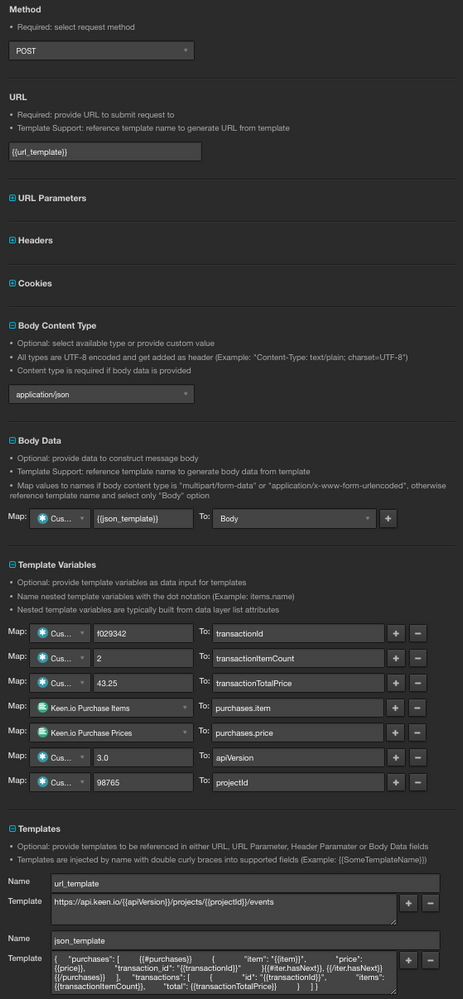
### メソッドフィールド

`POST`に構成します。

### URLフィールド

PutsReqバケットURLに構成します。


<blockquote>
一般的な実装をここで示すために、PutsReq URLが適しています。Kony APIのドキュメンテーションを参照してURLを確認してください。
</blockquote>


### ボディコンテンツタイプ

`application/json`オプションを選択します。

### ボディデータ

`Body`オプションを選択し、テンプレート参照を提供します。

|名前| 値|
|---| ---|
|`Body`| `{{json_template}}`|

### テンプレート変数

テンプレートで参照され、置換される名前と値のペアを構成します。

|名前| 値| ノート|
|---| ---| ---|
|`subscribers.ksid`| Kony Sub IDs| 文字列のセット属性|
|`customData.name`| Kony Data Names| 文字列のセット属性|
|`customData.content`| Kony Data Contents| 文字列のセット属性|


<blockquote>
変数は内部的にJSONに変換され、すべてのテンプレートで利用可能になります。
</blockquote>


#### 結果のJSON構造:

```json
{
    "subscribers": [
        {
            "ksid": "sub-id-1"
        },
        {
            "ksid": "sub-id-2"
        }
    ],
    "customData": [
        {
            "name": "name-1",
            "content": "Content A"
        },
        {
            "name": "name-2",
            "content": "Content B"
        },
        {
            "name": "name-3",
            "content": "Content C"
        }
    ]
}

```

### テンプレート

`json_template`  

```json
{
    "messageRequest": {
        "appId": "IceMobile",
        "global": {},
        "messages": {
            "message": {
                "content": {
                    "priorityService": "false",
                    "data": "Message Body",
                    "mimeType": "text/plain"
                },
                "overrideMessageId": 0,
                "startTimestamp": 0,
                "expiryTimestamp": 0,
                "subscribers": {
                    "subscriber": [
                        {{#subscribers}}
                        {
                            "ksid": "{{ksid}}"
                        }{{#iter.hasNext}}, {{/iter.hasNext}}
                        {{/subscribers}}
                    ]
                },
                "platformSpecificProps": {
                    "iphone": {
                        "badge": 0,
                        "customData": {
                            "key": [
                                {{#customData}}
                                {
                                    "name": "{{name}}",
                                    "content": "{{content}}"
                                }{{#iter.hasNext}}, {{/iter.hasNext}}
                                {{/customData}}
                            ]
                        }
                    }
                },
                "type": "PUSH"
            }
        }
    }
}
```

### レンダリングされたテンプレート

内部的にテンプレートがレンダリングされ、参照された場所にその内容が注入されます。

`json_template`  

```json
{
    "messageRequest": {
        "appId": "IceMobile",
        "global": {},
        "messages": {
            "message": {
                "content": {
                    "priorityService": "false",
                    "data": "Message Body",
                    "mimeType": "text/plain"
                },
                "overrideMessageId": 0,
                "startTimestamp": 0,
                "expiryTimestamp": 0,
                "subscribers": {
                    "subscriber": [
                        {
                            "ksid": "sub-id-1"
                        },
                        {
                            "ksid": "sub-id-2"
                        }
                    ]
                },
                "platformSpecificProps": {
                    "iphone": {
                        "badge": 0,
                        "customData": {
                            "key": [
                                {
                                    "name": "name-1",
                                    "content": "Content A"
                                },
                                {
                                    "name": "name-2",
                                    "content": "Content B"
                                },
                                {
                                    "name": "name-3",
                                    "content": "Content C"
                                }
                            ]
                        }
                    }
                },
                "type": "PUSH"
            }
        }
    }
}
```

## アクション構成のスクリーンショット
![](https://docs.tealium.com/images/server-side/example)
