---
title: Attribution Module
description: Adds the user-resettable advertising identifier (IDFA) to each tracking call and, optionally, implements the Apple Search Ads API to gather attribution information.
url: https://docs.tealium.com/platforms/ios-swift/module-list/attribution/
---
## Usage
The Attribution module adds the user-resettable advertising identifier (IDFA) to each tracking call and, optionally, implements the Apple Search Ads API to gather attribution information. Learn more about [setting up Apple Search Ads attribution](https://developer.apple.com/documentation/iad/setting_up_apple_search_ads_attribution).
In version 2.1.1 and later, the attribution module also includes `SKAdNetwork` support and adds the `ATTransparency.AuthorizationStatus` to the dispatch payload.
Use of this module is optional. Take the time to read about its functionality and decide if you need it, as it introduces additional dependencies. You are required to explain to Apple why you are using IDFA when you submit your app. If you do not state that you are using IDFA, Apple rejects your app. Learn more about [IDFA usage and rejections](https://developer.apple.com/app-store/review/rejections/).
The following platforms are supported:
* iOS
## Requirements
* UIKit
* AdSupport
* iOS 14 or later: AppTrackingTransparency
* iOS 14 or later: StoreKit
## Install
Install the Attribution module with Swift Package Manager, CocoaPods or Carthage.
### Swift Package Manager (Recommended)
Supported in version 1.9.0 and later, the Swift Package Manager is the recommended and simplest way to install the Tealium Swift library:
1. In your Xcode project, select **File > Add Package Dependencies**.
1. Enter the repository URL: `https://github.com/tealium/tealium-swift`
1. Configure the version rules. Typically, `"Up to next major"` is recommended. If the current Tealium Swift library version does not appears in the list, then reset your Swift package cache.
1. Select the `Attribution` module from the list of modules to install and add it each of your app targets in your Xcode project, under **Frameworks and Libraries**.
Learn more about the [Swift Package Manager installation for iOS](https://docs.tealium.com/platforms/ios-swift/install/#swift-package-manager-recommended).
### CocoaPods
To install the Attribution module with CocoaPods, add the following pod to your Podfile:
```perl
pod 'tealium-swift/Attribution'
```
Learn more about the [CocoaPods installation for iOS](https://docs.tealium.com/platforms/ios-swift/install/#cocoapods).
### Carthage
To install the Attribution module with Carthage, following these steps:
1. Go to the app target's General configuration page in Xcode.
1. Add the following framework to the **Embedded Binaries** section:
```perl
TealiumAttribution.framework
```
Learn more about the [Carthage installation for iOS](https://docs.tealium.com/platforms/ios-swift/install/#carthage).
## Initialize
To initialize the module include it in the [`collectors`](https://docs.tealium.com/platforms/ios-swift/api/tealium-config/#collectors) property.
```swift
config.collectors = [Collectors.Attribution]
```
Review the [Collectors](https://docs.tealium.com/platforms/ios-swift/modules/#collectors) documentation to understand how to correctly specify the collectors you require.
## Attribution in iOS 14+
In iOS 14 and later, apps are required to receive user permission to access the device's advertising identifier (IDFA). The user is prompted to grant "Permission to track" when the app launches for the first time. If the user declines, then the IDFA is not available to the app.
When the IDFA is not available, `SKAdNetwork` provides a method for registered advertising networks to attribute app installs to a campaign by receiving a signed signal directly from Apple. The advertising network only receives confirmation that the app was successfully installed, along with the campaign ID and optional conversion value.
Learn more about the `AppTrackingTransparency` and `SKAdNetwork` frameworks in [Consent and the Apple IDFA (Identifier for Advertisers)](https://docs.tealium.com/platforms/getting-started-mobile/idfa/).
### AppTrackingTransparency (ATT)
With the attribution module enabled, the user's tracking authorization status is automatically added to the dispatch payload as `device_tracking_authorization` and the value is a string representation of the [`ATTrackingManager.AuthorizationStatus`](https://developer.apple.com/documentation/apptrackingtransparency/attrackingmanager/authorizationstatus) enumeration.
If applicable, call `ATTrackingManager.requestTrackingAuthorization` separately. Learn more about [requesting tracking authorization to enable the Tealium SDK](https://docs.tealium.com/platforms/getting-started-mobile/idfa/).
### SKAdNetwork
Tealium automatically calls `SKAdNetwork.registerAppForAdNetworkAttribution()` on launch if `config.skAdAttributionEnabled` is set to `true`. This permits advertising networks to anonymously validate app installs. If the `config.skAdConversionKeys` dictionary is defined, then `SKAdNetwork.updateConversionValue()` is automatically called on the specified event and sent the value of the specified conversion key.
```swift
config.skAdConversionKeys = ["EVENT_NAME": "DATA_LAYER_VARIABLE"]
```
The conversion value must be an `Int` with a value between `0` and `63`. If the conversion value is a decimal, it must be converted to an integer before calling the conversion event.
For example:
```swift
config.skAdConversionKeys = ["purchase": "conversion_value"]
...
tealium?.track("purchase", dataLayer: ["order_subtotal": 456.87, "conversion_value": conversionValue])
```
Learn more about the [`SKAdNetwork` framework](https://docs.tealium.com/platforms/getting-started-mobile/idfa/).
#### Process
The following diagram shows the path of an ad's install validation. App A is the source app that displays an ad, and App B is the advertised app that the user installs.
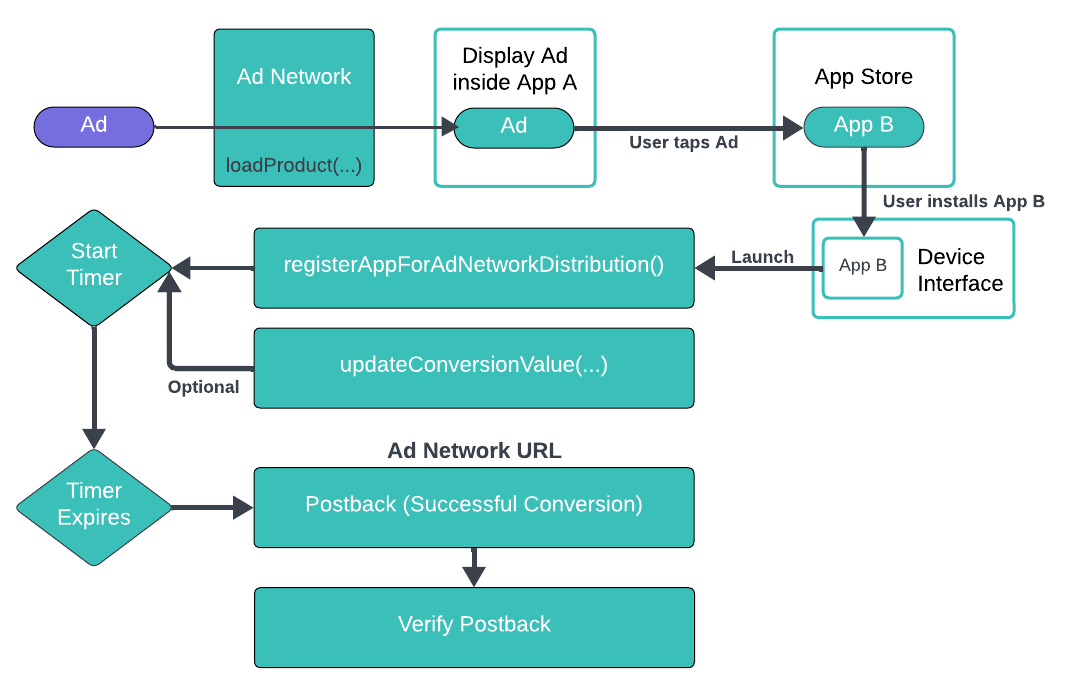
When a user clicks an ad within an app or mobile web browser, the App Store is launched and the user is taken to the product screen for the ad campaign. In iOS 14.5 and later, advertisers have the option to choose to display a custom view-through ad or a StoreKit-rendered ad. If the user installs the advertised app, the device stores a pending install validation. If the user opens the app within an attribution time window, the device sends the install validation postback to the ad network.
The notification is signed by Apple and includes the campaign ID, but excludes user or device-specific data. The postback may include a conversion value and the source app’s ID if Apple determines that providing the values meets Apple’s privacy threshold.
Learn more about [advertisement-driven app installations](https://developer.apple.com/documentation/storekit/skadnetwork).
#### Tealium's Role
There are three main parties involved in Apple's `SKAdNetwork` solution:
* Ad networks
* Source app
* Advertised apps
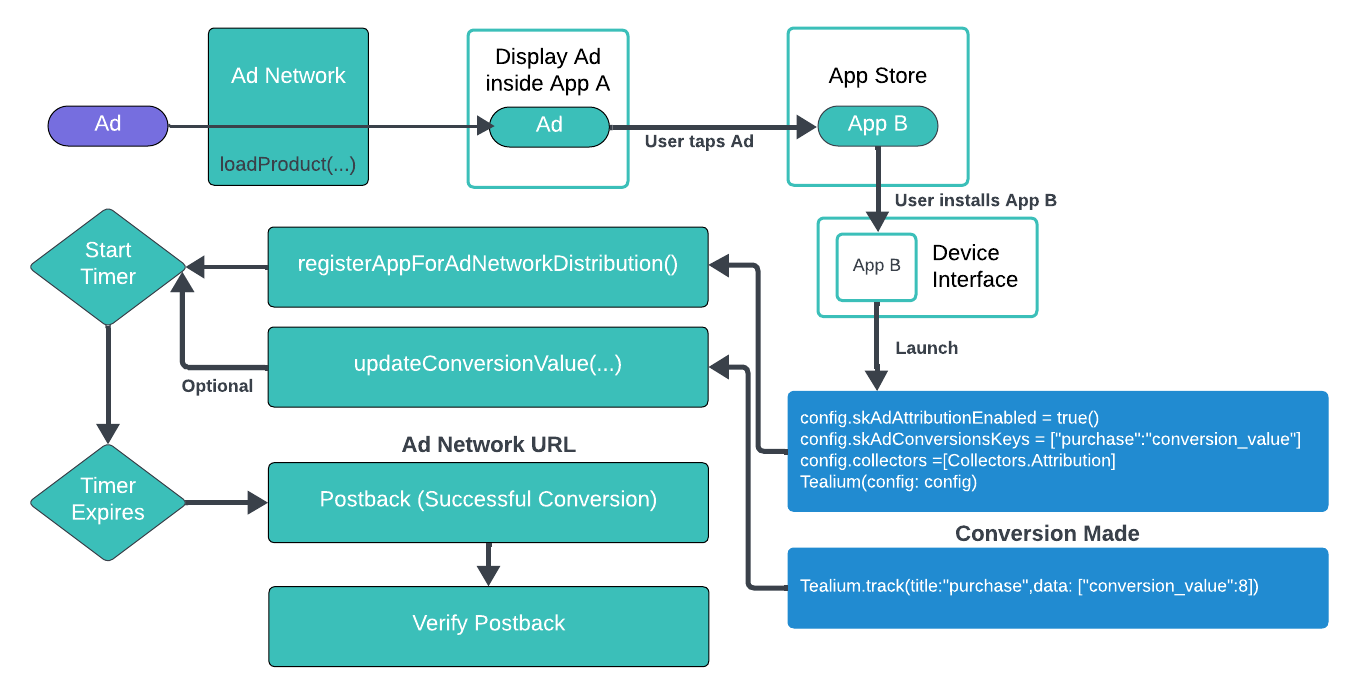
Tealium wraps calls to `SKAdNetwork`. If the `TealiumAttribution` module and the configuration flag are enabled, then `SKAdNetwork.registerAppForAdNetworkAttribution()` is called on app launch.
Additionally, if you have defined the [`skAdConversionKeys`](https://docs.tealium.com/platforms/ios-swift/api/tealium-config/#skadconversionkeys), then the `SKAdNetwork.updateConversionValue(_:)` method is called and passed in the specified conversion value. Tealium permits you to manage your calls to `SKAdNetwork` through the tracking you already have in place.
You may need to request tracking authorization from your users and add the appropriate keys to your `.plist` file.
The following diagram shows shows how Tealium works with `SKAdNetwork`:
#### Validation
Learn about [validating the calls to `SKAdNetwork`](https://developer.apple.com/documentation/storekit/skadnetwork/verifying_an_install_validation_postback).
## Search Ads API
To use Apple Search Ads API, enable the [`searchAdsEnabled`](https://docs.tealium.com/platforms/ios-swift/api/tealium-config/#searchadsenabled) property of the [`TealiumConfig`](https://docs.tealium.com/platforms/ios-swift/api/tealium-config/#tealiumconfig) object. Then we use the [`AAAttribution`](https://developer.apple.com/documentation/adservices/aaattribution) class to retrieve a token used to fetch the attribution object. The Tealium library does this as soon as the app launches, but it is possible that the information is not retrieved in a timely manner. The information is added to the data layer after receiving it from Apple, typically during the launch event.
In some cases there may be several events after launch. These variables are only retrieved from Apple's servers once during the app's lifetime, and are stored as persistent variables so that they become available on future app launches.
### From iAd framework to AdServices framework
In iOS 14.3 and later, Apple deprecated the `iAd` framework in favor of the new `AdServices`.
* The [`iAd`](https://developer.apple.com/documentation/iad) framework returned the same type of attribution data, but more in detail, only to users who consented through ATT.
* The new [`AdServices`](https://developer.apple.com/documentation/adservices) framework is less detailed, but offers the attribution data for all of the users.
In version 2.9.0 of the TealiumSwift SDK, we included a new version of the attribution module that uses the new `AdServices` for iOS 14.3 and later.
On February 7, 2023, Apple officially shut down the old `iAd` framework and announced it will soon be removed from iOS, advising developers to remove the dependency from all of the apps and SDKs.
In version 2.11.0 of the TealiumSwift SDK, we removed the `iAd` framework entirely because it was no longer supported by Apple. Moving forward, we will only use the new `AdServices` framework.
To avoid any discontinuity for our customers, all of the data that is included in the `AdServices` is mapped to the same data layer variables of the old `iAd` framework.
Some of the `iAd` attribution keys are not returned anymore by Apple, so we are deprecating them. You can still receive that data in case users received them before the `iAd` framework was finally shut down, but not for new installations.
### Action Required
The only required action for our customers is to update to version 2.11.0 or later of the TealiumSwift SDK. This action removes the `iAd` framework from their app and ensures that, for new installations, they are using only non-deprecated attribution keys from our data layer, as described below, as the deprecated keys will be empty.
## Data Layer
The following variables are transmitted with each tracking call while the module is enabled:
Variables prefixed with `ad_` are only set if [Search Ads](#search-ads-api) has been enabled.
| Variable Name | Description | Example |
| --- | --- | --- |
| `ad_campaign_id` | The corresponding ad's campaign ID. | `1234567890` |
| `ad_campaign_name` (deprecated) | The corresponding ad's campaign name. | `CampaignName` |
| `ad_creativeset_id` (deprecated) | The ID of the creative set which the corresponding advertisement was part of. | `456093` |
| `ad_creativeset_name` (deprecated) | The name of the creative set which the corresponding advertisement was part of.| `Beast Images` |
| `ad_group_id` | The corresponding ad's campaign group ID .| `1234567890` |
| `ad_group_name` (deprecated) | The corresponding ad's campaign group name.| `AdGroupName` |
| `ad_keyword` | The keyword from `iAd` or the keywordId from `AdServices`. | `1234567890` |
| `ad_keyword_matchtype` (deprecated) | This may either be Broad, Exact or Search Match. | `Exact` |
| `ad_id` | The identifier representing the assignment relationship between an ad object and an ad group (only for iOS 15.2 and later). | `AdID` |
| `ad_org_id` | The corresponding ad's campaign organization ID.| `OrgID` |
| `ad_org_name` (deprecated) | The corresponding ad's campaign organization name. | `OrgName` |
| `ad_purchase_date` (deprecated) | Date and time the user first downloaded your app. In the case where `iadconversion-type = "Redownload"`, this represents the original purchase date. This parameter may or may not have been associated with an Apple Search Ad.| `2016-12-05T17:31:40Z` |
| `ad_region` | Identifies the country or region associated with the campaign which drove this install. | `US` |
| `ad_user_clicked_last_30_days` | Boolean indicating if user clicked on a Search Ads impression within 30 days prior to app download. | `true` |
| `ad_user_conversion_type` | Identifies new download or re-download of the app.| `Download` |
| `ad_user_date_clicked` | Date and time the user clicked on a corresponding ad.| `2016-12-05T17:31:40Z` |
| `ad_user_date_converted` (deprecated) | Date and time the user downloaded the app.| `2016-12-05T17:31:40Z` |
| `device_tracking_authorization` | iOS 14 and later only. [`ATTrackingManager.AuthorizationStatus`](https://developer.apple.com/documentation/apptrackingtransparency/attrackingmanager/authorizationstatus) | [`notDetermined`, `restricted`, `denied`, `authorized`] |
| `device_advertising_enabled` | Boolean indicating if the user allowed advertisement tracking (if `false`, the advertising ID appears as a string of zeroes).| `true` |
| `device_advertising_id` | User-resettable advertising identifier (IDFA).| `6D92078A-8246...` |
| `device_advertising_vendor_id` | Unique ID guaranteed to be the same across all apps on the same device from a single vendor (apps with the same first two parts of the RDNS bundle identifier. For example, `com.tealium` or `com.acme`.) | `6D92078A-8246...` |