---
title: Data layer object (b)
description: Learn to use the variable alias to the data layer object.
url: https://docs.tealium.com/platforms/javascript/data-layer-object/
---
## How it works
The `b` variable is the JavaScript object in `utag.js` that represents the data layer. It holds the data layer object that is processed during a page load or tracking call.
In Tealium iQ, data layer variables are typically referenced using drop-down lists, but they can also be referenced in JavaScript code using the `b` variable.
For example, a common use of the **Set Data Values** extension is to set a default value to a variable if it's not already set. The extension might look like this:

In `utag.js`, this extension is represented in JavaScript code like this:
```js
function(a, b) {
try {
if (typeof b['page_type'] == 'undefined') {
b['page_type'] = "generic"
} catch (e) {
utag.DB(e);
}
}
}
```
The `b` variable is a local reference to the data layer object and `b['page_type']` is a reference to the UDO variable `page_type`. Similarly, when you use custom JavaScript in an extension, you can reference any variable in the data layer object by using `b`.
For `utag.js` version 4.39 or older, the content of the `b` object during tracking calls is a complete copy of `utag.data`. Learn more about this update in [release 4.40](https://docs.tealium.com/release-notes/?filter=tealium-universal-tag#tealium-universal-tag-2016-04-01).
### Where to use it
The `b` object is a locally scoped variable within specific sections of `utag.js` and is available in the following extension scopes:
* **Before Load Rules**
* **After Load Rules**
* **Tag Scope**
* **After Tags**
The `b` object cannot be referenced in the following scopes:
* **Pre Loader**
Extensions scoped to **Pre Loader** cannot reference the `b` object because they run before the `b` object is created.
* **DOM Ready**
Extensions scoped to **DOM Ready** cannot reference the `b` object because they run outside of the main scope.
### Scenario: Page load
On a standard page load, the `b` object is a collection of all the data on the page, including the [universal data object](https://docs.tealium.com/universal-data-object/).
For example, in the following example, you could reference `b['page_type']` in an extension:
```html
```
### Scenario: Tracking call
In a tracking call, the `b` object is a collection of all the data on the page (except the universal data object), as well as the data passed to the tracking call.
For example, in these tracking calls, you could reference `b['tealium_event']` in an extension:
```js
var tmp = { tealium_event: "link_click" };
utag.link(tmp)
utag.view({ tealium_event: "cart_add" })
```
In this example, it's worth noting that `b['page_type']` would not be defined (even if it's defined in `utag_data`) because it is not part of the data object passed in the tracking call.
To reference other types data layer variables from the page, see [Usage](#usage).
To include variables from `utag_data` in tracking calls use the [base variables setting in the publish settings](https://docs.tealium.com/publish-configuration/).
### Tag scoped extensions
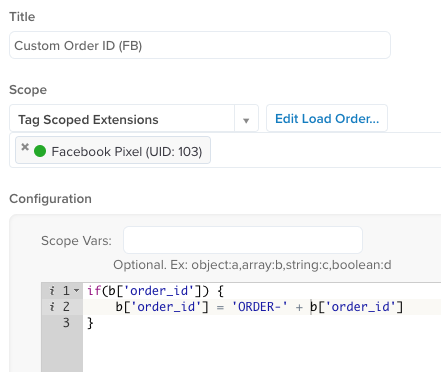
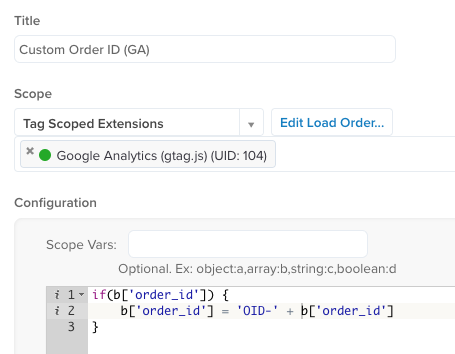
In extensions scoped to specific tags, the `b` object is a local copy of the data layer object. This means that the `b` object values can be modified without affecting other tags.
In these the examples, the data layer variable `order_id` is customized for each tag using a JavaScript Code extension. In each extension the `b` starts with the same value of `order_id`:
## Usage
To reference a `b` object variable in a tag template or extension, you must use the correct syntax for each variable type.
The syntax for each variable type is:
| Variable type | Syntax |
| --------------------- | ------ |
| Universal data object | `b['VAR_NAME']` |
| JavaScript page | `b['js_page.VAR_NAME']` |
| Query string | `b['qp.VAR_NAME']` |
| Standard cookie | `b['cp.VAR_NAME']` |
| DOM element | `b['dom.VAR_NAME']` |
| Meta data | `b['meta.VAR_NAME']` |
| Local storage | `b['ls.VAR_NAME']` |
| Session storage | `b['ss.VAR_NAME']` |
For more information, see [data layer variable types](https://docs.tealium.com/data-layer-variables/).