Learn about the Tealium Prism mobile SDK.
Overview
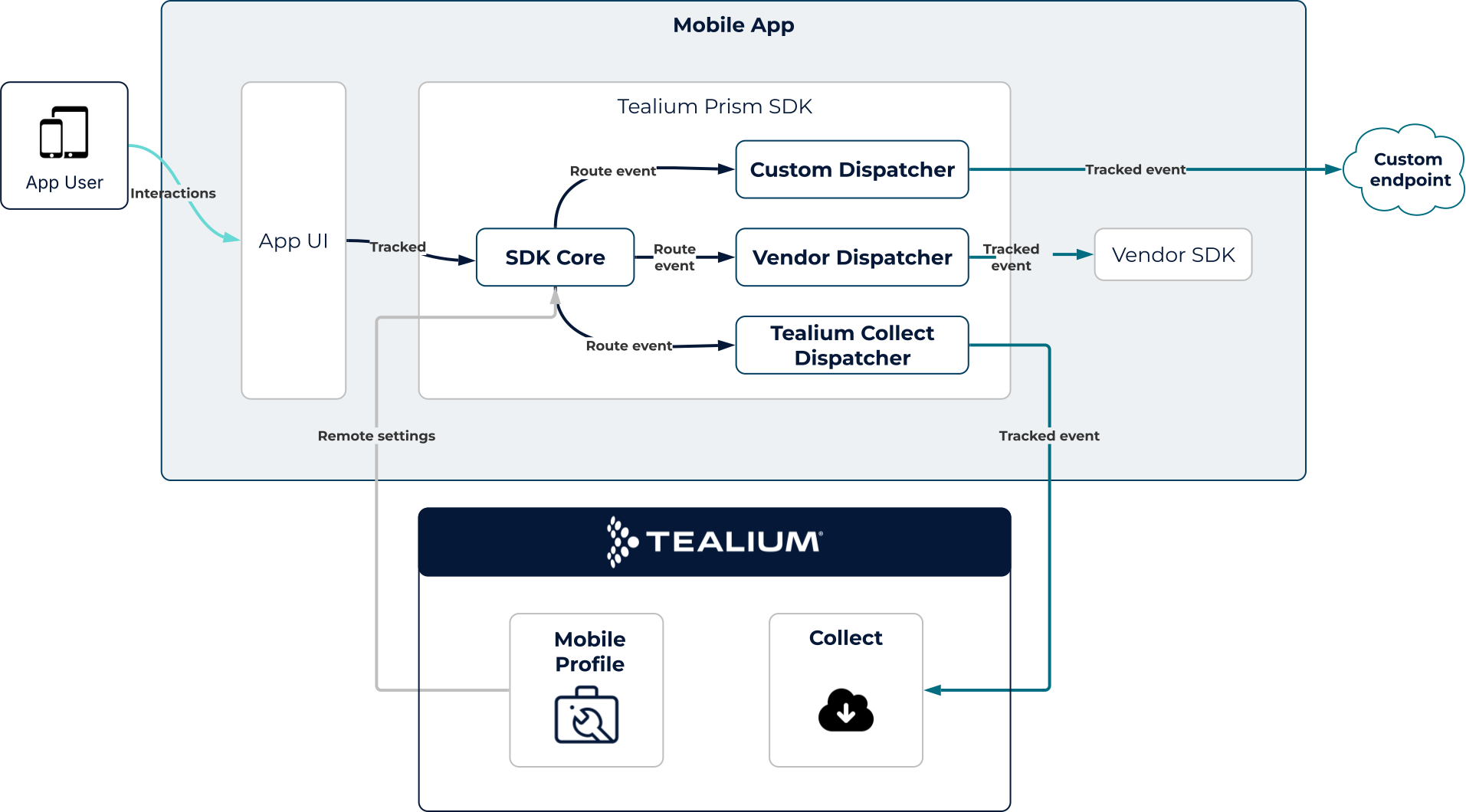
Tealium Prism is the mobile SDK for iOS (Swift), Android (Kotlin), and React Native. You instrument a single event API in your app and Prism routes those events to Tealium Collect and supported third-party SDKs. Most configuration occurs in a Tealium mobile profile, so you can update modules, rules, and transformations without a new app release.
Benefits
- Unified event API: A consistent event API for Swift and Kotlin with near-identical concepts and naming, and a TypeScript API for React Native.
- Multi-dispatcher pipeline: Send the same event to Tealium Collect and on-device vendor SDKs in parallel.
- Rules engine and barriers: Control event delivery based on connectivity, batching, or other conditions.
- On-device transformations: Modify, enrich, or filter event payloads before they leave the device, with the ability to update logic without an App Store/Play Store release.
- Remote configuration: Manage modules, rules, barriers, and transformations from a Tealium mobile profile without an app release.
How it works
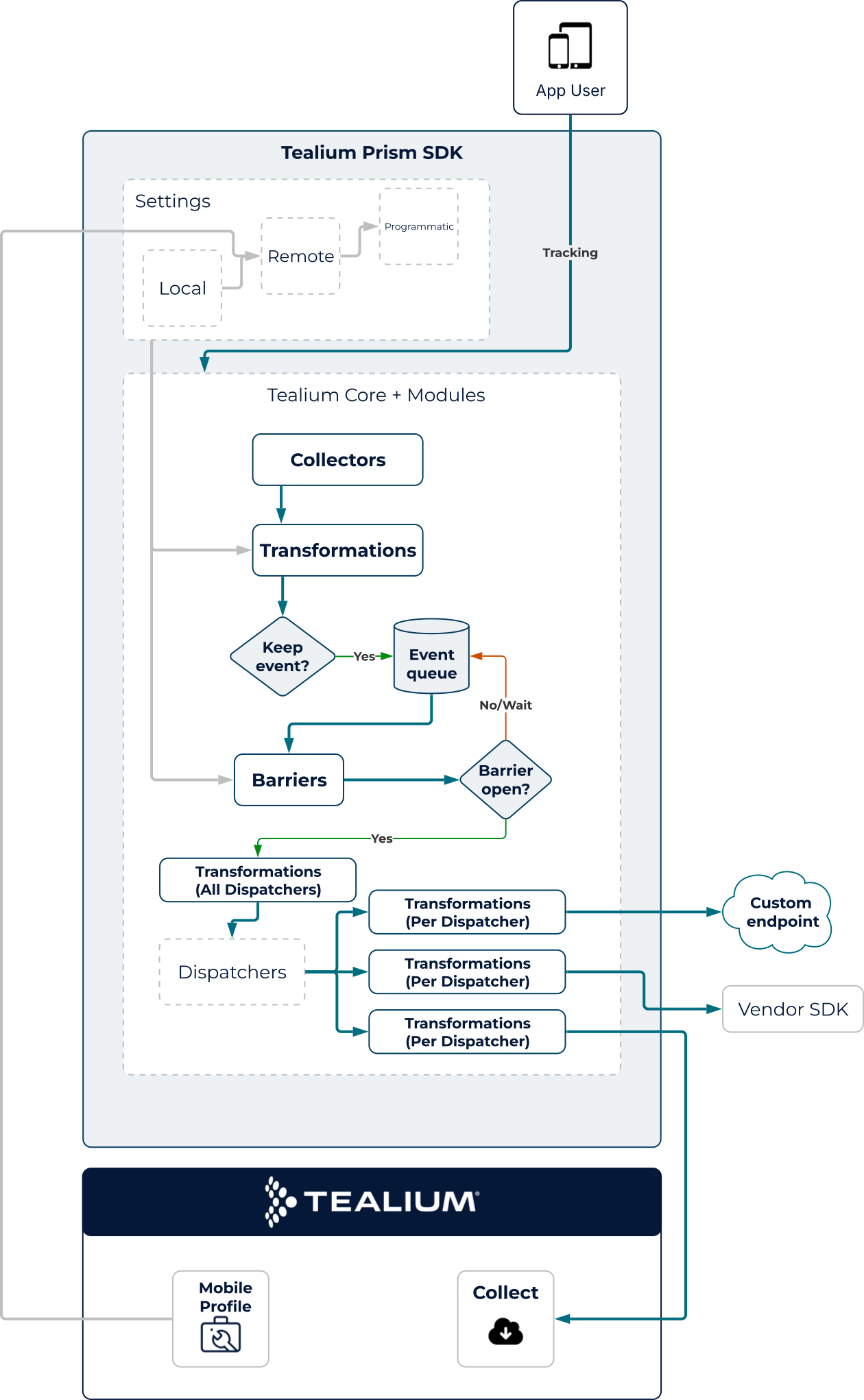
Tealium Prism is built for performance and maintainability, moving away from web-dependent logic to a fully native, unified approach. Three components control when and where events are delivered: a rules engine, dispatchers, and barriers.
Mobile profile
Most SDK configuration is set in a mobile profile. A mobile profile gives you a dedicated workspace to manage modules, extensions, barriers, and load rules through a UI. You publish the mobile profile to update a remote settings file which the SDK loads on the next app refresh or startup. No code changes or app release are required.
For more information, see Create a mobile profile.
This is the recommended approach for most configuration. It keeps implementation code minimal and lets your team adjust SDK behavior in response to business or operational needs. For other configuration options, see Advance configuration.
Native runtime
Prism eliminates legacy dependencies on WKWebView. All logic runs in a 100% native environment, powered by a custom rules engine and JSON configurations. This delivers a smaller memory footprint and improved battery efficiency, using specialized reactive frameworks for high-throughput event processing.
Swift and Kotlin parity
Both the Swift and Kotlin SDKs share nearly identical logic and naming conventions. This code parity enables mobile teams to manage iOS and Android implementations with a single mental model, reducing onboarding time and minimizing platform-specific discrepancies. The React Native package wraps these SDKs and exposes a subset of their features through a TypeScript API.
Event control
Barriers are rules that control when and how events are delivered to each destination, giving you precise control over event flow.
Previously, legacy SDKs used a single event queue, and if one destination was offline, all event delivery paused. With Prism, each dispatcher operates independently, and barriers can be set per destination, allowing parallel processing and minimizing bottlenecks.
For example, Tealium Collect uses connectivity and batching barriers to optimize bandwidth and ensure reliable delivery. Third-party SDKs receive events in real time, even when offline, so they can manage their own queues.
Native transformations
Use native transformations, with custom logic or built-in Tag Management extensions, to modify event payloads in Swift or Kotlin before they leave the device. Native transformations are ideal for correcting data issues or updating logic without an app update.
Advanced configuration
Two additional configuration methods are available for scenarios where remote settings are not sufficient.
Local JSON bundles a settings file directly in the app. Use this as a reliable fallback when the device cannot reach the remote settings endpoint, or to pre-configure behavior before the first remote fetch completes.
Programmatic configuration sets values directly in code using the SDK’s configuration API. Use this when:
- The configuration depends on device state at runtime: for example, adjusting batch size based on available disk space.
- A setting must be locked against remote changes: for example, enforcing
LogLevel.silentin production builds so a publishing mistake cannot enable verbose logging. - You need to verify behavior during development without publishing a change to the platform.
Programmatic settings take the highest precedence, overriding both remote and local JSON. In all other cases, configure using the UI.
| Method | Priority | Use when |
|---|---|---|
| Programmatic | 1 (highest) | Runtime-calculated values or settings that must be locked in code. |
| Remote settings | 2 | Standard operational configuration — modules, barriers, transformations, rules. |
| Local JSON | 3 | Fallback defaults bundled with the app. |
This page was last updated: November 3, 2026