---
title: Firebase dispatcher
description: Send Tealium Prism events to Firebase Analytics on iOS and Android with the Firebase dispatcher module.
url: https://docs.tealium.com/platforms/prism-mobile/module-list/firebase-dispatcher/
---
The Firebase dispatcher is a Tealium Prism module that forwards events to the Firebase Analytics SDK on the device. You track an event once with Prism and the dispatcher calls the native Firebase API. You configure mappings from your data layer to Firebase events, parameters, user properties, and consent settings in your Tealium mobile profile.
## Requirements
The Firebase dispatcher requires the following:
| Requirement | iOS | Android |
| :--- | :--- | :--- |
| Operating system | iOS 15+, macOS 10.15+, or tvOS 15+ | Android API 23+ |
| Tealium Prism | 0.5.0+ | 0.5.0+ |
| Firebase SDK | Firebase iOS SDK 12.x (FirebaseAnalytics) | Firebase Android BoM 34.6.0+ (firebase-analytics) |
| Firebase project files | `GoogleService-Info.plist` in the app target | `google-services.json` in the app module and the `com.google.gms.google-services` plugin |
| Kotlin | N/A | 2.0+ |
## Install
Add the Tealium Maven repository to `settings.gradle.kts` if you have not already:
```kotlin
pluginManagement {
repositories {
google()
gradlePluginPortal()
mavenCentral()
}
}
dependencyResolutionManagement {
repositories {
google()
mavenCentral()
maven { url = uri("https://maven.tealiumiq.com/android/releases/") }
}
}
```
Add the dispatcher and Firebase Analytics to your app module's `build.gradle.kts`. Declare `firebase-analytics` yourself to keep the Firebase SDK version under your control:
```kotlin
plugins {
id("com.google.gms.google-services") version "4.4.2"
}
dependencies {
implementation("com.tealium.prism:firebase:0.2.0")
implementation(platform("com.google.firebase:firebase-bom:34.6.0"))
implementation("com.google.firebase:firebase-analytics")
}
```
`prism-core` is included transitively.
To install with Swift Package Manager:
1. In Xcode, select **File > Add Package Dependencies**.
1. Enter the repository URL: `https://github.com/Tealium/tealium-prism-ios-firebase-dispatcher`.
1. Select **Up to next major** and add the `TealiumPrismFirebase` product to your app target.
Or add the package to `Package.swift`:
```swift
.package(url: "https://github.com/Tealium/tealium-prism-ios-firebase-dispatcher.git", from: "0.2.0")
```
To install with CocoaPods, add the following line to your Podfile:
```ruby
pod 'TealiumPrismFirebase'
```
The package depends on `TealiumPrismCore` and `FirebaseAnalytics`. Do not add the Firebase SDK separately.
## Initialize
No code is needed when your remote or local settings include the Firebase module. The dispatcher registers itself when the app starts and stays inactive until settings for it exist. For more information, see [Remote and local settings](https://docs.tealium.com/platforms/prism-mobile/install/#remote-and-local-settings).
The dispatcher initializes Firebase for you. On iOS, the dispatcher calls `FirebaseApp.configure()` on first use and skips it if your app already did. On Android, the `firebase-analytics` content provider initializes Firebase at startup.
When the device is offline, the Firebase SDK queues events and delivers them when connectivity is restored.
If your app configures modules in code, add the module to the `modules` list in `TealiumConfig`:
```kotlin
import com.tealium.prism.core.api.Tealium
import com.tealium.prism.core.api.TealiumConfig
import com.tealium.prism.core.api.Modules
import com.tealium.prism.core.api.misc.Environment
import com.tealium.prism.firebase.firebase
val config = TealiumConfig.Builder(
application = this,
accountName = "my_account",
profileName = "my_profile",
environment = Environment.PROD,
modules = listOf(
Modules.collect(),
Modules.firebase()
)
)
.setSettingsUrl("https://tags.tiqcdn.com/dle/my_account/my_profile/mobile_settings_prod.json")
.build()
val tealium = Tealium.create(config)
```
```swift
import TealiumPrismCore
import TealiumPrismFirebase
let config = TealiumConfig(account: "my_account",
profile: "my_profile",
environment: "prod",
modules: [
Modules.collect(),
Modules.firebaseDispatcher()
],
settingsUrl: "https://tags.tiqcdn.com/dle/my_account/my_profile/mobile_settings_prod.json")
let tealium = Tealium.create(config: config)
```
To lock a setting so that remote changes cannot override it, pass a builder closure. For more information, see [Advanced configuration](https://docs.tealium.com/about-prism-mobile/#advanced-configuration).
```kotlin
Modules.firebase { builder ->
builder.setAnalyticsEnabled(true)
}
```
```swift
Modules.firebaseDispatcher { builder in
builder.setAnalyticsEnabled(true)
}
```
## Configure the module
1. In your Tealium mobile profile, go to **Modules**, and add the **Firebase** module.
1. Set the module settings. Each is optional. If omitted, Firebase applies its own default.
1. Add mappings from your data layer variables to Firebase destinations. See [Data mappings](#data-mappings).
1. Optionally restrict the module with load rules. For more information, see [Rules](https://docs.tealium.com/platforms/prism-mobile/rules/).
1. Save and publish the mobile settings. The SDK fetches the published file at startup and on each remote settings refresh. See [publish mobile settings](https://docs.tealium.com/publish-mobile-settings/).
| Setting | Settings key | Type | Description |
| :--- | :--- | :--- | :--- |
| Session timeout | `session_timeout_seconds` | Number | Firebase session timeout in seconds. |
| Analytics collection enabled | `analytics_collection_enabled` | Boolean | Turns Firebase Analytics collection on or off. |
| Log level | `log_level` | String | (iOS only) One of `min`, `error`, `warning`, `notice`, `info`, `debug`, `max`. |
`session_timeout_seconds` and `analytics_collection_enabled` are also available as commands. Module settings apply when the module starts and again whenever the SDK fetches updated settings. The matching command applies at event time.
## Data mappings
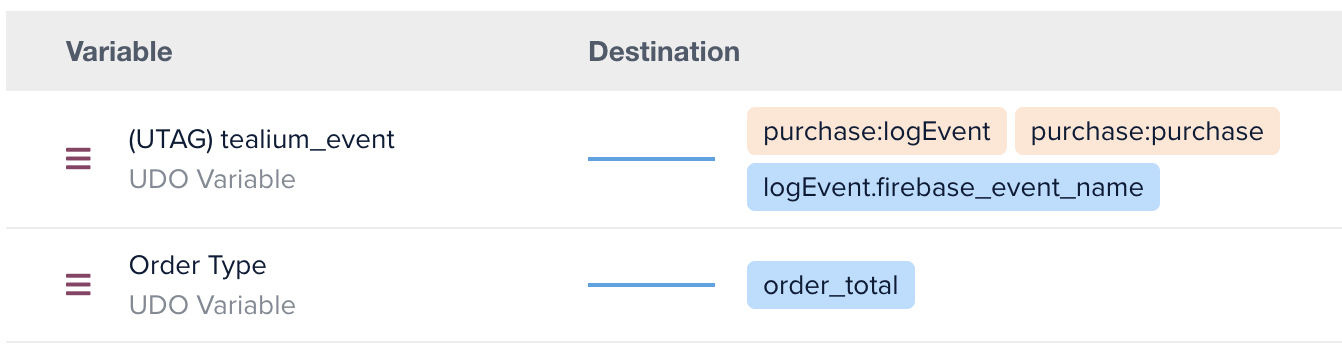
A mapping copies a data layer variable to a destination in the Firebase command payload. The following mapping runs `logevent` when `tealium_event` is `purchase`, uses the event name as the Firebase event name, and sends `order_total` as the Firebase `value` parameter:
The available mappings are:
### Firebase Config
| Variable | Type |
|:---------|:-----|
| `firebase_session_timeout_seconds` | Integer as String |
| `firebase_analytics_collection_enabled` | Boolean as String |
| `firebase_log_level` | String |
### Standard
| Variable | Type/Values | Description |
|:---------|:-----|:------------|
| `param_achievement_id` | `String` | Achievement ID |
| `param_ad_network_click_id` | `String` | Ad Network Click ID |
| `param_affiliation` | `String` | Affiliation |
| `param_cp1` | `String` | CP1 |
| `param_campaign` | `String` | Campaign |
| `param_character` | `String` | Character |
| `param_content` | `String` | Content |
| `param_content_type` | `String` | Content Type |
| `param_coupon` | `String` | Coupon |
| `param_creative_name` | `String` | Creative Name |
| `param_creative_slot` | `String` | Creative Slot |
| `param_currency` | `String` | Currency |
| `param_destination` | `String` | Destination |
| `param_end_date` | `String` | End Date |
| `param_flight_number` | `String` | Flight Number |
| `param_group_id` | `String` | Group ID |
| `param_index` | `String` | Index |
| `param_item_brand` | `String` | Item Brand |
| `param_item_category` | `String` | Item Category |
| `param_item_id` | `String` | Item ID |
| `param_item_list` | `String` | Item List |
| `param_item_name` | `String` | Item Name |
| `param_item_variant` | `String` | Item Variant |
| `param_level` | `Long` | Level |
| `param_location` | `Long` | Location |
| `param_medium` | `String` | Medium |
| `param_number_nights` | `Long` | Number Of Nights |
| `param_number_pax` | `Long` | Number Of Passengers |
| `param_number_rooms` | `Long` | Number Of Rooms |
| `param_origin` | `String` | Origin |
| `param_price` | `Double` | Price |
| `param_quantity` | `Long` | Quantity |
| `param_screen_name` | `String` | Screen Name |
| `param_screen_class` | `String` | Screen Class |
| `param_score` | `Long` | Score |
| `param_search_term` | `String` | Search Term |
| `param_shipping` | `Double` | Shipping |
| `param_method` | `String` | Method |
| `param_source` | `String` | Source |
| `param_travel_class` | `String` | Travel Class |
| `param_virtual_currency_name` | `String` | Virtual Currency Name |
| `param_start_date` | `String` | Start Date |
| `param_term` | `String` | Term |
| `param_tax` | `Double` | Tax |
| `param_transaction_id` | `String` | Transaction ID |
| `param_value` | `Long or Double` | Value |
| `param_level_name` | `String` | Level Name |
| `param_success` | `String` | Success |
| `param_ad_format` | `String` | Ad Format |
| `param_ad_platform` | `String` | Ad Platform |
| `param_ad_source` | `String` | Ad Source |
| `param_ad_unit_name` | `String` | Ad Unit Name |
| `param_campaign_id` | `String` | Campaign ID |
| `param_creative_format` | `String` | Creative Format |
| `param_discount` | `String` | Discount |
| `param_extend_session` | `String` | Extend Session |
| `param_item_category2` | `String` | Item Category2 |
| `param_item_category3` | `String` | Item Category3 |
| `param_item_category4` | `String` | Item Category4 |
| `param_item_category5` | `String` | Item Category5 |
| `param_item_list_id` | `String` | Item List ID |
| `param_item_list_name` | `String` | Item List Name |
| `param_items` | `Array` | Items |
| `param_location_id` | `String` | Location ID |
| `param_marketing_tactic` | `String` | Marketing Tactic |
| `param_payment_type` | `String` | Payment Type |
| `param_promotion_id` | `String` | Promotion ID |
| `param_promotion_name` | `String` | Promotion Name |
| `param_shipping_tier` | `String` | Shipping Tier |
| `param_source_platform` | `String` | Source Platform |
| `param_user_signup_method` | `String` | User Signup Method |
| `param_user_allow_ad_personalization_signals` | `String` | User Allow Ad Personalization Signals |
| `param_email_address` | `String` | Email Address |
| `param_phone_number` | `String` | Phone Number |
| `param_hashed_email_address` | `String` | Hashed Email Address |
| `param_hashed_phone_number` | `String` | Hashed Phone Number |
### E-Commerce
| Variable | Type/Values | Description |
|:---------|:-----|:------------|
| `order_id` | `String` | Order ID |
| `order_total` | `Long or Double` | Order Total |
| `order_shipping` | `Double` | Shipping Amount |
| `order_tax` | `Double` | Tax Amount |
| `order_currency` | `String` | Currency |
| `order_coupon_code` | `String` | Promo Code |
| `product_id` | `Array` | List of Product IDs |
| `product_name` | `Array` | List of Names |
| `product_brand` | `Array` | List of Brands |
| `product_category` | `Array` | List of Categories |
| `product_quantity` | `Array` | List of Quantities |
| `product_unit_price` | `Array` | List of Prices |
| `param_item_list` | `Array` | List of Presentation Lists |
| `param_item_variant` | `Array` | List of Variants |
| `param_index` | `Array` | List of Indexes |
### Consent settings
| Variable | Type/Values | Description |
|:---------|:-----|:------------|
| `ad_storage` | `String` | Ad Storage |
| `analytics_storage` | `String` | Analytics Storage |
| `ad_user_data` | `String` | Ad User Data |
| `ad_personalization` | `String` | Ad Personalization |
## Events
To trigger Firebase events, use data mappings in the Firebase module in your mobile profile to map the values of `tealium_event` to their matching Firebase event names. For example, in this mapping, when `tealium_event="purchase"` it triggers the Firebase events for `purchase` and `logEvent`:

### `initiateconversionmeasurement`
| | |
| :--- | :--- |
| iOS method | `initiateOnDeviceConversionMeasurement()` |
| Android method | N/A |
| Destinations | `hashed_email_address`, `hashed_phone_number`, `email_address`, `phone_number` |
| Notes | iOS only. At least one destination is required. If more than one is mapped, only the first in the order listed is used. |
{class="dt--pivot"}
### `logevent`
| | |
| :--- | :--- |
| iOS method | `logEvent()` |
| Android method | `logEvent()` |
| Destinations | `event_name`, `parameters`, `parameters.`, `parameters.items.` |
| Notes | `event_name` is required. All other destinations are optional. To map items, use parallel arrays (for example `product_id` and `product_price`) or an array of objects with `parameters.items.`. A scalar counts as a single-element array. When you use parallel arrays, every array under `items` must be the same length. If the lengths differ, the command fails with `arrayLengthMismatch`. Null values are dropped from an item, and an item left with no values is dropped entirely. |
{class="dt--pivot"}
### `resetdata`
| | |
| :--- | :--- |
| iOS method | `resetAnalyticsData()` |
| Android method | `resetAnalyticsData()` |
| Destinations | None |
| Notes | Clears analytics data and resets the app instance ID. |
{class="dt--pivot"}
### `setanalyticscollectionenabled`
| | |
| :--- | :--- |
| iOS method | `setAnalyticsCollectionEnabled()` |
| Android method | `setAnalyticsCollectionEnabled()` |
| Destinations | `analytics_collection_enabled` |
| Notes | Previously collected data is retained. |
{class="dt--pivot"}
### `setconsent`
| | |
| :--- | :--- |
| iOS method | `setConsent()` |
| Android method | `setConsent()` |
| Destinations | `consent_settings`, `consent_settings.ad_storage`, `consent_settings.analytics_storage`, `consent_settings.ad_user_data`, `consent_settings.ad_personalization` |
| Notes | Each value must be `granted` or `denied`. Only the types present in the payload are updated. The rest keep their previous status. |
{class="dt--pivot"}
### `setdefaultparameters`
| | |
| :--- | :--- |
| iOS method | `setDefaultEventParameters()` |
| Android method | `setDefaultEventParameters()` |
| Destinations | `parameters`, `parameters.` |
| Notes | Parameters are merged into the existing defaults, replacing any with the same name. Omit `parameters` entirely to clear all defaults. An empty `parameters` object is a no-op and leaves the current defaults in place. |
{class="dt--pivot"}
### `setsessiontimeout`
| | |
| :--- | :--- |
| iOS method | `setSessionTimeoutInterval()` |
| Android method | `setSessionTimeoutDuration()` |
| Destinations | `session_timeout_seconds` |
| Notes | Always mapped in seconds. Android converts to milliseconds internally. |
{class="dt--pivot"}
### `setuserid`
| | |
| :--- | :--- |
| iOS method | `setUserID()` |
| Android method | `setUserId()` |
| Destinations | `user_id` |
| Notes | An empty string clears the user ID. |
{class="dt--pivot"}
### `setuserproperty`
| | |
| :--- | :--- |
| iOS method | `setUserProperty()` |
| Android method | `setUserProperty()` |
| Destinations | `property_name`, `property_value` |
| Notes | Both destinations accept a string or an array of strings. Arrays must be the same length. An empty value removes the property. |
{class="dt--pivot"}
## Verify
Enable Firebase debug mode on your test device, then track an event that maps to `logevent`. The event appears in **DebugView** within seconds with the mapped parameters.
* [View events in Xcode debug console](https://firebase.google.com/docs/analytics/ios/events#view-events-in-xcode-debug-console) (iOS)
* [View events in debug log](https://firebase.google.com/docs/analytics/android/events#view-events-in-debug-log) (Android)
If the event does not appear, use [Trace](https://docs.tealium.com/platforms/prism-mobile/trace/) to confirm the event reached Prism with the expected data layer values.
## Troubleshooting
| Symptom | Cause | Fix |
| :--- | :--- | :--- |
| No events in DebugView | The remote or local settings have no `FirebaseDispatcher` entry. | Add the Firebase module to your mobile profile and publish, or check your local settings file. |
| Event reaches Prism but not Firebase | No mapping sets `command_name` for that `tealium_event`. | Add a `command_name` mapping with a filter on the event name. |
| Settings do not apply | The module ID differs between local, remote, and programmatic settings. | Use the same key under `modules` in every source. |
| Firebase logs are silent on Android | `log_level` is iOS only. | Run `adb shell setprop log.tag.FA VERBOSE`. |
| Consent command fails with `invalidParameterType` | A consent type or status is not one of the accepted values. | Map only `ad_storage`, `analytics_storage`, `ad_user_data`, `ad_personalization` to `granted` or `denied` (case-insensitive). Any other value fails the whole command. |
### Command errors
When a command fails, the dispatcher logs a warning, skips that command, and continues. Other commands you mapped on the same event still run, and the event still reaches your other dispatchers. Search the device log for `Command '' failed:`. The message wording differs slightly between iOS and Android. The error types are the same on both.
| Error | Cause | Fix |
| :--- | :--- | :--- |
| `missingParameter` | A destination the command requires has no mapping. | Map it. Required: `event_name` for `logevent`, `user_id` for `setuserid`, `property_name` and `property_value` for `setuserproperty`, `consent_settings` for `setconsent`, `session_timeout_seconds` for `setsessiontimeout`, `analytics_collection_enabled` for `setanalyticscollectionenabled`. |
| `invalidParameterType` | A mapped value has the wrong type, names an unknown consent type or status, or is a `hashed_*` value that is not valid Base64. | Check the type against the commands table. For consent, map only the four supported types to `granted` or `denied`. |
| `arrayLengthMismatch` | Parallel arrays have different lengths, either under `parameters.items` or `property_name` against `property_value`. | Make the arrays the same length, or switch `items` to the array-of-objects format. |
| `commandNotFound` | The value in `map_to` is not a supported command name. | Check it against the commands table. Matching is case-insensitive and ignores surrounding whitespace, but the name must contain no separators, for example `setuserid` or `SetUserID`, not `set_user_id`. |
The less common errors `emptyParameter`, `emptyArray`, and `noValidParameters` occur when a mapped value is empty or when no supported destination is mapped for the command.
## Limitations
* `initiateconversionmeasurement` and `log_level` are iOS only.
* Only one Firebase dispatcher can be active in an app.
## Reference
* [Prism iOS Firebase API reference](https://docs.tealium.com/tealium-prism-ios-firebase-dispatcher/)
* [Prism Android Firebase API reference](https://docs.tealium.com/tealium-prism-android-firebase-dispatcher/)