---
title: DoubleClick Ad Exchange Connector Setup Guide
description: This article describes how to set up the DoubleClick for Ad Exchange connector in your Customer Data Hub account.
url: https://docs.tealium.com/server-side-connectors/doubleclick-ad-exchange-connector/
---
## Connector actions
| Action Name | AudienceStream | EventStream |
| --- | :---: | :---: |
|Add Visitor to User-List or Segment| ✓| ✓|
|Remove Visitor from User-List or Segment| ✓| ✓|
## API information
This connector uses the following vendor API:
* API Name: Google Audience Partner API DmpUserListService
* API Version: v201809
* API Endpoint: ``
* Documentation: [Authorized Buyer (formerly DoubleClick Ad Exchange) API](https://developers.google.com/authorized-buyers/)
## Configure settings
Navigate to the Connector Marketplace and add a new connector. For general instructions on how to add a connector, see the [About Connectors](https://docs.tealium.com/about-connectors/) article.
When you add this connector you are prompted to accept the vendor's data platform policy.
After adding the connector, configure the following settings:
* **Client Customer ID (Required)**
* Your (DoubleClick Customer) Identifier in the selected product.
* **Select the Target Product (Required)**
* The target product, either **DoubleClick AdExhchange - Buyer** or **DoubleClick AdExchange - Publisher**.
## Create a new segment
Use the following steps to create a new segment in AudienceStream:
1. Click **Create a New Segment** from the top of the Actions selection drop-down screen.
2. Enter the **Segment Name**, **Segment Member Lifespan**, **Integration Code**, and **Segment Description**.
If you use a [DataAccess](https://docs.tealium.com/about-dataaccess/) product (EventStore, AudienceStore, EventDB, or AudienceDB), the segment name must be fewer than 128 characters in length. Otherwise, DataAccess may trim the segment name and errors may occur.
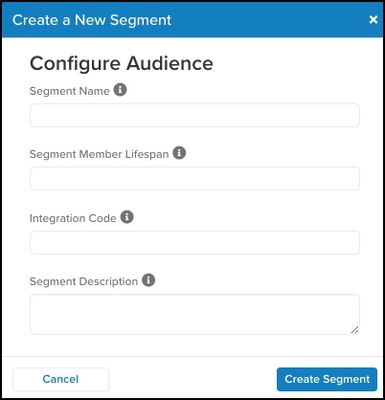
3. Click **Create Segment**.
The Integration Code is an ID used by user list sellers to correlate IDs on their systems. If no ID is available, you can manually enter a random number between 1 and 1,000. Confirmation displays in the form of a check mark next to the Create Segment button to verify that the segment has been created.
## Action settings - parameters and options
Click **Next** or go to the **Actions** tab. This is where you configure connector actions.
This section describes how to set up parameters and options for each action.
### Action - Add Visitor to User-List or Segment
#### Parameters
|**Parameter**| * **Description** |
|---| ---|
|Select the Target User-list/Segment| - (Required) User map identifier.
- Specifies the user that this operation applies to.
- This is the target User-list/Segment where the user will be added to.
|
|Google User ID| - Google User ID
- Provided by the ADX cookie-matching service.
|
|iOS Advertising ID| |
|Android Advertising ID| |
|RIDA| |
|AFAI| |
|MSAI| |
|Data Source ID| - (Optional) An ID indicating the data source that contributed this membership.
- Required to be in the range of 1 to 1,000.
- Any ID greater than 1,000 results in a BAD_DATA_SOURCE_ID error.
- These IDs do not have reference or meaning for Google and are only used as labels for reporting purposes.
|
### Action - Remove Visitor from User-List or Segment
#### Parameters
|**Parameter**| **Description**|
|---| ---|
|Select the Target User-list/Segment| - Required, this is the target User-list/Segment where the user will be removed from.
|
|Google User ID| - Google User ID
- Provided by the ADX cookie-matching service.
|
|iOS Advertising ID| |
|Android Advertising ID| |
|RIDA| |
|AFAI| |
|MSAI| |
|Data Source ID| - (Optional) An ID indicating the data source that contributed this membership.
- Required to be in the range of 1 to 1,000.
- Any ID greater than 1,000 results in a BAD_DATA_SOURCE_ID error.
- These IDs do not have reference or meaning for Google and are only used as labels for reporting purposes.
|