---
title: Facebook Audiences Connector Setup Guide
description: This article describes how to set up the Facebook Audiences connector in your Customer Data Hub account.
url: https://docs.tealium.com/server-side-connectors/facebook-audiences-connector/
---
## API information
This connector uses the following vendor API:
* API Name: Facebook Graph API - Marketing API
* API Version: v25.0
* API Endpoint: `https://graph.facebook.com`
* Documentation: [Facebook Marketing API](https://developers.facebook.com/docs/marketing-api/)
## Batch limits
This connector uses batched requests to support high-volume data transfers to the vendor. Parallel processing may result in events reaching the vendor out of sequence. Add a sequence value to events if ordering is important. For more information, see [Batched actions](https://docs.tealium.com/batched-actions/). Requests are queued until one of the following thresholds is met or the profile is published:
* Max number of requests: 10000
* Max time since oldest request: 10 minutes
* Max size of requests: 1 MB
## Configuration
Go to the Connector Marketplace and add a new connector. Read the [Connector Overview](https://docs.tealium.com/about-connectors/) article for general instructions on how to add a connector.
After adding the connector, configure the following settings:
* **Authentication type**: Select the authentication type to use to connect to Facebook. This option is not available in the legacy connectors interface.
* **SUAT (System User Authentication Token)**: (Recommended) Select this option for a more stable and persistent authentication method. For more information, see [Facebook: Get a System User Access Token](https://developers.facebook.com/docs/news-indexing/guides/access-tokens/).
* **OAuth2**: This connection generally expires within 60 days, causing unpredictable results for all Facebook Ad actions. You must re-authenticate the connection before it expires to avoid issues. If you select this option, click **Establish Connection** to authenticate with Facebook.
Before clicking the **Establish Connection** button, ensure that you are signed into Facebook with the account that is linked with the Ad Account ID that is being used. If this is not the case, issues can arise with the token that is generated.
* **Ad Account ID**: (Required) The Facebook Audiences Account ID you want to manage. For more information, see [Facebook: Find your Facebook ad account ID number](https://www.facebook.com/business/help/1492627900875762).
Before you can use this connector and build a custom audience in Facebook, you must agree to the [Facebook Custom Audience Terms](https://www.facebook.com/ads/manage/customaudiences/tos.php).
### Create custom audience
You must create your first custom audience on the Facebook site to accept the terms and conditions before you are able to create a custom audience through the connector.
To use your custom audience, it must contain a minimum of 20 entries. If your audience has been created successfully, a small check icon is displayed beside the button.
Click **Create Custom Audience**, then configure the following settings:
* **Audience Name**: (Required) The name of the custom audience. Use the audience or segment name from your CRM (for example, `Qualified Leads - US - Q3 2026` or `High Value Customers - EMEA`). Meta uses this name to identify your audience segment.
* **Audience Metadata (JSON)**: (Optional) A JSON object describing the audience criteria, mapped to the `description` parameter in the Meta API. Use key-value pairs with aggregated or categorical attributes. Do not include PII. For example: `{"lifecycle_stage":"churned","region":"EMEA","tier":"high_value"}`. Meta uses this metadata with Audience Labels and optimization features. Label assignment occurs in Meta Ads Manager. The value must be valid JSON for Meta to parse the metadata.
* **Customer File Source**:
* `USER_PROVIDED_ONLY`: Use advertiser-collected information directly from customers.
* `PARTNER_PROVIDED_ONLY`: Use advertiser-sourced information directly from partners, such as agencies or data providers.
* `BOTH_USER_AND_PARTNER_PROVIDED`: Use advertiser-collected information directly from customers and partner-sourced information, such as agencies.
* **Audience Type**:
* `VALUE_BASED_AUDIENCE`: Identify customers that share similar behaviors with your highest-value customers.
* `CUSTOMER_FILE_AUDIENCE`: (Default) Identify customers based on information from the customer file, such as their email address, phone number, or other identifiers.
On the Facebook Audiences site, you have the option to create audiences based on a customer list, website traffic, or app activity. For this example, create your audience based on a customer list.
For more information, see [Meta Business Help Center: Create a customer list custom audience](https://www.facebook.com/business/help/170456843145568?id=2469097953376494).
## Actions
| Action Name | AudienceStream | EventStream |
|---| ---| ---|
|Add User to Custom Audience| ✓| ✗|
|Remove User from Custom Audience| ✓| ✗|
|Opt Out User from All Custom Audiences| ✓| ✗|
Enter a name for the action and select the action type.
The following section describes how to set up parameters and options for each action.
### Add User to Custom Audience
#### Parameters
|Parameter| Description|
|---| ---|
|Custom Audience to Add User To| - (Required) Select your Target Custom Audience.
- Audiences created from customer files are not displayed.
- Before you can use this connector and build a custom audience in Facebook, you must agree to the [Facebook Custom Audience Terms](https://www.facebook.com/ads/manage/customaudiences/tos.php).
|
|Email Address| - Identify a user based on their email address.
|
|Phone Number| - Identify a user based on their phone number. Include only digits with country code, area code, and number. For example, `16505551212`.
|
|Facebook User ID| - Identify a user based on their Facebook ID.
- You must provide the "Facebook App ID" corresponding to the Facebook User ID (UID) when using this identifier type.
|
|Facebook App ID| - Required if the "Facebook User ID" is used as the user identifier.
- See "Facebook User ID".
|
|Mobile Advertiser ID| - Use this to target a user based on the app user ID, Apple's Advertising Identifier (IDFA), or Android's advertising ID.
|
|External ID| - Do not hash.
- Any unique ID from the advertiser, such as loyalty membership IDs, user IDs, and external cookie IDs.
|
|Zip Code| - Postal code.
- Exact format depends on country.
|
|City| - User City.
- Lowercase.
- No punctuation or spaces.
|
|Country| - User Country.
- 2-letter country code.
- ISO 3166-1 Alpha-2 format.
|
|US State| - User State in the United States.
- Lowercase.
- 2-character ANSI abbreviation code.
|
|First Name| - User first name.
- Lowercase.
- No punctuation or special characters.
- UTF-8 format.
|
|Last Name| - User last name.
- Lowercase.
- No punctuation or special characters.
- UTF-8 format.
|
|Year of Birth| - Year of birth for user.
YYYY format.- Values from
1900 to current year. - No punctuation or special characters.
- UTF-8 format.
|
|Day of Birth| - Day of birth for user.
- `DD` format.
- Values from `01` to `31`.
|
|Month of Birth| - Birth month for user.
- `MM` format.
- Values from `01` to `12`.
|
|Custom Audience Override| - (Optional) Provide a **Custom Audience ID** to override the value in the required section. This field lets you use AudienceStream variables to populate the Audience ID.
|
|User Identifier Already Hashed| - Select this option if the target user identifier is already hashed. Only values hashed with SHA256 are supported by Facebook.
### Remove User from Custom Audience
#### Parameters
|Parameter| Description|
|---| ---|
|Custom Audience to Remove User From| - (Required) Select your Target Custom Audience.
- Before you can use this connector and build a custom audience in Facebook, you must agree to the [Facebook Custom Audience Terms](https://www.facebook.com/ads/manage/customaudiences/tos.php).
|
|Email Address| - Identify a user based on their email address.
|
|Phone Number| - Identify a user based on their phone number. Include only digits with country code, area code, and number. For example, `16505551212`.
|
|Facebook User ID| - Identify a user based on their Facebook ID.
- You must provide the "Facebook App ID" corresponding to the Facebook User ID (UID) when using this identifier type.
|
|Facebook App ID| - Required if the "Facebook User ID" is used as the user identifier.
- See "Facebook User ID".
|
|Mobile Advertiser ID| - Use this to target a user based on the app user ID, Apple's Advertising Identifier (IDFA), or Android's advertising ID.
|
|External ID| - Do not hash.
- Any unique ID from the advertiser, such as loyalty membership IDs, user IDs, and external cookie IDs.
|
|Zip Code| - Postal code.
- Exact format depends on country.
|
|City| - User City.
- Lowercase.
- No punctuation or spaces.
|
|Country| - User Country.
- 2-letter country code.
- ISO 3166-1 Alpha-2 format.
|
|US State| - User State in the United States.
- Lowercase.
- 2-character ANSI abbreviation code.
|
|First Name| - User first name.
- Lowercase.
- No punctuation or special characters.
- UTF-8 format.
|
|Last Name| - User last name.
- Lowercase.
- No punctuation or special characters.
- UTF-8 format.
|
|First Initial| - First initial of user.
- Lowercase.
- No punctuation or special characters.
- UTF-8 format.
|
|Year of Birth| - Year of birth for user.
- `YYYY` format.
- Values from `1900` to current year.
|
|Day of Birth| - Day of birth for user.
- `DD` format.
- Values from `01` to `31`.
|
|Month of Birth| - Birth month for user.
- `MM` format.
- Values from `01` to `12`.
|
|Gender| - Gender of user.
- `M` for male, `F` for female
|
|Lookalike Value| - An arbitrary, numeric value for each user set when you create a seed custom audience from CRM data.
- Facebook uses this to determine which users in audience are worth the most to you, in a quantifiable way.
|
|Custom Audience Override| - (Optional) Provide a **Custom Audience ID** to override the value in the required section. This field lets you use AudienceStream variables to populate the Audience ID.
|
|User Identifier Already Hashed| - Select this option if the target user identifier is already hashed. Only values hashed with SHA256 are supported by Facebook.
|
### Opt Out User from All Custom Audiences
#### Parameters
|Parameter| Description|
|---| ---|
|Email Address| - Identify a user based on their email address.
|
|Phone Number| - Identify a user based on their phone number. Include only digits with country code, area code, and number. For example, `16505551212`.
|
|Facebook User ID| - Identify a user based on their Facebook ID.
- You must provide the "Facebook App ID" corresponding to the Facebook User ID (UID) when using this identifier type.
|
|Facebook App ID| - Required if the "Facebook User ID" is used as the user identifier.
- See "Facebook User ID".
|
|Mobile Advertiser ID| - Use this to target a user based on the app user ID, Apple's Advertising Identifier (IDFA), or Android's advertising ID.
|
|External ID| - Do not hash.
- Any unique ID from the advertiser, such as loyalty membership IDs, user IDs, and external cookie IDs.
|
|Zip Code| - Postal code.
- Exact format depends on country.
|
|City| - User City.
- Lowercase.
- No punctuation or spaces.
|
|Country| - User Country.
- 2-letter country code.
- ISO 3166-1 Alpha-2 format.
|
|US State| - User State in the United States.
- Lowercase.
- 2-character ANSI abbreviation code.
|
|Year of Birth| - Year of birth for user.
- `YYYY` format.
- Values from `1900` to current year.
|
|Day of Birth| - Day of birth for user.
- `DD` format.
- Values from `01` to `31`.
|
|Month of Birth| - Birth month for user.
- `MM` format.
- Values from `01` to `12`.
|
|User Identifier Already Hashed| - Select this option if the target user identifier is already hashed. Only values hashed with SHA256 are supported by Facebook.
|
|Last Name| - User last name.
- Lowercase.
- No punctuation or special characters.
- UTF-8 format.
|
|First Initial| - First initial of user.
- Lowercase.
- No punctuation or special characters.
- UTF-8 format.
|
|Gender| - Gender of user.
- `M` for male, `F` for female
|
|Lookalike Value| - An arbitrary, numeric value for each user that is set when you create a seed custom audience from CRM data.
- Facebook uses this value to determine which users in audience are worth the most to you, in a quantifiable way.
|
## Using the Facebook Audiences connector
### Create a visitor ID
The Facebook Audiences connector requires at least one visitor ID attribute with the ability to be passed through to Facebook Audiences.
Use the following resources to set up a visitor ID attribute:
* [Setting up a Visitor ID attribute](https://docs.tealium.com/visitor-id-attribute/)
* [Facebook Marketing API](https://developers.facebook.com/docs/marketing-api/audiences-api)
### Define an audience
Your account may have several visitor ID attributes defined. In this case, it is important to create a [visitor badge named `Known Visitor`](https://docs.tealium.com/known-visitor-badge-guide/) to check for the existence of any of the visitor IDs. Using this attribute ensures that the audience only contains visitors with an assigned visitor ID that can be passed to Facebook. You cannot target an unknown visitor.
Combine the `Known Visitor` badge with other conditions to create an audience for the connector.
This connector also has required ID parameters, such as email, phone, app, or user IDs. At least one of these IDs is required. Including these IDs in your audience filter helps avoid connector errors.
### Testing
The most effective testing method is to run a [Trace](https://docs.tealium.com/about-trace/) to ensure that your events are handled properly and to check your Facebook dashboard to verify that your Custom Audience was created and populated.
## FAQ
### Why can't I see my audiences in the AudienceStream drop-down list?
If you have more than 2,000 audiences in Facebook, they are not all selectable in the drop-down list from an AudienceStream connector.
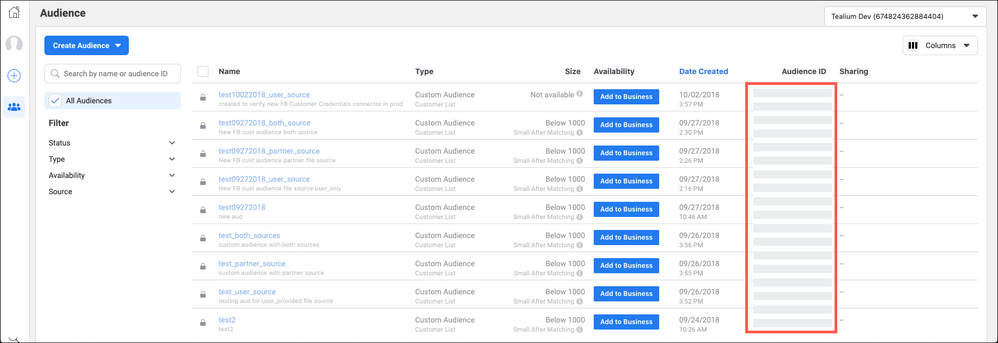
Use the following steps in Facebook to view all audiences and select the identifier for a specific audience:
1. Log in to Facebook as the user that has access to the Facebook Audiences account.
1. Go to .
1. Find the audience you are looking for and copy the Audience ID.
If the Audience ID does not display, you can modify your table column view to include it.
1. Return to AudienceStream and enter the Audience ID as custom value for your AudienceStream connector.