---
title: X Custom Audiences Connector Setup Guide
description: This article describes how to set up the X Custom Audiences connector.
url: https://docs.tealium.com/server-side-connectors/x-custom-audiences-connector/
---
## API Information
This connector uses the following vendor API:
* API Name: X Ads API
* API Version: v12
* API Endpoint: `https://ads-api.x.com/`
* Documentation: [X Custom Audiences API](https://developer.x.com/en/docs/x-ads-api/audiences/api-reference)
## Batch Limits
This connector uses batched requests to support high-volume data transfers to the vendor. For more information, see [Batched Actions](https://docs.tealium.com/batched-actions/). Requests are queued until one of the following thresholds is met or the profile is published:
* Max number of requests: 1000
* Max time since oldest request: 60 minutes
* Max size of requests: 2 MB
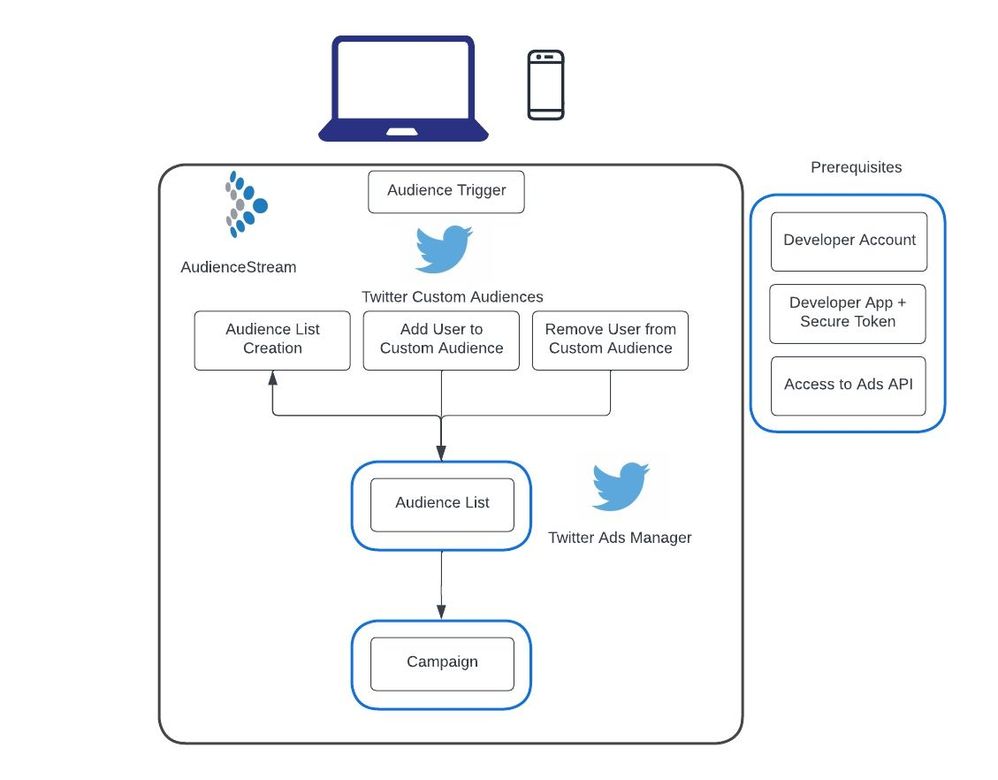
## Prerequisites
1. Sign up for a [developer account](https://developer.x.com/en/apply-for-access). Both `Essential` and `Elevateddeveloper` access can access the Ads API. Please see the [access levels](https://developer.x.com/en/docs/x-api/getting-started/about-x-api#v2-access-level) to determine what access is required.
1. Create a [developer app](https://developer.x.com/en/apps) and secure your token
1. Request [access to the Ads API](https://developer.x.com/en/docs/x-ads-api/apply). Make sure to include the correct App ID in the application. The App ID can be found in the [Developer Portal](https://developer.x.com/en/portal/dashboard) under **Projects & Apps**. For example: `16489123`
If you are already building on the X Developer Platform and have a developer account, skip to step 3.
## How it works
X Custom Audiences gives you control over who sees your X Ads. X Ads gives you powerful context to connect your message to what’s most meaningful to your customers in real time. Engaging with real-time Tweets can influence conversations in a way that can help build your business.
Audiences is a tool in your [X Ads](http://ads.x.com) account that lets you review and manage your audiences. You can access it by navigating to **Tools > Audiences**.
From there, you can use Custom Audiences in campaign targeting to directly reach the users you care about. Tealium provides the ability to create an X Custom Audience through the user interface within AudienceStream and leverage your audience data to populate the Audience lists. Additionally, Audience lists can be created in your X Ads account and populated into AudienceStream to add or remove users. Examples of audiences that you can re-target include: previous customers, web visitors who haven't yet converted, and/or high-value customers.
Tealium provides a list of hashed identifiers that can be sent to X to add or remove a user from the custom audience list, and X performs a match and produces segments that are made available against media buying on X. Your lists are matched with @handles on X so that you can directly target them in your campaigns, making your marketing highly relevant.
## Considerations
* All user identifiers except "Partner User ID" must be hashed using SHA256 hashing methods and [normalized](https://developer.x.com/en/docs/ads/audiences/overview/user-data#data-normalization).
* If the "User Identifier is already hashed" checkbox is unchecked, the connector action normalizes and hashes the mapped value.
* When you create a Custom Audience, there's an initial processing period where the users on the Custom Audience are "matched" by the X systems to their X @handle. This will then enable ad serving with the Promoted Ads to their account.
* It's possible that not all of the users on your Custom Audience are active X users, which is why you might see a final Custom Audience size that is smaller than the connector actions firing volume.
* All Custom Audiences appear in AudienceStream, but only those in `Ready` serving status will properly target users in your campaign. This is viewable within your **X Ads account > Audiences** section.
* An audience can only be targeted if it matches at least 100 users active within the past 90 days on X-owned and -operated clients.
* Generally speaking, audience changes are processed in batches that run every 6-8 hours. While an audience change is processing the existing audience to be updated is unaffected.
* Audience lists created through AudienceStream are added as the "List" Type within the Ads Campaign manager.
* It is recommended to not use X data to derive or infer potentially sensitive characteristics about X users. A listing of these characteristics can be found at [More About Restricted uses of the X APIs](https://developer.x.com/en/developer-terms/more-on-restricted-use-cases).
## Configure Settings
Go to the Connector Marketplace and add a new connector. Read the [Connector Overview](https://docs.tealium.com/about-connectors/) article for general instructions on how to add a connector.
After adding the connector, configure the following settings:
* **Ad Account ID**
* (Required) Provide your X Ad Account ID.
* Your Account ID can be located in your account's URL when logged in.
* Example: If the URL is `https://ads.x.com/accounts/1234abcd/`, the account ID is `1234abcd`.
## Create a Custom Audience Overview
The Create Custom Audience overlay appears within the **Configuration** screen of the X Custom Audiences connector. The **Name** field is the only required value for creation of an Audience List.
The `list_type` parameter was previously used to identify the user identifier type of the Audience (for instance: email, X User ID, Partner User ID, et cetera). However, audiences now have the ability to accept multiple user identifiers for the same audience, and this field is no longer required.
## Actions
| Action Name | AudienceStream | EventStream |
| --- | :---: | :---: |
| Add User To Custom Audience | ✓ | ✓ |
| Add User to Custom Audience (multiple identifiers) | ✓ | ✓ |
| Remove User From Custom Audience | ✓ | ✓ |
| Remove User from Custom Audience (multiple identifiers) | ✓ | ✓ |
| Add User to Do Not Reach List | ✓ | ✓ |
| Remove User from Do Not Reach List | ✓ | ✓ |
Enter a name for the action and select the action type from the drop-down menu.
The following section describes how to set up parameters and options for each action.
### Action - Add User To Custom Audience
#### User identifiers
You must provide at least one of the following parameters:
| **Parameter** | **Type** |**Description** |
| --- | --- | --- |
| Email | String | Provide a plain text email address that has been already whitespace trimmed, lowercased, and SHA256 hashed. If an unhashed email address is mapped, select the User Identifier Hashing checkbox. |
| Phone Number | String | Provide a plain text phone number that has been already whitespace trimmed, lowercased, and SHA256 hashed. If an unhashed phone number is mapped, select the User Identifier Hashing checkbox. |
| Device ID | String| Provide the device ID that has been already whitespace trimmed, lowercased, and SHA256 hashed. This value should be an [iOS Advertising Identifier](https://developer.apple.com/Library/ios/documentation/AdSupport/Reference/ASIdentifierManager_Ref/ASIdentifierManager.html), [Google Advertising ID](https://developer.android.com/google/play-services/id.html), or when not available - [Android ID](https://developer.android.com/google/play-services/id.html). If an unhashed device ID is mapped, please select the User Identifier Hashing checkbox.|
| Twitter Handle | String| Provide an X handle that has been already whitespace trimmed, lowercased, and SHA256 hashed. If an unhashed X handle is mapped, select the User Identifier Hashing checkbox. |
| Twitter ID | String | Provide an X ID that has been already whitespace trimmed, lowercased, and SHA256 hashed. The X ID is a unique value that every account on X has. No two people have the same ID. Although an account can change its @handle, it can never change its X ID. If an unhashed X ID is mapped, select the User Identifier Hashing checkbox. |
| Partner User ID | String| Provide the partner user ID. If an unhashed Partner User ID is mapped, select the User Identifier Hashing checkbox.|
| User Identifier Hashing | Boolean | If the user identifier is already hashed, select this checkbox. Otherwise, the connector will [normalize](https://developer.x.com/en/docs/ads/audiences/overview/user-data#data-normalization) and hash the mapped value. |
#### Parameters
|**Parameter**| **Description**|
|---| ---|
|Custom Audience| - (Required) Select audience from list. This value is retrieved from the X Ads account. You can create a custom audience on the **Configuration** screen.
- For more information, see [X: Custom Audiences](https://developer.x.com/en/docs/ads/audiences/overview).
|
|Effective At| - Membership option.
- The UTC time at which the custom audience associations should take effect.
- Expressed in ISO 8601 format.
- Defaults to the current date and time.
- A milliseconds (MS) since epoch timestamp may be provided, and will be formatted correctly.
|
|Expired At| - Membership option.
- The UTC time at which the custom audience associations should expire.
- The specified time must be later than the value of **Effective At**.
- Expressed in ISO 8601 format.
- Defaults to your configured default expiration period, which is typically 30 days or 720 hours from the value of **Effective At**.
|
### Action - Add User To Custom Audience (multiple identifiers)
#### User identifiers
You must provide at least one of the following parameters:
| **Parameter** | **Type** |**Description** |
| --- | --- | --- |
| Email (apply SHA256 hash) | String | Provide a plain text email address and the connector whitespace trims, lowercases, and hashes this value using SHA256 hash. |
| Email (already SHA256 hashed) | String| Provide an email address that has been already whitespace trimmed, lowercased, and SHA256 hashed. |
| Phone Number (apply SHA256 hash) | String | Provide a plain text phone number and the connector will whitespace trim, lowercase, and hash this value using SHA256 hash. |
| Phone Number (already SHA256 hashed) | String| Provide a phone number that has been already whitespace trimmed, lowercased, SHA256 hashed, and in E164 format. |
| Device ID (apply SHA256 hash) | String| Provide the device ID and the connector whitespaces trim, lowercase, and hash this value using SHA256 hash. |
| Device ID (already SHA256 hashed)| String | Provide a device ID that has been already whitespace trimmed, lowercased, and SHA256 hashed. |
| Twitter Handle (apply SHA256 hash)| String | Provide an X handle and the connector will whitespace trim, lowercase, and hash this value using SHA256 hash. |
| Twitter Handle (already SHA256 hashed) | String| Provide an X handle that has been already whitespace trimmed, lowercased, and SHA256 hashed. |
| Twitter ID (apply SHA256 hash) | String| Provide an X ID and the connector will whitespace trim, lowercase, and hash this value using SHA256 hash. |
| Twitter ID (already SHA256 hashed)| String | Provide an X ID that has been already whitespace trimmed, lowercased, and SHA256 hashed. |
| Partner User ID | String| Provide the partner user ID. |
#### Parameters
|**Parameter**| **Description**|
|---| ---|
|Custom Audience| - (Required) Select audience from list. This value is retrieved from the X Ads account. You can create a custom audience on the **Configuration** screen.
- For more information, see [X: Custom Audiences](https://developer.x.com/en/docs/ads/audiences/overview).
|
|Effective At| - Membership option.
- The UTC time at which the custom audience associations should take effect.
- Expressed in ISO 8601 format.
- Defaults to the current date and time.
- A milliseconds (MS) since epoch timestamp may be provided, and will be formatted correctly.
|
|Expired At| - Membership option.
- The UTC time at which the custom audience associations should expire.
- The specified time must be later than the value of **Effective At**.
- Expressed in ISO 8601 format.
- Defaults to your configured default expiration period, which is typically 30 days or 720 hours from the value of **Effective At**.
|
### Action - Remove User From Custom Audience
#### User identifiers
You must provide at least one of the following parameters:
| **Parameter** | **Type** |**Description** |
| --- | --- | --- |
| Email | String | Provide a plain text email address that has been already whitespace trimmed, lowercased, and SHA256 hashed. If an unhashed email address is mapped, select the User Identifier Hashing checkbox. |
| Phone Number | String | Provide a plain text phone number that has been already whitespace trimmed, lowercased, and SHA256 hashed. If an unhashed phone number is mapped, select the User Identifier Hashing checkbox. |
| Device ID | String| Provide the device ID that has been already whitespace trimmed, lowercased, and SHA256 hashed. This value should be an [iOS Advertising Identifier](https://developer.apple.com/Library/ios/documentation/AdSupport/Reference/ASIdentifierManager_Ref/ASIdentifierManager.html), [Google Advertising ID](https://developer.android.com/google/play-services/id.html), or when not available - [Android ID](https://developer.android.com/google/play-services/id.html). If an unhashed device ID is mapped, select the User Identifier Hashing checkbox.|
| Twitter Handle | String| Provide an X handle that has been already whitespace trimmed, lowercased, and SHA256 hashed. If an unhashed X handle is mapped, select the User Identifier Hashing checkbox. |
| Twitter ID | String | Provide an X ID that has been already whitespace trimmed, lowercased, and SHA256 hashed. The X ID is a unique value that every account on X has. No two people have the same ID. Although an account can change its @handle, it can never change its X ID. If an unhashed X ID is mapped, select the User Identifier Hashing checkbox. |
| Partner User ID | String| Provide the partner user ID. If an unhashed Partner User ID is mapped, select the User Identifier Hashing checkbox.|
| User Identifier Hashing | Boolean | If the user identifier is already hashed, select this checkbox. Otherwise, the connector will [normalize](https://developer.x.com/en/docs/ads/audiences/overview/user-data#data-normalization) and hash the mapped value. |
#### Parameters
|**Parameter**| **Description**|
|---| ---|
|Custom Audience| - (Required) Select audience from list. This value is retrieved from the X Ads account. You can create a custom audience on the **Configuration** screen.
- For more information, see [X: Custom Audiences](https://developer.x.com/en/docs/ads/audiences/overview).
|
|Effective At| - Membership option.
- The UTC time at which the custom audience associations should take effect.
- Expressed in ISO 8601 format.
- Defaults to the current date and time.
- A milliseconds (MS) since epoch timestamp may be provided, and will be formatted correctly.
|
|Expired At| - Membership option.
- The UTC time at which the custom audience associations should expire.
- The specified time must be later than the value of **Effective At**.
- Expressed in ISO 8601 format.
- Defaults to your configured default expiration period, which is typically 30 days or 720 hours from the value of **Effective At**.
|
### Remove User from Custom Audience (multiple identifiers)
#### User identifiers
You must provide at least one of the following parameters:
| **Parameter** | **Type** |**Description** |
| --- | --- |--- |
| Email (apply SHA256 hash) | String | Provide a plain text email address and the connector whitespace trims, lowercases, and hashes this value using SHA256 hash. |
| Email (already SHA256 hashed) | String| Provide an email address that has been already whitespace trimmed, lowercased, and SHA256 hashed. |
| Phone Number (apply SHA256 hash) | String | Provide a plain text phone number and the connector will whitespace trim, lowercase, and hash this value using SHA256 hash. |
| Phone Number (already SHA256 hashed) | String| Provide a phone number which has been already whitespace trimmed, lowercased, SHA256 hashed, and in E164 format. |
| Device ID (apply SHA256 hash) | String| Provide the device ID and the connector whitespaces trim, lowercase, and hash this value using SHA256 hash. |
| Device ID (already SHA256 hashed)| String | Provide a device ID which has been already whitespace trimmed, lowercased, and SHA256 hashed. |
| X Handle (apply SHA256 hash)| String | Provide an X handle and the connector will whitespace trim, lowercase, and hash this value using SHA256 hash. |
| X Handle (already SHA256 hashed) | String| Provide an X handle which has been already whitespace trimmed, lowercased, and SHA256 hashed. |
| X ID (apply SHA256 hash) | String| Provide an X ID and the connector will whitespace trim, lowercase, and hash this value using SHA256 hash. |
| X ID (already SHA256 hashed)| String | Provide an X ID which has been already whitespace trimmed, lowercased, and SHA256 hashed. |
| Partner User ID | String| Provide the partner user ID. |
#### Parameters
|**Parameter**| **Description**|
|---| ---|
|Custom Audience| - (Required) Select audience from list. This value is retrieved from the X Ads account. You can create a custom audience on the **Configuration** screen.
- For more information, see [Custom Audiences](https://developer.x.com/en/docs/ads/audiences/overview).
|
|Effective At| - Membership option.
- The UTC time at which the custom audience associations should take effect.
- Expressed in ISO 8601 format.
- Defaults to the current date and time.
- A milliseconds (ms) since epoch timestamp may be provided, and will be formatted correctly.
|
|Expired At| - Membership option.
- The UTC time at which the custom audience associations should expire.
- The specified time must be later than the value of **Effective At**.
- Expressed in ISO 8601 format.
- Defaults to your configured default expiration period, which is typically 30 days or 720 hours from the value of **Effective At**.
|
#### Parameters
| **Parameter** | **Description** |
| --- | --- |
| Do Not Reach List | - (Required) Select the **Do Not Reach** list from the drop-down list.
- Each X account can have at most one Do Not Reach List.
- The `DNRL` must be created in the X `UI`. For more information, see [X: Do Not Reach Lists](https://business.x.com/en/help/campaign-setup/campaign-targeting/do-not-reach-lists).
|
#### User Identifier
| **Parameter** | **Description** |
| --- | --- |
| Email (apply SHA256 hash) | String | Provide a plain text email address and the connector whitespace trims, lowercases, and hashes this value using SHA256 hash. |
| Email (already SHA256 hashed) | String| Provide an email address that has been already whitespace trimmed, lowercased, and SHA256 hashed. |
### Remove User from Do Not Reach List
#### Parameters
| **Parameter** | **Description** |
| --- | --- |
| Do Not Reach List | - (Required) Select the **Do Not Reach** list from the drop-down list.
- Each X account can have at most one Do Not Reach List.
- The `DNRL` must be created in the X `UI`. For more information, see [X: Do Not Reach Lists](https://business.x.com/en/help/campaign-setup/campaign-targeting/do-not-reach-lists).
|
#### User Identifier
| **Parameter** | **Description** |
| --- | --- |
| Email (apply SHA256 hash) | String | Provide a plain text email address and the connector whitespace trims, lowercases, and hashes this value using SHA256 hash. |
| Email (already SHA256 hashed) | String| Provide an email address that has been already whitespace trimmed, lowercased, and SHA256 hashed. |