Resolve common issues with Tealium Configuration MCP, including connection failures, unexpected agent behavior, and session errors.
Tealium Configuration MCP cannot connect to my Tealium profile
Confirm that the Tealium Configuration MCP connector is enabled for the current conversation. Disconnect and reconnect the connector, then sign in again if the authentication session has expired.
Verify the following in the Tealium UI:
- The account and profile selection is correct under your server-side User Preferences.
- You have the required Tealium Configuration MCP access to the profile through a user group with MCP Server access (platform permissions) or through Reader, Editor, or Publisher profile-level access (legacy permissions).
- The profile has at least one published revision.
If the issue continues, contact your admin to verify the Tealium Configuration MCP setup for your organization.
Tealium Configuration MCP takes unexpected actions
If the agent behaves unexpectedly, generate a diagnostic report using the built-in feedback prompt in Claude Desktop or claude.ai:
- In the message composer, click the + icon.
- Select Add from Tealium Configuration MCP.
- Select Mcp-feedback and follow the prompts.
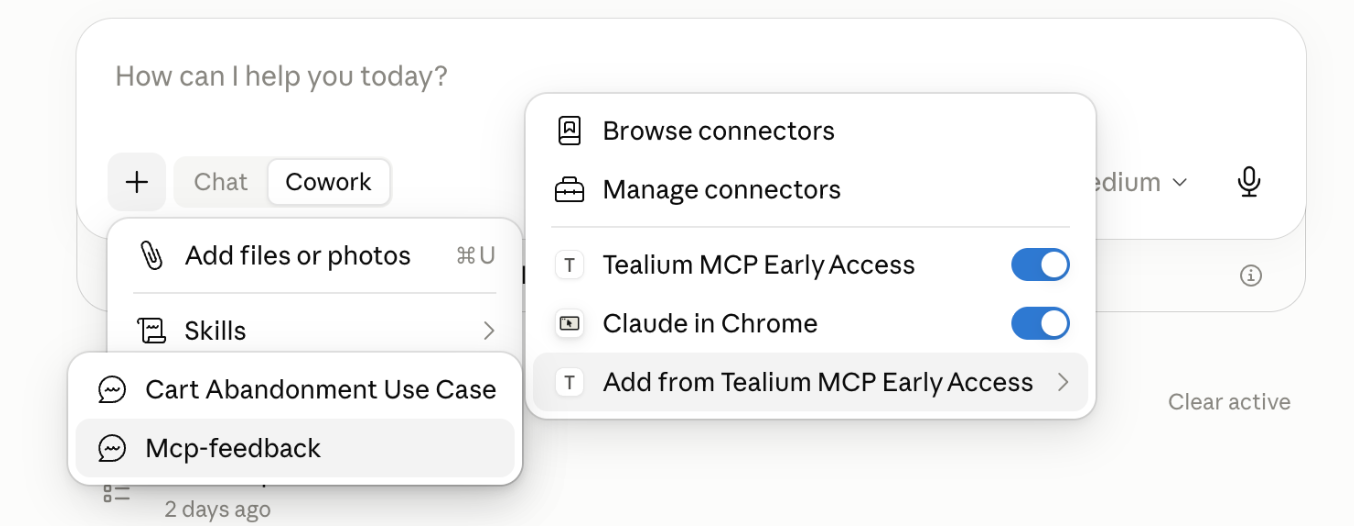
Share the exported report with Tealium support for analysis.
Tealium Configuration MCP creates a version that does not load in the Tealium UI
Do not publish the version. If the version was already published, use Version Management to roll back to the previous published version. Contact support and provide details about what the agent was doing when the issue occurred.
Tealium Configuration MCP cannot modify an existing audience
Tealium Configuration MCP can read some audiences that it cannot modify. This limitation can occur when an audience has not been edited and published in the current audiences UI. Open the audience in Activate > Audiences, make no changes, and save and publish it. Publishing upgrades the audience to the current configuration format automatically. After publishing, start a new MCP session. On the next tool call, Tealium Configuration MCP notifies you that a new published version is available, but the current session draft still holds the older audience version. This upgrade is permanent and cannot be reverted.
Audiences that use segments are not supported for Tealium Configuration MCP configuration changes. You must edit those audiences in the Tealium UI.
A requested entity or action is unavailable
Check the supported objects list to confirm that the entity and operation are supported. Review your prompt and rephrase with more explicit instructions if Tealium Configuration MCP cannot complete the task.
Changes are not visible after committing
Confirm that the commit completed successfully. If needed, type commit to force a commit. Then open Version History in the Tealium UI and locate the new saved version. Committing does not publish. The new version requires a separate publish action in the Tealium UI.
Running out of tokens
Upgrade your Claude plan. If a specific activity or prompt seems to consume an unexpectedly high number of tokens, contact Tealium support with details about the prompt and task. Sharing these details helps Tealium investigate and optimize further.
The model starts losing accuracy in a long conversation
For long conversations where the model starts hallucinating or losing accuracy, ask the model to summarize the conversation, then start a new chat using that summary as the initial context.
This page was last updated: October 13, 2026