---
title: Connector template variables
description: Learn how to build advanced connector requests using template variables.
url: https://docs.tealium.com/server-side/connectors/templates/template-variables/
---
## Overview
Connector templates and template variables let you build custom API requests for connectors. Use them to dynamically populate payloads in the format required by a vendor's endpoint, such as JSON or XML.
Templates define the structure of your API request and template variables provide the dynamic values.
For more information, see [about-connector-templates](https://docs.tealium.com/about-connector-templates/).
## How it works
Template variables are attribute mappings that provide the dynamic data for your templates.
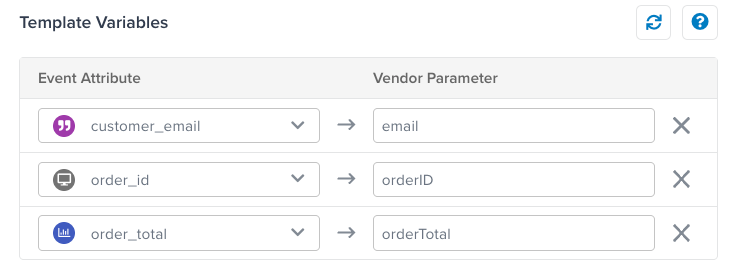
For example, to include a dynamic order ID value in a template, map the attribute `order_id` to a template variable named `orderID`. Then, in the template, reference `{{orderID}}` where the order ID value should appear.
To add template variables, go to the connector action, click the **Templates** tab, and map attributes to variable names.
## Data types
To use connector templates effectively, it's important to understand the structure of the data used to render a template.
This section describes how to use template variables of different data types in templates, including how to reference values directly, use helper methods like `.toJson`, and how to iterate over multiple values.
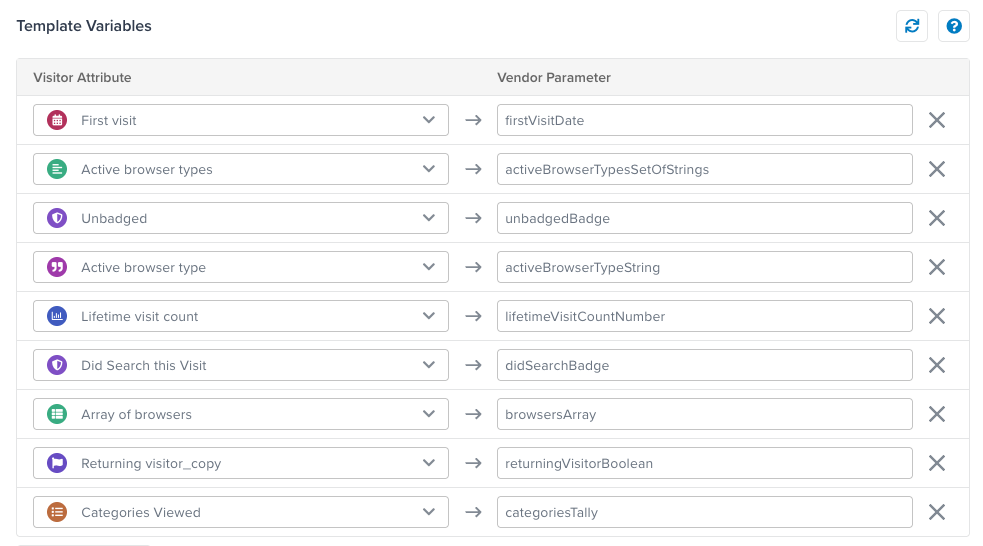
These examples are based on the following template variable mappings:
### Badge
A variable mapped to a badge attribute has the value `true` if it's assigned or an empty value if it's not assigned. A badge variable never has the value `false`, so to avoid blank values, use a section and inverted section to force a value of `true` or `false`.
**Template variable values:**
```js
unbadgedBadge =
didSearchBadge = true
```
**Template:**
```json
{
"badge1": "{{unbadgedBadge}}",
"badge2": {{didSearchBadge}},
"badge1SectionInvert": {{#unbadgedBadge}}true{{/unbadgedBadge}}{{^unbadgedBadge}}false{{/unbadgedBadge}},
"badge2SectionInvert": {{#didSearchBadge}}true{{/didSearchBadge}}{{^didSearchBadge}}false{{/didSearchBadge}}
}
```
**Rendered template:**
```json
{
"badge1": "",
"badge2": true,
"badge1SectionInvert": false,
"badge2SectionInvert": true
}
```
### Boolean
A variable mapped to a boolean is either `true`, `false`, or unassigned. Render the value directly or use it in section or inverted section logic. Boolean values are not quoted.
**Template variable values:**
```js
returningVisitorBoolean = false
```
**Template:**
```json
{
"boolean": {{returningVisitorBoolean}},
"booleanSectionTrue": {{#returningVisitorBoolean}}true{{/returningVisitorBoolean}},
"booleanSectionInvert": {{^returningVisitorBoolean}}false{{/returningVisitorBoolean}}
}
```
**Rendered template:**
```json
{
"boolean": false,
"booleanSectionTrue": ,
"booleanSectionInvert": false
}
```
Keep in mind that the boolean value might not be set. To handle this in a template, use section and inverted section logic to force a value to be rendered.
**Template logic:**
```json
{
"boolean": {{#returningVisitorBoolean}}true{{/returningVisitorBoolean}}{{^returningVisitorBoolean}}false{{/returningVisitorBoolean}}
}
```
### Date
A variable mapped to a date attribute is represented as a timestamp (numbers) in the template data and rendered as ISO 8601 strings in the output.
Helper functions: [formatDate](https://docs.tealium.com/connector-template-helper-functions/#formatDate), [toTimestamp](https://docs.tealium.com/connector-template-helper-functions/#toTimestamp), [toTimestampMs](https://docs.tealium.com/connector-template-helper-functions/#toTimestampMs), [unixTimestamp](https://docs.tealium.com/connector-template-helper-functions/#unixTimestamp), [unixTimestampMs](https://docs.tealium.com/connector-template-helper-functions/#unixTimestampMs).
**Template variable values:**
```js
firstVisitDate = 1749081326718
```
**Template:**
```json
{
"date": "{{firstVisitDate}}"
}
```
**Rendered template:**
```json
{
"date": "2025-06-04T23:55:26.718Z"
}
```
### Number
A variable mapped to a number attribute can be rendered directly or converted to an integer using `.toInteger`.
**Template variable values:**
```js
lifetimeVisitCountNumber = 1.0
```
**Template:**
```json
{
"number": {{lifetimeVisitCountNumber}},
"numberToInteger": {{lifetimeVisitCountNumber.toInteger}}
}
```
**Rendered template:**
```json
{
"number": 1.0,
"numberToInteger": 1
}
```
### String
A variable mapped to a string attribute can be referenced directly. If you are building a JSON template, use `.toJson` to ensure an escaped string that can be quoted.
Helper functions: [hash](https://docs.tealium.com/connector-template-helper-functions/#hash), [md5](https://docs.tealium.com/connector-template-helper-functions/#md5), [sha1](https://docs.tealium.com/connector-template-helper-functions/#sha1), [sha256](https://docs.tealium.com/connector-template-helper-functions/#sha256), [substring](https://docs.tealium.com/connector-template-helper-functions/#substring).
**Template variable values:**
```json
activeBrowserTypeString = "Chrome"
```
**Template:**
```json
{
"string": "{{activeBrowserTypeString.toJson}}"
}
```
**Rendered template:**
```json
{
"string": "Chrome"
}
```
### Set of Strings
A variable mapped to a set of strings attribute is similar to an array but may not preserve order. To render a set of strings variable as an array, use `.toJson`. For more advanced cases, use an iteration to apply a custom format for each entry.
Helper functions: [sum](https://docs.tealium.com/connector-template-helper-functions/#sum).
**Template variable values:**
```json
activeBrowserTypesSetOfStrings = ["Chrome", "Safari"]
```
**Template:**
```json
{
"setOfStrings": {{activeBrowserTypesSetOfStrings}},
"setOfStringsToJson": {{activeBrowserTypesSetOfStrings.toJson}},
"setOfStringsIter": [
{{#activeBrowserTypesSetOfStrings}}
"-- {{.}} --"{{#iter.hasNext}},{{/iter.hasNext}}
{{/activeBrowserTypesSetOfStrings}}
]
}
```
Referencing a set of strings variable directly, without `.toJson` or iterating, renders unquoted values.
**Rendered template:**
```json
{
"setOfStrings": [Chrome,Safari],
"setOfStringsToJson": ["Chrome", "Safari"],
"setOfStringsIter": [
"-- Chrome --",
"-- Safari --"
]
}
```
### Arrays
A variable mapped to an array attribute should be referenced with `.toJson`. For more advanced cases, use an iteration to apply a custom format for each entry.
Helper functions: [sum](https://docs.tealium.com/connector-template-helper-functions/#sum).
Referencing an array variable directly renders unquoted values.
**Template variable values:**
```json
browsersArray = ["Chrome", "Safari"]
```
**Template:**
```json
{
"array": {{browsersArray}},
"arrayToJson": {{browsersArray.toJson}},
"arrayIter": [
{{#browsersArray}}
"-- ({{iter.index}}) {{.}} --"{{#iter.hasNext}},{{/iter.hasNext}}
{{/browsersArray}}
],
}
```
**Rendered template:**
```json
{
"array": [Chrome,Safari],
"arrayToJson": ["Chrome", "Safari"],
"arrayIter": [
"-- (1) Chrome --",
"-- (2) Safari --"
]
}
```
### Tally
A variable mapped to a tally attribute is a map of keys to numeric values. Use `.toJson` to render the full tally with quoted keys. Use `.entrySet` to iterate the tally, then `key` and `value` to reference the key-value pairs.
Referencing a tally directly renders unquoted values.
**Template variable values:**
```js
categoriesTally = {
"Shirts" : 1,
"Blazers" : 2,
"Electronics" : 4,
"Eyewear" : 1
}
```
**Template:**
```json
{
"tally": {{categoriesTally}},
"tallyToJson": {{categoriesTally.toJson}},
"tallyIter": {
{{#each categoriesTally.entrySet}}
"{{key}}": "{{value.toInteger}}"{{#iter.hasNext}},{{/iter.hasNext}}
{{/each}}
}
}
```
**Rendered template:**
```json
{
"tally": {Shirts=1, Blazers=2, Electronics=4, Eyewear=1},
"tallyToJson": {
"Shirts":1,
"Blazers":2,
"Electronics":4,
"Eyewear":1
},
"tallyIter": {
"Shirts": "1",
"Blazers": "2",
"Electronics": "4",
"Eyewear": "1"
}
}
```