---
title: Webhook - Kony API
description: How to configure an advanced Webhook - Send Custom Request action using Template Variables for Kony API
url: https://docs.tealium.com/server-side/connectors/webhook-connectors/vendor-examples/webhook-kony-api/
---
## Overview
Submit an http request to Kony with a list of subscriber IDs and name & value pairs. Whole request body is a JSON message.
## Vendor requirements
### Sample JSON message:
```json
{
"messageRequest": {
"appId": "IceMobile",
"global": {},
"messages": {
"message": {
"content": {
"priorityService": "false",
"data": "Message Body",
"mimeType": "text/plain"
},
"overrideMessageId": 0,
"startTimestamp": 0,
"expiryTimestamp": 0,
"subscribers": {
"subscriber": [
{
"ksid": "95784"
},
{
"ksid": "97899"
}
]
},
"platformSpecificProps": {
"iphone": {
"badge": 0,
"customData": {
"key": [
{
"name": "trip_type",
"content": "o"
},
{
"name": "o",
"content": "LAX"
},
{
"name": "d",
"content": "NRT"
},
{
"name": "dd",
"content": "2016-01-09"
},
{
"name": "rd",
"content": "2016-01-20"
}
]
}
}
},
"type": "PUSH"
}
}
}
}
```
#### Notes
* Subscribers array is dynamic and can contain one or more subscriber IDs.
* "customData" key array is dynamic and can contain one or more name and content objects.
## Action implementation
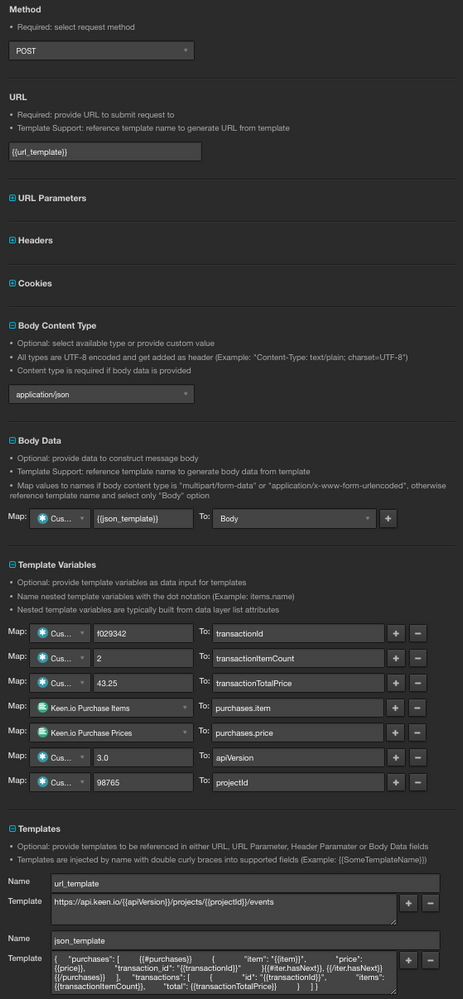
### Method field
Set to `POST`.
### URL field
Set to PutsReq bucket URL.
Consult Kony API documentation for a URL. A PutsReq URL is adequate to demonstrate a general implementation here.
### Body content type
Select option `application/json`.
### Body data
Select `Body` option and provide a template reference.
|Name| Value|
|---| ---|
|`Body`| `{{json_template}}`|
### Template variables
Set name and value pairs to be referenced and replaced in templates.
|Name| Value| Note|
|---| ---| ---|
|`subscribers.ksid`| Kony Sub IDs| Set of Strings attribute|
|`customData.name`| Kony Data Names| Set of Strings attribute|
|`customData.content`| Kony Data Contents| Set of Strings attribute|
Variables are internally translated to JSON and made available to all templates.
#### Resulting JSON structure:
```json
{
"subscribers": [
{
"ksid": "sub-id-1"
},
{
"ksid": "sub-id-2"
}
],
"customData": [
{
"name": "name-1",
"content": "Content A"
},
{
"name": "name-2",
"content": "Content B"
},
{
"name": "name-3",
"content": "Content C"
}
]
}
```
### Templates
`json_template`
```json
{
"messageRequest": {
"appId": "IceMobile",
"global": {},
"messages": {
"message": {
"content": {
"priorityService": "false",
"data": "Message Body",
"mimeType": "text/plain"
},
"overrideMessageId": 0,
"startTimestamp": 0,
"expiryTimestamp": 0,
"subscribers": {
"subscriber": [
{{#subscribers}}
{
"ksid": "{{ksid}}"
}{{#iter.hasNext}}, {{/iter.hasNext}}
{{/subscribers}}
]
},
"platformSpecificProps": {
"iphone": {
"badge": 0,
"customData": {
"key": [
{{#customData}}
{
"name": "{{name}}",
"content": "{{content}}"
}{{#iter.hasNext}}, {{/iter.hasNext}}
{{/customData}}
]
}
}
},
"type": "PUSH"
}
}
}
}
```
### Templates Rendered
Internally template gets rendered and its content injected where referenced.
`json_template`
```json
{
"messageRequest": {
"appId": "IceMobile",
"global": {},
"messages": {
"message": {
"content": {
"priorityService": "false",
"data": "Message Body",
"mimeType": "text/plain"
},
"overrideMessageId": 0,
"startTimestamp": 0,
"expiryTimestamp": 0,
"subscribers": {
"subscriber": [
{
"ksid": "sub-id-1"
},
{
"ksid": "sub-id-2"
}
]
},
"platformSpecificProps": {
"iphone": {
"badge": 0,
"customData": {
"key": [
{
"name": "name-1",
"content": "Content A"
},
{
"name": "name-2",
"content": "Content B"
},
{
"name": "name-3",
"content": "Content C"
}
]
}
}
},
"type": "PUSH"
}
}
}
}
```
## Action configuration screenshot