---
title: About DataAccess
description: This article describes Tealium DataAccess, it's capabilities, and the different data formats.
url: https://docs.tealium.com/server-side/data-storage/about/
---
To have DataAccess enabled for your account and profile, contact your account manager.
## Prerequisites
Users must be assigned the Data Warehouse Admin role to use DataAccess. For more information, see [Server-side account-settings]().
## How it works
Tealium DataAccess is an enterprise data hub solution that extends the power of [Tealium iQ Tag Management](https://docs.tealium.com/iq-tag-management/), [Tealium AudienceStream CDP](https://docs.tealium.com/introduction-to-audiencestream/), and [Tealium EventStream API Hub](https://docs.tealium.com/introduction-to-eventstream/) with long-term storage for data collected from web and mobile touch points, online and offline channels, and real-time audiences.
DataAccess works with EventStream feeds to store event data and with AudienceStream audiences to store visitor profile data.
DataAccess consists of the following products:
* [Tealium EventStore]()
* [Tealium AudienceStore]()
* [Tealium EventDB]()
* [Tealium AudienceDB]()
### Data formats
Built on the enterprise-class solutions Amazon Redshift and Amazon S3, DataAccess offers two formats for storage: structured data and semi-structured data.
#### Structured data
Structured data is stored in Amazon Redshift Spectrum. The data has fixed fields and a high degree of organization, which makes it easy to upload, extract, load, store, query, and analyze data. Structured data can be accessed using third-party business intelligence tools.
Structured data is used for the following products:
* [Tealium EventDB]()
* [Tealium AudienceDB]()
#### Semi-structured data
Semi-structured data is a raw format that is stored in Amazon S3. Data can be downloaded as JSON files directly from the interface. Due to the lack of organization in semi-structured data, structure is harder to accomplish. To use the data, Extract, Transform, and Load (ETL) into systems such as Hadoop is required.
Semi-structured data is used for the following products:
* [Tealium EventStore]()
* [Tealium AudienceStore]()
## Product capabilities
|Offerings name| Store data| Extract data| Query data| Analyze data| Visualize data|
|:-:| :-:| :-:| :-:| :-:| :-:|
|EventStore| ✔| ✔| | ✔| |
|EventDB| ✔| ✔| ✔| ✔| ✔|
|AudienceStore| ✔| ✔| | ✔| |
|AudienceDB| ✔| ✔| ✔| ✔| ✔|
|EventDirect| | ✔| | | |
|Webhook (Event/Audience)| | ✔| | | |
## Product descriptions
|Offerings name| Description| Structure type| Technology used|
|---| ---| ---| ---|
|EventStore| - EventStore collects raw event data from your web, mobile, internet of things (IoT), and offline channels.
- The data is stored in a semi-structured data format in [JavaScript Object Notation (JSON)](http://www.json.org/) on an Amazon Simple Storage Service S3 bucket.
| Semi-structured| Amazon S3|
|EventDB| - EventDB extends the capabilities of EventStore by taking the raw event data and organizing it into a structured Amazon Redshift database instance.
- Any Postgres-enabled platform can access this data and users can run SQL directly against the database.
- The structured data can then be used by business intelligence (BI) tools, such as Splunk and data visualization tools, such as Tableau.
| Structured| Amazon Redshift Spectrum|
|EventDirect| - EventDirect sends event data, such as the following, directly to an Enterprise Data Warehouse (EDW) of your choice:
- Metadata
- Querystring parameters
- Web cookie data
- In-content events
- JavaScript variables
- Marketing source
- URL parameters
- Data manipulation / Tealium iQ extension data - privacy, lookup tables, attribution)
- The data is sent in HTTP POST format.
| Customer Choice| Customer Host|
|AudienceStore| - AudienceStore provides raw storage of audience data and attributes collected from AudienceStream.
- Like EventStore, the data is stored in a semi-structured format on an Amazon S3 instance.
- [JavaScript Object Notation (JSON](http://www.json.org/)) or Comma Separated Value (.csv) are employed to create this file.
- The data is made available for download through the Amazon S3 bucket.
| Semi-structured| Amazon S3|
|AudienceDB| - Like EventDB, AudienceDB expands on the capabilities of AudienceStore and stores audience data and attributes collected from AudienceStream in a structured format.
- Any Postgres-enabled platform can access this data and users can run SQL directly against the database.
- The structured data can be tapped and used for historical analysis or visualization at a later date by BI tools such as Splunk and data visualization tools, such as Tableau.
| Structured| Amazon Redshift|
|Webhook (Event/Audience)| - Webhook (Event/Audience) sends audience data (attributes / profiles, badges, and omnichannel / offline data) directly to the EDW of your choice.
| Customer Choice| Customer Host|
DataAccess products only collect data while they are enabled.
## Logging
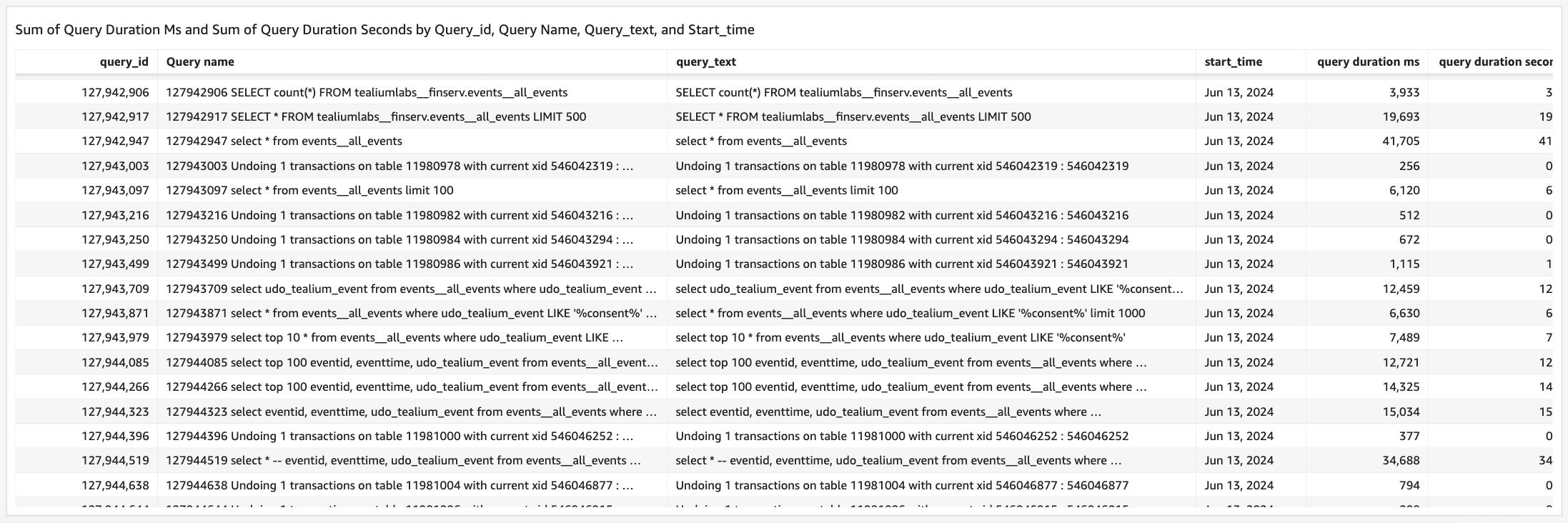
All queries to DataAccess are logged and stored in the **DataAccess query history** dataset.
The dataset is available in read-only mode to all DataAccess customers. You can access it in the following ways:
* **DataAccess tables**: Requires authentication credentials. For more information, see [connect-to-databases](https://docs.tealium.com/connect-to-databases/).
* **Insights dashboard**: Available under **Analyze > Insights > Dashboards > Analyses**. For more information, see [manage-analyses](https://docs.tealium.com/manage-analyses/).
You can use the query history dataset to:
* Identify unauthorized access or unusual query patterns that may indicate security threats.
* Maintain an audit trail of user activity to support regulatory requirements.
* Detect inefficient queries that may affect DataAccess performance.