---
title: AudienceDB data guide
description: This article describes the data available within the Tealium DataAccess AudienceDB.
url: https://docs.tealium.com/server-side/data-storage/audiencedb-eventdb/audiencedb-data-guide/
---
## How it works
AudienceDB stores both visit-level and visitor-level data to a Postgres-like database in Amazon Redshift™ where you can query and analyze the data directly using your preferred SQL client or Business Intelligence (BI) tool.
When AudienceDB is activated, a database is created in Amazon Redshift™ to store your AudienceStream data. The new database contains a table for each data type that it can store. Data associated with visit-level data is stored in tables prefixed with `visit_`. Data associated with visitor-level data is stored in tables prefixed with `visitor_`. In addition to the tables, several views are also created to make it easier to write queries.
If you are new to AudienceDB, review the basics in [Working with AudienceDB and EventDB](https://docs.tealium.com/audiencedb-and-eventdb/).
## EventDB and AudienceDB diagram
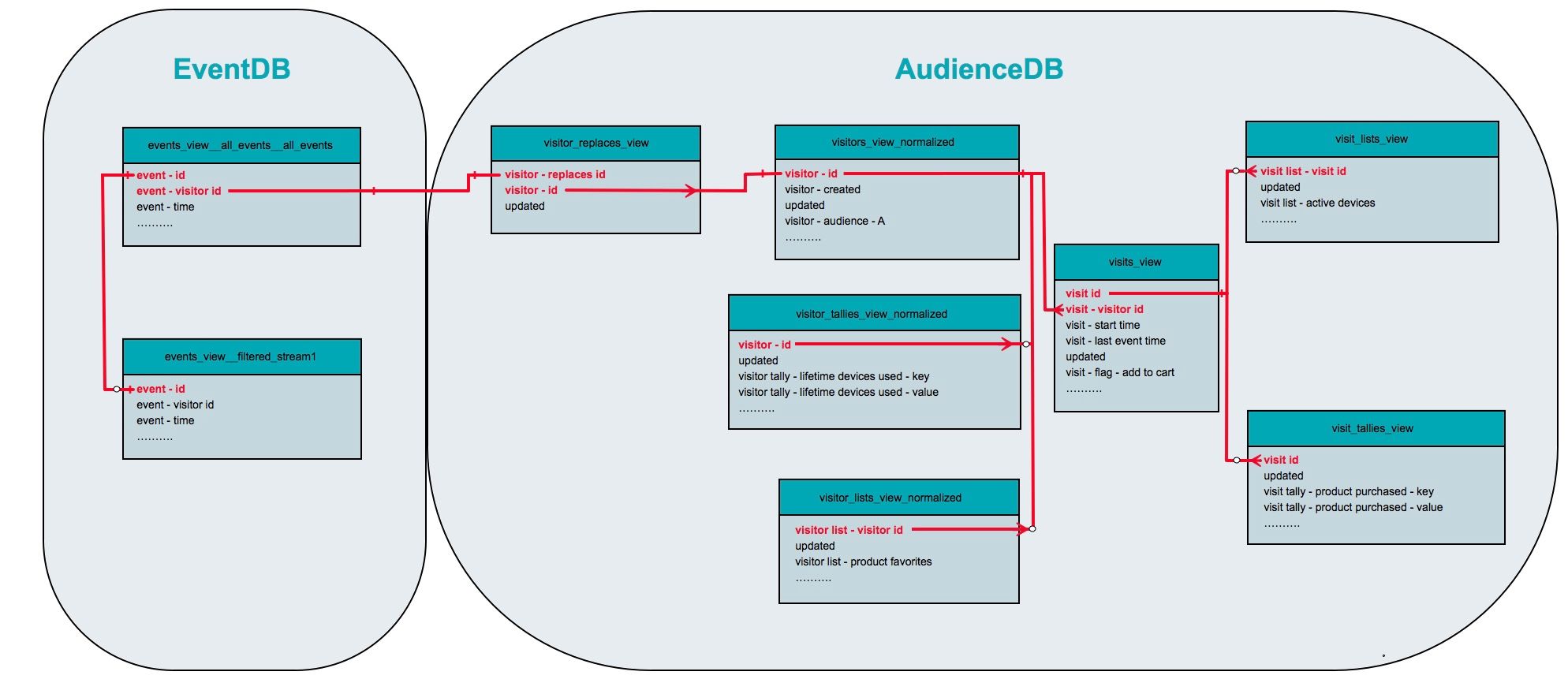
Event, visitor, and visit attributes work together in EventDB and AudienceDB. The following diagram illustrates the relationships between the EventDB and AudienceDB attributes. These relationships are important when writing queries that return event data for a specific visit or visitor.
## Attributes and column names
Each visit and visitor attribute that is enabled for AudienceDB appears as a column in one or more of the database tables.
The following is a list of the attribute data types and the corresponding naming convention of the columns where "###" represents the attribute ID. The examples shown in the table indicate visitor attributes. Visit attributes use the word "visit" in place of "visitor".
|Attribute data type| Table column name|
|---| ---|
|Array| - **Table**: `array_###`
- **View**: `visitor array - array_name (###)`
- **Normalized**: `visitor array - array_name`
|
|Audience
Values `t` for true and `f` for false indicate the presence in audience.| - **Table**: `audience_account_profile_###`
- **View**: `visitor - audience - audience_name (account_profile_###)`
- **Normalized**: `visitor - audience - audience_name`
|
|Badge
Values `t` for true and `f` for false indicate presence of badge.| - **Table**: `badge_###`
- **View**: `visitor - badge - badge_name (###)`
- **Normalized**: `visitor - badge - badge_name`
|
|Boolean| - **Table**: `flag_###`
- **View**: `visitor - flag - boolean_name (###)`
- **Normalized**: `visitor - flag - boolean_name`
|
|Date| - **View**: `visitor - date - date_name (###)`
- **Normalized**: `visitor - date - date_name`
|
|Number| - **Table**: `metric_###`
- **View**: `visitor - metric - metric_name (###)`
- **Normalized**: `visitor - metric - metric_name`
|
|Set of Strings| - **Table**: `list_###`
- **View**: `visitor list - set_name (###)`
- **Normalized**: `visitor list - set_name`
|
|String| - **Table**: `property_###`
- **View**: `visitor - property - property_name (###)`
- **Normalized**: `visitor - property - property_name`
|
|Tally| - **Table**: `visitor_tally_###_key` `visitor_tally_###_value`
- **View**: `visitor tally - tally_name (###) - key` "visitor tally - tally_name (###) - value"
- **Normalized**: `visitor tally - tally_name - key` "visitor tally - tally_name - value"
|
## AudienceDB tables
The following table describes AudienceDB table types used for audience data and the name of the corresponding "view" and "normalized" tables:
|Data type and description| Table/View/Normalized name|
|---| ---|
|**Arrays**
Each item in the array is a row in the table with an additional column named `index` for the zero-based array position.| `visit_arrays`
`visit_arrays_view`
`visitor_arrays`
`visitor_arrays_view`
`visitor_arrays_view_normalized`|
|**Set of Strings**
Each item in the set is a row in the table.| `visit_lists`
`visit_lists_view`
`visitor_lists`
`visitor_lists_view`
`visitor_lists_view_normalized`|
|**Tally**
Each item in the tally is a row in the table with one column for the key (suffix `_key`) and one column for the value (suffix `_value`).| `visit_tallies`
`visit_tallies_view`
`visitor_tallies`
`visitor_tallies_view`
`visitor_tallies_view_normalized`|
|**Stitched Visitors**
Visitor IDs that are stitched in the profile as part of [visitor stitching]().| `visitor_replaces`
`visitor_replaces_view`|
|**Visits**
Current visit attributes and any audiences they belong to.| `visits`
`visits_view`|
|**Visitors**
Visitor attributes and any audiences they belong to.| `visitors`
`visitors_view`
`visitors_view_normalized`|
|**Visitor Batches**| For internal use only|
### Visitor tables, views, and normalized views
AudienceDB exposes visitor data as a table, a view, and a normalized view. Each one serves a different purpose.
| Table/View Name | Description |
|---|---|
| `visitors` (table) | Contains all historical rows for each visitor, including every state change. Column names use attributes IDs (for example, `badge_30`, `flag_5052`). Use this table for auditing and change-over-time queries. |
| `visitors_view` (view) | Contains the latest state only (one row per visitor). Column names use attribute IDs and names (for example, `visitor - badge - VIP (13)`). Use this view for current-state reporting. |
| `visitors_view_normalized` (normalized view) | Contains the same rows as `visitors_view`, but column names omit the attribute ID (for example, `visitor - badge - VIP`). Use this view with BI tools and for stable dashboards where column names must remain consistent. |
| `visitor_replaces` (table) | Contains all versions of stitched visitor ID mappings, including replaced IDs. Use this table for complete stitching history. |
| `visitor_replaces_view` (view) | Contains only the latest, non-replaced visitor IDs. Use this view to resolve visitor IDs to their current profiles. |
## Sample database structures
The following sections provide sample structure examples for each view to assist in determining what is unique about each view and how the view differs from other views.
### Visit arrays
The following example shows the basic formatting for the `visit_arrays` table:
```nohl
visit_id | index | updated | visit_array_421
----------------------------------+--------------------------------------------------------------------------
13e1a63890793caa346f90607a76c1c98 | 0 | 2018-05-17 01:03:30.344 | Smartphone
13e1a63890793caa346f90607a76c1c98 | 1 | 2018-05-17 01:03:30.344 | Phone Charger
13e1a63890793caa346f90607a76c1c98 | 2 | 2018-05-17 01:03:30.344 | Smartphone Case
```
### Visit lists
The following example shows the basic formatting for the `visit_lists` table:
```nohl
myexample=# select visit_id, updated, visit_list_284 from visit_lists;
visit_id | updated | visit_list_284
----------------------------------+-------------------------------------------------------------------------
13e1a63890793caa346f90607a76c1c98 | 2018-04-22 12:50:20.471 | Cell Phones & Accessories
13e1a63890793caa346f90607a76c1c98 | 2018-04-22 12:50:20.471 | Computers and Tablets
13e1a63890793caa346f90607a76c1c98 | 2018-04-22 12:50:20.471 | Office Supplies
```
### Visit tallies
The following example shows the basic formatting for the `visitor_tallies` table:
```nohl
myexample=# select visit_id, updated, visit_tally_5144_key, visit_tally_5144_value from visit_tallies;
visit_id | updated | visit_tally_5144_key | visit_tally_5144_value
-----------------------------------------------------------------+-------------------------+----------------------+-----------------------
19fd8716d2f8341b81f84f471b5f950873d5c88acee9c61089f286fb8b5d4903 | 2017-09-04 20:39:05.303 | Furniture | 2
06db172cf2a8fd7f9ff882a28a14ad266ee67824c9bc3ee0b1fcc451b42cec68 | 2017-09-05 06:20:16.209 | Furniture | 14
162e22ba6c168bff2385bcfba9d4ba8e15767d1ad8b519b3a872a2ad89d3f3dd | 2017-09-05 06:04:59.671 | Search | 2
4225575ce21a7f9454c56c269eccfee9782e03c6f647a743f058b7b667dd3bbb | 2017-09-20 06:30:14.63 | Home | 1
e1e5dd5e58bc97056f8340e242205e1ec2ab0a88c94c890563399f55828638f7 | 2017-09-09 14:22:08.575 | Furniture | 3
(5 rows)
```
### Visitor arrays view
The following example shows the basic formatting for the `visitor_arrays_view` table:
```nohl
myexample=# select "visitor - id", "index", "updated", "visitor array - cart product name (421)" from visitor_arrays_view;
"visitor array - visitor id" | index | updated | "visitor array - cart product name (421)"
----------------------------------+--------------------------------------------------------------------------
13e1a63890793caa346f90607a76c1c98 | 0 | 2018-05-17 01:03:30.344 | Smartphone
13e1a63890793caa346f90607a76c1c98 | 1 | 2018-05-17 01:03:30.344 | Phone Charger
13e1a63890793caa346f90607a76c1c98 | 2 | 2018-05-17 01:03:30.344 | Smartphone Case
```
### Visitor lists
The following example shows the basic formatting for the `visitor_lists` table:
```nohl
myexample=# select visitor_id, updated, visitor_list_5168 from visitor_lists;
visitor_id | updated | visitor_list_5168
-----------------------------------------------+-------------------------+-------------------
015e94db670900084e37016b9b7300087002f07f00432 | 2017-11-04 13:30:33.553 | Cell Phones
015e94db670900084e37016b9b7300087002f07f00432 | 2017-11-04 13:30:33.553 | Phone Accessories
015e94db670900084e37016b9b7300087002f07f00432 | 2017-11-04 13:30:33.553 | Office Supplies
```
### Visitor replaces
The following example shows the basic formatting for the `visitor_replaces` table:
```nohl
myexample=# select visitor_replaces_id, visitor_id, updated from visitor_replaces where updated is not null;
visitor_replaces_id | visitor_id | updated
----------------------------------------------+-------------------------------------------------+------------------------
015f8d82498b00132b921ecf890d00089001c08100432 | myexample_main__5216_username@gmail.com | 2017-11-23 15:32:28.81
015f4a0302b9009e17205a49027005079001c07100c48 | myexample_main__5216_username@myexample.com | 2017-11-24 22:50:31.105
015feb1537cc00305e319fca622400085001d07d00720 | myexample_main__5216_username@yahoo.com | 2017-11-26 01:22:27.57
015decf4f3170011afb0979834420007e007b07600720 | myexample_main__5216_username@hotmail.com | 2018-01-03 22:03:20.837
015e3b903e48000c7944f6af4b8e00087016907f0049e | myexample_main__5216_username@cox.net | 2018-01-28 03:59:45.031
(5 rows)
```
### Visitor tallies
The following example shows the basic formatting for the `visitor_tallies` table:
```nohl
myexample=# select visitor_id, updated, visitor_tally_57_key, visitor_tally_57_value from visitor_tallies;
visitor_id | updated | visitor_tally_57_key | visitor_tally_57_value
----------------------------------------------+-------------------------+----------------------+------------------------
015dcd068996007c1f95a24aa47002075008d06d0093c | 2017-09-01 03:14:18.519 | Safari | 8
015e40b27e55004ec842e2b9d0f800090001c08800408 | 2017-09-02 13:35:40.834 | Chrome | 2
015e34c9fd270014a6799597769a00088008808000408 | 2017-08-31 05:44:14.013 | Chrome | 1
(5 rows)
```
### Visitors view
The following example shows the basic formatting for the `visitors_view` table:
```nohl
select "visitor - id", "visitor - created", "updated", "visitor - audience - bedroom shoppers (myexample_main_102)" from visitors_view limit 1;
visitor - id | visitor - created | updated | visitor - audience - bedroom shoppers (myexample_main_102)
-----------------------------------------------+---------------------+------------------------+---------------------------------------------------------------
015de32cbb1e00265733c8c3c5bc00080001c07800976 | 2017-08-14 23:55:46 | 2017-08-20 15:27:48.75 | f
(1 rows)
```
### Visits table
The following example shows the basic formatting for the `visits` table:
```nohl
myexample=# select visit_id, visitor_id, start_time, last_event_time, updated, property_5300, flag_5432 from visits limit 5;
visit_id | visitor_id | start_time | last_event_time | updated | property_5300 | flag_5432
-----------------------------------------------------------------+-----------------------------------------------+---------------------+---------------------+-------------------------+---------------+-----------
4af5f070998b6e471d05a809d55c62811784c57ee196c39a599c0a352e925e01 | 015c9e257f220048ebb26bfdb68405072001c06a00bd0 | 2017-07-18 17:04:31 | 2017-07-18 17:39:27 | 2017-07-18 18:09:28.994 | |
42fd5d3067b5472a57aa7fe6e8cf12d5d60ea2a9399d54de01bfb0b06e33bd73 | 015cc166a9b100028f7070a6e51d01049003e00d00bd0 | 2017-07-18 21:10:21 | 2017-07-18 21:13:32 | 2017-07-18 21:43:32.948 | |
9729e709ec80bc476dc6c36c6bf33f998f92c3f2e3af5509078c6402ceff29bf | 015d56a5ec3d00128011a73f446404079001c07100838 | 2017-07-19 18:28:26 | 2017-07-19 18:28:26 | 2017-07-19 18:38:27.903 | |
6d1c801fb894234347d27a61b9b0f82ac918bfdc36a0510ab3be8ea6a72b9038 | 015c662062aa00474d60cc4f7b4005072001c06a00bd0 | 2017-07-19 19:30:08 | 2017-07-19 19:30:08 | 2017-07-19 19:40:12.802 | |
c97a0a0c9dfc4cb58e23dbfdb98528cddc8a989c9d65f0e6fd89ffdc5e82c727 | 015c662062aa00474d60cc4f7b4005072001c06a00bd0 | 2017-07-19 21:33:00 | 2017-07-19 21:33:00 | 2017-07-19 21:43:02.803 | |
(5 rows)
```
## Understanding stitched visitors
In AudienceDB, only one visitor profile is maintained in the visitors table for visitors that become stitched. The visitor profiles for stitched visitors are viewed as one, but with different IDs. The `visitor_replaces` table provides a lookup method to view the replaced `visitor_ids` to accomplish this.
Visitor Replaces table example:
|`visitor_replaces_id`| `visitor_id`|
|---| ---|
|1| 3|
|2| 3|
|4| 6|
|5| 6|
In this table:
* Visitor1 and Visitor2 are stitched into Visitor3.
* Visitor4 and Visitor5 are stitched into Visitor6.
The above information can be used to join the `visitors` table to the `visits` table or the EventDB tables, if needed.
To join events from EventDB to AudienceDB:
* Join `events_x` directly to the `visitors` table for non-stitched visitors, and;
* Join through the `visitor_replaces` table for those that have been stitched, as shown in the following example:
```sql
SELECT e."event - id", v."visitor - id"
FROM account__profile.events_view__all_events__all_events e
LEFT JOIN account__profile.visitor_replaces_view r ON e."event - visitor id" = r."visitor - replaces id"
JOIN account__profile.visitors_view_normalized v ON (v."visitor - id" = r."visitor - id" or v."visitor - id" = e."event - visitor id")
limit 1000;
```
* This example accounts for visitor IDs in `events_all_events` being in `visitors` OR `visitor_replaces`.
Visitors attributed to single event sessions are not stored in the visitors table.
## Additional resources
* [(Amazon Redshift™) Best Practices for Designing Queries](https://docs.aws.amazon.com/redshift/latest/dg/c_designing-queries-best-practices.html).
* [(Amazon Redshift™) Tuning Query Performance](https://docs.aws.amazon.com/redshift/latest/dg/c-optimizing-query-performance.html).