This guide describes the data available in EventDB, including built-in columns, cookie variables, tag execution data, and performance timing metrics.
Contact your account manager to activate EventDB for the appropriate profiles in your account. For information about configuring the attributes stored in EventDB, see Configure AudienceDB and EventDB.
EventDB stores event-level data captured by the Tealium Collect tag or other Collect library. EventDB uses EventStore as its data source and loads that data into Amazon Redshift for SQL-based querying.
How it works
EventDB loads data from EventStore in the following steps:
- The Tealium Collect tag sends event data to EventStore, where it’s stored in an Amazon S3 bucket as flattened JSON.
- When the S3 bucket reaches a size of 100 MB uncompressed or after one hour has elapsed, whichever comes first, the system compresses the data and prepares it for Redshift.
- After compression, the system copies and imports the data into the Redshift database for your account.
New data is stored in EventDB within 30 to 90 minutes, depending on the load for the Redshift cluster.
Event feeds and tables
Each event feed is stored in the Redshift schema ACCOUNT__PROFILE, where ACCOUNT__PROFILE is your Tealium account and profile separated by a double underscore, for example mycompany__main. Within that schema, each event feed has:
- A base table named
events__{event-feed-id} - A view with descriptive column names:
events_view__{feed-name}__{event-feed-id}
The event feed ID is the identifier for the feed in EventStream. To find the feed ID, go to Live Events, click the feed, and inspect the URL.
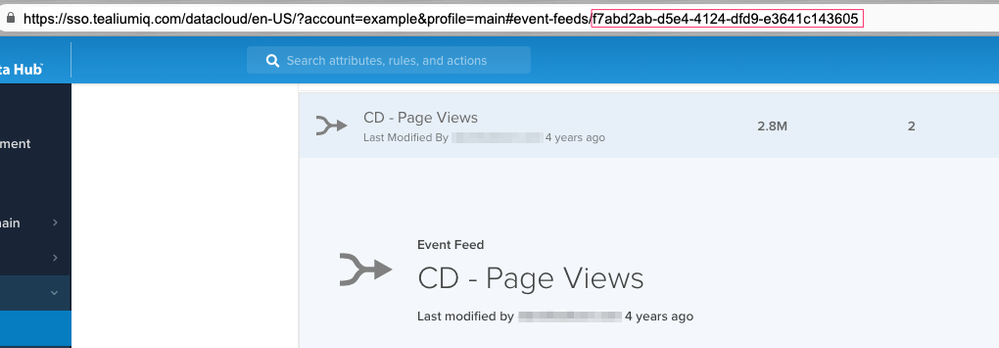
For example, for a feed named “Conversions” with ID 7f78639b-34c2-4f8e-a575-d132c1008c80 in the schema mycompany__main:
| Table type | Full table reference |
|---|---|
| Base table | mycompany__main.events__7f78639b_34c2_4f8e_a575_d132c1008c80 |
| View | mycompany__main.events_view__conversions__7f78639b_34c2_4f8e_a575_d132c1008c80 |
The All Events feed uses fixed names instead of a feed ID:
| Table type | Full table reference |
|---|---|
| Base table | mycompany__main.events__all_events |
| View | mycompany__main.events_view__all_events__all_events |
Column naming conventions
EventDB provides two ways to access the same data. The base table uses short, prefixed column names such as pageurl_full_url and firstpartycookies_utag_main_ses_id. The view uses descriptive column names such as event - page url - full_url and event - first party cookies - utag_main_ses_id.
This guide documents the base table column names. The following prefixes indicate the category of data:
| Prefix | Data category |
|---|---|
| (none) | Built-in columns |
dom_ | DOM variables captured from the page |
firstpartycookies_ | First-party cookie values |
js_ | JavaScript variables from the page |
meta_ | Page metadata |
pageurl_ | Page URL components |
referrerurl_ | Referrer URL components |
tags_ | Tag execution data |
udo_ | Data layer variables |
Not all prefixes appear in every EventDB table. The following columns are always included:
- DOM attributes (
dom_) - Preloaded Tealium event attributes (
udo_tealium_*,udo_ut_*) - Tag execution data (
tags_) - First-party cookie values (
firstpartycookies_) - Page URL and referrer URL components (
pageurl_,referrerurl_)
The following columns only appear if the corresponding event attributes are enabled for EventDB:
- JavaScript variables (
js_) - Page metadata (
meta_) - Custom data layer variables (
udo_) — only present if the variables exist in your data layer
For more information, see Configure AudienceDB and EventDB.
Built-in columns
The Tealium Collect tag sends several predefined variables alongside the event data, as described in the following sections.
Default columns
| Column | Description |
|---|---|
visitorid | The unique ID of the visitor. |
eventid | An alphanumeric identifier unique to the event. |
eventtime | The event timestamp stored as a UTC datetime in Amazon Redshift (for example, 2024-08-01 00:00:02). This differs from the epoch millisecond representation in EventStore. |
useragent | The user-agent header for the client. |
clientip | The IP address of the client. Requires the Enable Visitor IP Attribute setting to be enabled in server-side account settings. |
DOM variables
DOM data from the page appears as columns prefixed with dom_. DOM attributes are always sent to EventDB and cannot be excluded. For more information, see Configure AudienceDB and EventDB.
| Column | Description |
|---|---|
dom_domain | Domain of the site. |
dom_pathname | Pathname of the URL. |
dom_query_string | Querystring portion of the URL, captured directly from the DOM (document.location.search). |
dom_url | The full URL of the HTML document. |
dom_title | Title of the HTML document. |
dom_viewport_width | Device screen width. |
dom_viewport_height | Device screen height. |
Page URL variables
| Column | Description |
|---|---|
pageurl_scheme | The URI protocol, such as http or https. |
pageurl_domain | Domain of the site. |
pageurl_path | Pathname of the URL. |
pageurl_querystring | Querystring portion of the URL, parsed from the full page URL. |
pageurl_query_params_KEY | For each querystring parameter, a column containing the parameter value, where KEY is the parameter name. |
pageurl_full_url | The full URL of the page. |
Referrer URL variables
| Column | Description |
|---|---|
referrerurl_scheme | The URI protocol of the referring URL. |
referrerurl_domain | Domain of the referring site. |
referrerurl_path | Pathname of the referring URL. |
referrerurl_querystring | Querystring portion of the referring URL following the ? character. |
referrerurl_query_params_KEY | For each referring URL querystring parameter, a column containing the parameter value, where KEY is the parameter name. |
referrerurl_full_url | The full URL of the referring page. |
First-party cookie variables
First-party cookie values use columns prefixed with firstpartycookies_. EventDB captures values from all browser cookies, not just utag_main. The column name reflects the cookie name and key. For example, firstpartycookies_utag_main_ses_id corresponds to the ses_id key in the utag_main cookie.
| Column | Description |
|---|---|
firstpartycookies_utag_main_ses_id | A unique identifier for the session. |
firstpartycookies_utag_main__st | The time at which the current visitor session expires, in milliseconds. |
firstpartycookies_utag_main_v_id | The visitor ID. |
firstpartycookies_utag_main__ss | A flag indicating the start of a session. Values are 0 or 1. |
firstpartycookies_utag_main__pn | The page number within the current session. Increments on each page load. |
firstpartycookies_utag_main__sn | The session count for this visitor. |
firstpartycookies_utag_main__se | The number of events during the current session. |
firstpartycookies_utag_main_dc_region | The AudienceStream region where the visit session data is kept, collected from the HTTP response header. |
firstpartycookies_utag_main_dc_group | A random number used with the Sample Size setting in the Tealium Collect tag to determine which events are sampled. |
firstpartycookies_utag_main_dc_visit | (Legacy) The number of sessions for which the Collect tag has fired. Starts at 1 for the first visit. |
firstpartycookies_utag_main_dc_event | (Legacy) The number of events for which the Collect tag has fired. Starts at 1 for the first page view of a visit. |
firstpartycookies_COOKIENAME | A cookie value, where COOKIENAME is the cookie name. For example, the _ga cookie appears as firstpartycookies__ga. |
JavaScript variables
JavaScript variables from the page appear as columns prefixed with js_. The exact column names depend on the variables available on your site. Check your EventDB schema or Live Events to confirm naming.
| Column | Description |
|---|---|
js_VARIABLE | A JavaScript variable from the page. |
For example, js_screen_availheight captures the available screen height, and js__tealplc_libraryversion captures the Tealium Private Label Cloud library version.
Meta variables
HTML metadata from the page appears as columns prefixed with meta_.
| Column | Description |
|---|---|
meta_VARIABLE | An HTML meta tag value, where VARIABLE is the meta tag name. |
For example, meta_description captures the page meta description, and meta_og_title captures the Open Graph title.
Tags executed
Each tag that fires on an event generates a column in the following format:
tags_PROFILE_TAGID_executed
PROFILE is the Tealium iQ profile name and TAGID is the numeric ID of the tag. The value is true when the tag executed on the event, and (null) when it did not.
For example, tags_platform_3_executed indicates that tag 3 in the platform profile executed on the event.
Data layer (UDO) variables
Data layer variables sent with the event use columns prefixed with udo_. For example, a data layer variable named page_name maps to udo_page_name. The maximum character length for any single value is 255 characters.
The Tealium Collect tag also sends several built-in variables in the udo_ namespace:
| Column | Description |
|---|---|
udo_tealium_event | The name of the event, such as view or link. |
udo_tealium_event_type | The type of tracking call, such as view or link. |
udo_tealium_library_name | The Collect library, such as utag.js. |
udo_tealium_library_version | The utag.js version number. |
udo_tealium_datasource | The data source identifier for the Collect tag. |
udo_tealium_random | A random number generated for the event. |
udo_tealium_session_id | The unique identifier for the session. |
udo_tealium_session_number | The session count for this visitor. |
udo_tealium_session_event_number | The number of events in the current session. |
udo_tealium_timestamp_epoch | The Unix epoch timestamp of the event. |
udo_tealium_timestamp_utc | The UTC timestamp of the event. |
udo_tealium_timestamp_local | The local timestamp of the event. |
udo_tealium_account | The Tealium account. |
udo_tealium_profile | The Tealium iQ profile name. |
udo_tealium_environment | The publish environment, such as prod. |
udo_ut_account | The Tealium iQ account. Earlier equivalent of udo_tealium_account. |
udo_ut_profile | The Tealium iQ profile. Earlier equivalent of udo_tealium_profile. |
udo_ut_env | The publish environment associated with the utag.js file. Earlier equivalent of udo_tealium_environment. |
udo_ut_event | The event type, such as view. Earlier equivalent of udo_tealium_event. |
udo_ut_domain | The top-level domain of the page. |
udo_ut_version | The utag.js version and publish timestamp. |
Performance timing variables
Browser performance timing metrics appear as columns prefixed with udo_timing_. These metrics provide Real User Monitoring (RUM) data about page load performance.
| Column | Description |
|---|---|
udo_timing_domain | The domain where the timing data was collected. |
udo_timing_timestamp | The date and time when the timing data was collected, in epoch time. |
udo_timing_dns | DNS lookup time. |
udo_timing_connect | Connection time. |
udo_timing_time_to_first_byte | Time to first byte from the server. |
udo_timing_dom_loading_to_interactive | Time from DOM loading to DOM interactive state. |
udo_timing_dom_interactive_to_complete | Time from DOM interactive to DOM complete state. |
udo_timing_load | Page load event duration. |
udo_timing_front_end | Front-end rendering time. |
udo_timing_fetch_to_response | Time from fetch start to response start. |
udo_timing_fetch_to_complete | Time from fetch start to DOM complete. |
udo_timing_fetch_to_interactive | Time from fetch start to DOM interactive. |
udo_timing_pathname | The pathname where the timing data was collected. |
udo_timing_query_string | The query string in the URL where the timing data was collected. |
udo_timing_response | Server response time. |
If the value of a timing column equals zero, no timing information was captured. Ignore zero values when reporting or averaging.
Data retention
EventDB data remains available in Amazon Redshift for the length of time specified in your contract. When an event record reaches its expiration date, it’s automatically purged. For more information, see About AudienceDB and EventDB.
Calculate visitor timezone
EventDB doesn’t store the timezone for a visitor directly. To calculate the timezone, compare eventtime with firstpartycookies_utag_main_ses_id on the row where firstpartycookies_utag_main__ss equals 1, which marks the start of the session. Because eventtime is a UTC datetime and firstpartycookies_utag_main_ses_id is an epoch millisecond value, convert firstpartycookies_utag_main_ses_id to a UTC datetime before comparing. The difference between the two values represents the visitor’s UTC offset.
Sample row
The following shows a representative subset of columns from a single EventDB row:
| Column | Sample value |
|---|---|
visitorid | e9a2771b641f48009921b3a783db4c84 |
eventid | 9ec23b59-2540-4a38-8ad0-2a1ec5d6016a |
eventtime | 2024-08-01 00:00:02 |
dom_title | countryroadgroup | main |
pageurl_scheme | https |
pageurl_domain | my.tealiumiq.com |
pageurl_path | /tms |
pageurl_full_url | https://my.tealiumiq.com/tms |
referrerurl_scheme | https |
referrerurl_domain | my.tealiumiq.com |
referrerurl_path | /tms |
firstpartycookies_utag_main_ses_id | 1722465600428 |
firstpartycookies_utag_main__pn | 7 |
firstpartycookies_utag_main__sn | 199 |
firstpartycookies_utag_main__ss | 0 |
tags_platform_3_executed | true |
udo_tealium_event | profile_publish_status |
udo_tealium_library_name | utag.js |
udo_tealium_library_version | 4.48.0 |
udo_tealium_datasource | ujitge |
udo_tealium_random | 8550613331015047 |
udo_tealium_session_id | 1722465600428 |
udo_tealium_session_number | 199 |
udo_tealium_session_event_number | 398 |
udo_tealium_environment | prod |
udo_user_type | client |
The sample includes account-specific data layer variables such as udo_user_type alongside built-in columns. The data layer variables in your EventDB tables depend on your implementation.
This page was last updated: April 29, 2026