Event specifications are a way to validate the quality of incoming data.
How it works
Event specifications (also referred to as “event specs”) represent your data layer for events. Event specifications allow the data quality of your events to be validated in real-time using the live events chart or event specification detail view.
Event specifications contain a set of definitions, which consist of:
- The
tealium_eventattribute, which represents the name of the event and the specification associated with it. For example, if thetealium_eventattribute has a value ofvideo_complete, the system looks for an event specification with the namevideo_completeto validate the incoming event against. Use event specifications to categorize and manage your events based on their purpose and expected data structure. - A list of attributes that describe the data expected for that event. Attributes are individual pieces of information, such as
video_id,video_length, orvideo_platform. By defining these attributes, you create a clear expectation of the data your system should receive. Defined attributes help teams maintain consistent data structures, reduce errors, and simplify troubleshooting. - Their expected data types, such as string, number, or boolean. Defining data types helps ensure that each attribute contains the correct kind of information. Defined data types reduce errors, improve data consistency, and make it easier to validate and process events across different systems.
- Whether they are required for a valid event. Required attributes must be present in an event for it to be considered valid. Required attributes ensure that critical information is always included, which is essential for accurate analysis and decision-making.
During validation, each attribute is evaluated for presence, data type, and any configured data value rules. Required attribute failures produce an invalid event. Optional attribute failures produce a warn event. For information about configuring data value rules, see Add a validation rule to an attribute.
Validation is limited to 100 attributes per event. Required attributes are evaluated first in alphabetical order, followed by optional attributes in alphabetical order. Attributes beyond the limit are not validated and are marked as warn with the reason Spec limit reached.
Event specifications do not filter out data. Even if an event is invalid, the system still processes the event.
Example event specification
For example, a video_complete event contains the following attributes and data:
{
    "tealium_event"  : "video_complete", // name of event and specification
    "video_id"       : "xWlEk2i9r5Q",
    "video_length"   : 300,
    "video_name"     : "How to track videos in Tealium",
    "video_platform" : "YouTube",
}
An event specification for this video_complete event contains the following:
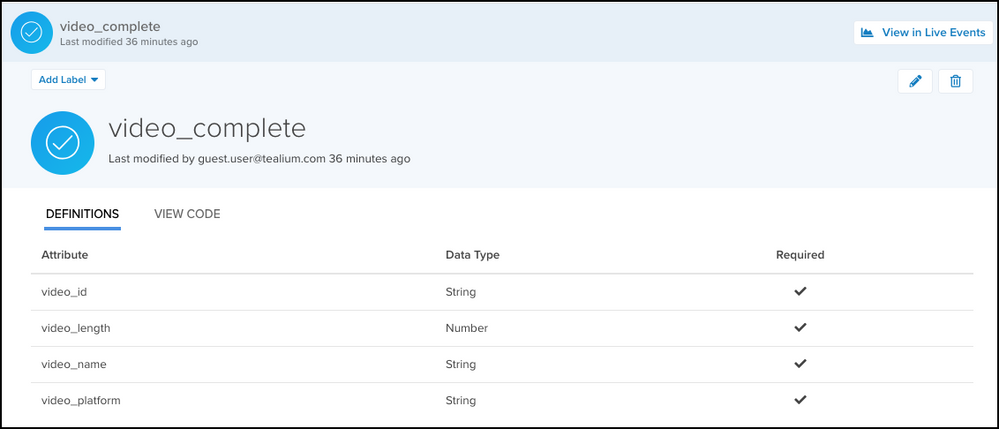
- The
tealium_eventattribute identifies the event asvideo_complete. - The Definitions table provides contextual information about the event and defines the required attributes, their expected data types, and whether they are required for a valid event.
Benefits
Event specifications provide two primary benefits for data management:
- To standardize the implementation of events across all platforms.
- To evaluate the data quality of incoming events.
View event specification statistics
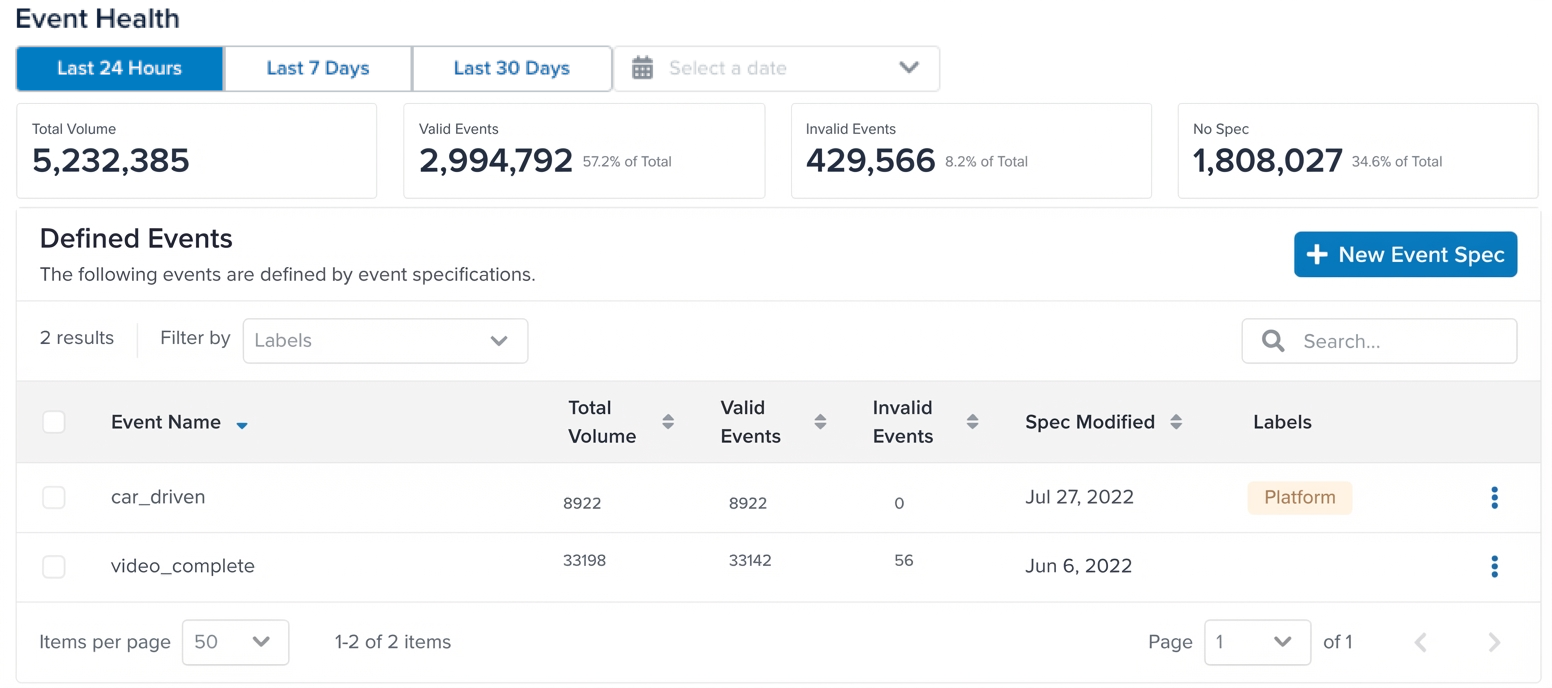
The Event Health window displays the total statistics for all event specifications. The table shows the statistics for each individual event specification. You can select a time frame to view the statistics for that period.
The following statistics are displayed:
- Total Volume
The total number of events received in the selected time frame. - Valid Events
The number of events that satisfy the requirements of an active event specification. Valid events have a known value for thetealium_eventattribute and all the required attributes from the specification. The more valid events you see, the better your data quality. Higher counts indicate your installations are sending the data expected in your specifications. - Warn Events
The number of events that match a specification and pass all required attribute checks, but have one or more optional attributes that are missing, have the wrong data type, or don’t match a configured data value rule. Fixing warn events improves the completeness of your optional attribute data. - Invalid Events
The number of events that match an event specification, but have at least one required attribute that is missing, has the wrong data type, or doesn’t match a configured data value rule. These issues can be resolved by fixing the installation code that is sending the events or adjusting the event specification. - No Spec
The number of events that do not have a matching event specification. No Spec events either do not have thetealium_eventattribute or do not have a corresponding event specification.
The Defined Events table lists all existing event specifications and the Total Volume, Valid Events, Warn Events, Invalid Events, and No Spec statistics for each event specification.
View event specification details
Click any event specification in the Defined Events table to view its details.
Statistics about the event specification are displayed at the top of the page, including the total volume of events matching the specification, and the percentage of valid, warn, and invalid events.
The Definitions table provides contextual information about the event and defines the required attributes, their expected data types, and whether they are required for a valid event.
Code sample
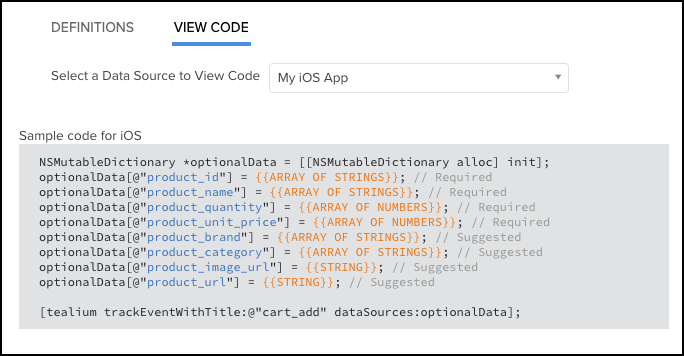
From the event specification details window, click Code and select the data source you are using to display the base code and examples to use for this event specification.
The following code sample demonstrates the tracking code for the video_complete event for a data source named My iOS App:
Event specifications in live events
Once an event specification is created and the tracking code is implemented, use the live events chart to view incoming events in real-time to evaluate their data quality.
For more information, see Live events.
This page was last updated: September 2, 2026