Use the functions writer AI assistant to generate, edit, and debug JavaScript code for data transformation, event, and visitor functions.
This feature is only available to select customers. If you are interested in trying this feature, contact support.
Functions writer is a capability of the AI assistant built specifically for the functions code editor.
The functions AI assistant can:
- Write and edit function code.
- Generate test payloads.
- Debug and explain existing function code.
- Advise on best practices for performance, personally identifiable information (PII) handling, and error handling.
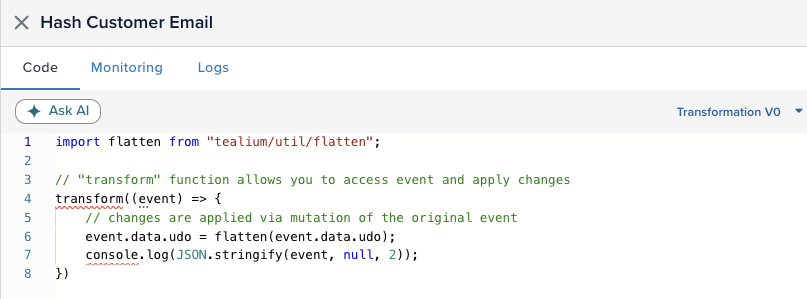
To open the AI assistant, click Ask AI in the functions code editor.
Requirements
This feature requires the following:
- An account admin must enable the Functions AI assistant at the account level and profile level in AI Settings. For more information, see Tealium AI features.
How it works
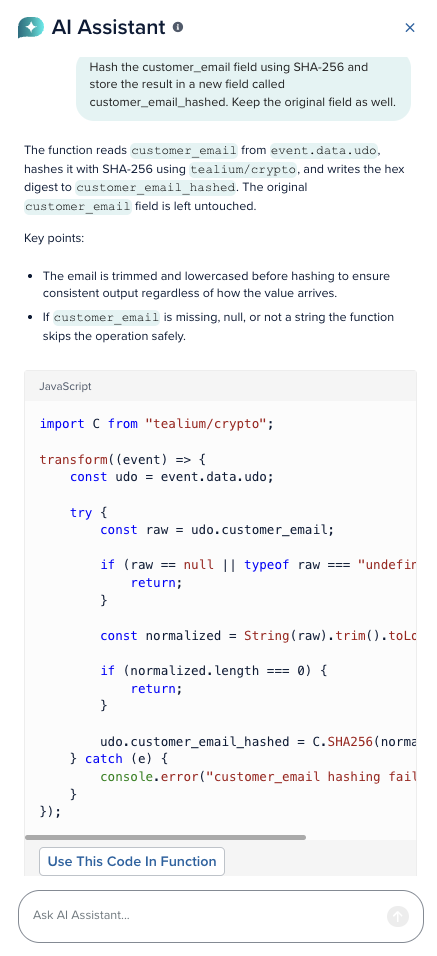
The functions AI assistant provides a dedicated chat session about the currently open function. Open the AI assistant and describe what you need in plain English. The functions AI assistant responds and generates JavaScript code, trigger rules, or test payloads for the current function.
The AI assistant always confirms its actions before making changes to your function configuration.
Session context
The AI assistant automatically includes the context of the current function. This context includes the function code, active trigger rule, test payload, account and profile details, and defined attributes. While the function is open, the AI assistant persists the context, even if you close and re-open the chat window.
Sessions expire after 30 minutes of inactivity or if you close the function window. Each function you open starts a new AI chat session.
Data transformation functions
The AI assistant reads the active runtime and generates code accordingly. When a data transformation function is open, the following constraints apply:
- The AI assistant only generates synchronous code. It excludes calls to
fetch,async,await, Promises, and network I/O. - Generated code modifies
event.data.udodirectly and does not reassignevent. - Generated code cannot write to attributes with the
tealium_prefix.
For more information, see About data transformation functions.
Event and visitor functions
Event and visitor functions execute in a runtime that supports async operations and outbound HTTP calls. When an event or visitor function is open, the AI assistant can generate code that:
- Makes outbound HTTP calls.
- Accesses stored auth credentials using
helper.getAuth(). - Re-sends events using
track().
For more information, see Event and visitor functions.
Use the functions AI assistant
To use the functions AI assistant:
- Go to Server-Side > Functions.
- Open a function or create one.
- In the code editor, click Ask AI to open the AI assistant panel.
- Describe what you want the function to do or ask questions about the function. The more specific your description, the more accurate the result. For examples, see example prompts.
- Review the response and apply the changes, or continue chatting to make adjustments.
Apply changes
When the AI assistant generates code or a test payload, it displays a button to confirm that you want to replace the current function or payload with the generated one.
Click Use This Code In Function or Use This Test Payload to replace all existing code or test payload.
Example prompts
The following examples show how to describe tasks for each function type.
Data transformation functions
Trim whitespace and lowercase the customer_email field.
Hash customer_email with SHA-256 and store the result in customer_email_hashed. Lowercase the email before hashing. Keep the original field.
Set customer_segment to high_value if order_total is greater than 500, otherwise set it to standard.
Event and visitor functions
When tealium_event equals purchase, POST order_id, order_total, and customer_email from event.data.udo to https://api.example.com/orders as JSON. Use a Bearer token from auth key "orders_token". Skip the call if order_id is missing.
Using customer_id from event.data.udo, call GET https://api.example.com/customers/{customer_id} with a Bearer token from auth key "crm_token". Extract loyalty_tier from the response and re-track it with track() alongside the original tealium_event.
Test payloads
Generate a test payload for a purchase event with two products.
Create a test payload where customer_email is missing, to test the null guard.
Give me a test payload that satisfies the trigger rule you just created.
Debug and explain existing code
Review my current code and identify any edge cases I have not handled.
Explain how my current trigger rule works.
Rate limits
Tealium tracks token usage at the account level across multiple AI features. If you exceed the account-level limit, you cannot use AI features until the limit resets. The AI assistant displays the reset time when you reach the limit.
This page was last updated: August 26, 2026