AI connectors and Tealium functions overview
Overview of how AI connectors and Tealium functions work, with guidance on when to use AI connectors for LLM activation or Tealium functions to invoke your own model.
Tealium supports two approaches for integrating AI models into real-time data workflows:
- AI connectors: Integrate with supported large language model (LLM) providers for prompt-based interactions.
- Tealium functions: Invoke your own model or call custom endpoints.
Use this guide to understand how each approach works and when to use each one.
How AI connectors work
AI connectors integrate with hosted LLM APIs from supported providers (OpenAI, Amazon Bedrock, and Google Vertex AI) and require prompt-based interactions that return structured JSON. They follow a consistent prompt, response, and activation pattern across all supported providers.
To use an AI connector, you need authentication credentials for your provider and at least one configured action that defines the prompt template and the Tealium data to include.
AI connectors are designed for LLM activation only. They are not intended for invoking traditional machine learning models that return numeric scores or tabular predictions. For those use cases, use Tealium functions.
Data flow
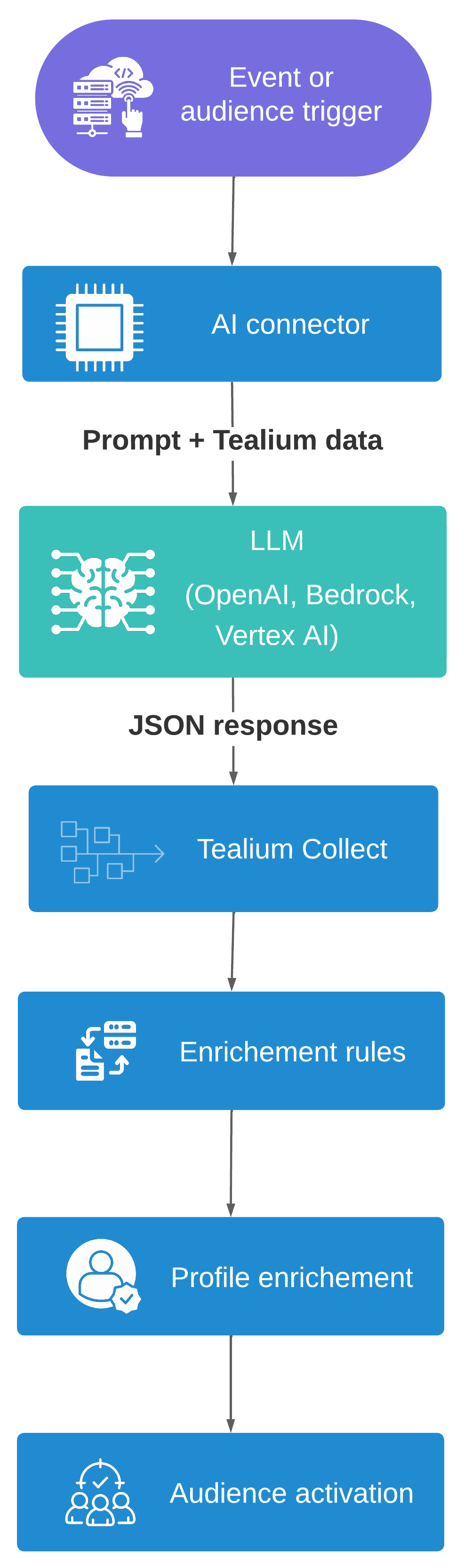
- Trigger fires: An event or audience change triggers the connector action.
- Prompt sent: The connector sends your prompt and Tealium data to the AI model endpoint.
- Response received: The model returns a JSON object.
- Event ingested: The connector forwards the response to Tealium Collect.
- Profile enriched: Enrichment rules write the response values to visitor profile attributes.
- Audiences activate: Audience rules evaluate the updated attributes and downstream connectors fire.
Prompt
When a connector action fires, it constructs a prompt using your template and the Tealium data you configured.
To include event or visitor data in the prompt, reference the variables {{event_payload}} and {{visitor_profile}}. Enable Add Event Payload or Add Visitor Profile in the connector action settings to make these variables available. For audience actions, you can also enable Add Current Visit to include current visit data within the visitor profile object.
The prompt tells the model:
- What data to evaluate
- What question to answer
- What format to use in the response
Response
The AI connector parses the model response and extracts a JSON object. The response must include the required Tealium routing parameters (tealium_account, tealium_profile, tealium_visitor_id) and one or more output values.
Activation
If the model returns a valid JSON object, the connector forwards it to Tealium Collect as an inbound event. Enrichment rules then write the response values to visitor profile attributes. From there, audiences and downstream connectors activate based on the enriched profile.
Supported AI connectors
The following AI connectors are available:
| Connector | Description |
|---|---|
| OpenAI | Invoke GPT models with event or visitor data using the OpenAI API. |
| Amazon Bedrock AI | Invoke foundation models and managed prompts through AWS Bedrock. |
| Google Vertex AI | Invoke Vertex AI models with event data for real-time enrichment. |
Each connector follows the same prompt, response, and activation pattern described above. Configuration details such as authentication, model selection, and action parameters are specific to each connector.
How Tealium functions work for AI
Tealium functions provide a code-based approach for invoking your own model (IYOM). Instead of using a preconfigured connector, you write JavaScript to call any model endpoint directly from an event or visitor function. Use cases include traditional machine learning models returning numeric scores, LLMs hosted on platforms without a dedicated AI connector, and endpoints on data platforms such as Snowflake Cortex, Databricks Model Serving, or Amazon SageMaker.
Tealium functions support both event functions (triggered after an event is processed) and visitor functions (triggered after a visitor profile updates), allowing you to score either immediate event context or accumulated visitor history.
When a function fires, it follows these steps:
- Collect event attributes or visitor profile data.
- Build a request payload for your model endpoint.
- Call the endpoint using
fetch(). - Parse the response.
- Send the prediction to Tealium Collect using
track(). - Enrichments write the prediction values to the visitor profile.
Because functions cannot directly modify visitor profiles, predictions must flow through Tealium Collect and be written to the profile through enrichments.
Functions support both synchronous and asynchronous model invocation. For models that respond within 10 seconds, use a standard await pattern. For slower models, use a fire-and-forget pattern. The function sends the request and exits immediately. The model then POSTs the result to a callback URL when inference completes.
For implementation details, see Create a function for AI activation.
Choosing between AI connectors and Tealium functions
Use an AI connector when
- You are invoking a large language model for prompt-based inference.
- Your use case maps to one of the supported providers: OpenAI, Amazon Bedrock, or Google Vertex AI.
- Your prompt uses a consistent template with event or visitor data as input.
- The model returns structured JSON that can be forwarded directly as a Tealium event.
- You want to configure the integration through the Tealium UI without writing code.
- Your use case consists of targeted, high-value events or audiences rather than high-volume, low-value events such as page views.
AI connectors are designed for use cases that return structured, predictable JSON output, such as classification labels, confidence values, or identifiers from a predefined list. They are not designed for long-form content or media generation. If your use case requires free-form output, align with your organization’s AI governance processes before moving to production.
Use Tealium functions when
- You need to invoke a traditional machine learning model that returns numeric scores or tabular predictions.
- Your model is hosted on a platform without a dedicated AI connector.
- Your payload requires custom logic, data transformation, or PII filtering before sending to the model.
- You need to handle asynchronous model responses or custom network configuration.
When you must remove or tokenize PII before sending data to a model, use Tealium functions to apply custom filtering and send only the approved fields to the endpoint.
Comparison
| Consideration | AI connectors | Tealium functions |
|---|---|---|
| Setup | Configure through the UI | Write JavaScript code |
| Model types supported | LLMs only | Any ML or AI model, including traditional ML |
| Supported providers | OpenAI, Amazon Bedrock, Google Vertex AI | Any HTTPS endpoint |
| Prompt control | Template-based with variable substitution | Fully programmable |
| Authentication | Managed in connector settings | Stored as authentication tokens in Tealium functions |
| Payload structure | Fixed based on event or visitor data | Fully customizable |
| PII filtering before model call | Platform-level only (consent categories and restricted attributes). No custom pre-processing code inside the connector | Fully customizable filtering and transformation in JavaScript before calling the model |
| Response handling | Automatic JSON parsing and event forwarding | Custom parsing in code |
| Asynchronous support | Limited. The Bedrock AI Workflow action supports asynchronous responses through Lambda callbacks | Supported through fire-and-forget pattern and model callbacks to Tealium Collect |
Common use cases
The following table lists common AI use cases and the recommended integration approach for each.
| Use case | Description | Recommended approach |
|---|---|---|
| Sentiment analysis | Classify customer feedback or review events as positive, neutral, or negative. | AI connector |
| Intent classification | Identify a customer’s likely intent based on browsing or purchase history. | AI connector |
| Next-best-action (playbook selection) | Select from a finite set of approved actions or offers based on visitor context. | AI connector |
| Propensity scoring | Predict the likelihood of a conversion, churn, or high-value action using a trained machine learning model. | Tealium functions |
| Next-best-action (score optimization) | Score a set of candidate actions using a numeric model and select the highest-scoring one. | Tealium functions |
| Feature store lookup | Retrieve pre-calculated scores or features from a data platform for activation. | Tealium functions |
| Custom endpoint inference | Invoke a model hosted on a platform without a dedicated AI connector. | Tealium functions |
Resources
This page was last updated: April 1, 2026