EventDB and AudienceDB queries and reports
This guide provides sample SQL queries for EventDB and AudienceDB to build reports on visitor behavior, session activity, device usage, and omnichannel attribution.
Each section includes sample queries that you can adapt to your schema. Scenarios covered in this guide include:
- Bounce sessions and session behavior
- Visitors and visits over time
- Top pages and entrances
- Known visitors and identity stitching
- Cross-device usage
- Channel attribution and offline purchase activity
Requirements
To run these queries, you need:
- Tealium AudienceStream
- EventDB and AudienceDB enabled for your account and profile. See Configure AudienceDB and EventDB.
- The required attributes configured in AudienceStream as listed in the tables below. Default attributes are available in all accounts. Contact your account manager for custom attribute configuration.
In each query, replace ACCOUNT__PROFILE with your database name. This value is your Tealium account and profile joined with a double underscore, for example mycompany__main.
Column names in these queries follow AudienceDB and EventDB view naming conventions based on attribute titles. The exact column names in your account depend on how you define attributes in AudienceStream. Verify column names against your schema before running queries.
Required AudienceDB attributes
| Table | Attribute | Type |
|---|---|---|
visitor_replaces_view | visitor - id | Default |
visitor_replaces_view | visitor - replaces id | Default |
visits_view | visit - property - active device (46) | Default |
visits_view | visit - visitor id | Default |
visitor_tallies_view_normalized | visitor tally - lifetime devices used - key | Default |
visitor_tallies_view_normalized | visitor - id | Default |
visitors_view_normalized | visitor - id | Default |
visitors_view_normalized | visitor - metric - average visit duration in minutes | Default |
Required EventDB attributes
| Table | Attribute | Type |
|---|---|---|
events_view__all_events__all_events | event - visitor id | Default |
events_view__all_events__all_events | event - first party cookies - utag_main_ses_id | Default |
events_view__all_events__all_events | event - first party cookies - utag_main__pn | Default |
events_view__all_events__all_events | event - time | Default |
events_view__all_events__all_events | event - page url - full_url | Default |
events_view__all_events__all_events | event - omnichannel - createddate | Custom |
events_view__all_events__all_events | event - omnichannel - price | Custom |
events_view__all_events__all_events | event - first party cookies - channel_name_cookie | Custom |
EventDB queries
EventDB stores event-level data such as page views, sessions, and timestamps. Use these queries to analyze traffic patterns and session behavior.
For more information about EventDB tables and schema, see EventDB data guide.
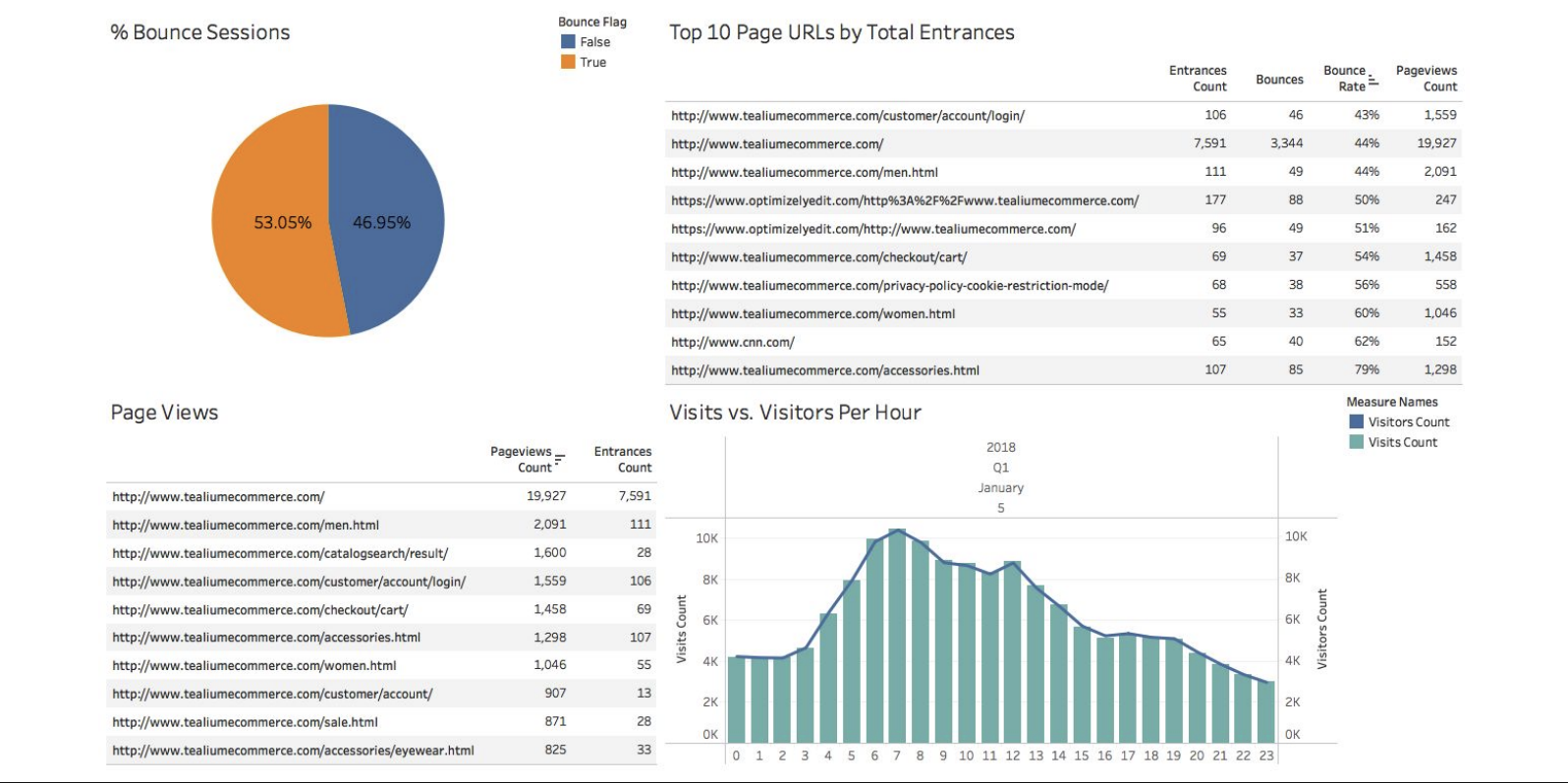
Bounce sessions
A bounce is a session with a single page view. The utag_main__pn cookie tracks the page number within a session. A value of 1 indicates the visitor didn’t advance past the first page.
SELECT
  COUNT(DISTINCT "event - first party cookies - utag_main_ses_id")
    AS total_sessions,
  COUNT(DISTINCT CASE
    WHEN "event - first party cookies - utag_main__pn" = 1
    THEN "event - first party cookies - utag_main_ses_id"
  END)
    AS bounced_sessions
FROM ACCOUNT__PROFILE.events_view__all_events__all_events;
Visitors and visits per hour
This query counts unique visitors and sessions per hour.
SELECT
  DATE_TRUNC('hour', "event - time")                               AS hour,
  COUNT(DISTINCT "event - visitor id")                             AS visitors,
  COUNT(DISTINCT "event - first party cookies - utag_main_ses_id") AS visits
FROM ACCOUNT__PROFILE.events_view__all_events__all_events
GROUP BY hour
ORDER BY hour;
Top pages by views and entrances
An entrance occurs when a URL is the first page of a session, identified by utag_main__pn = 1.
SELECT
  "event - page url - full_url"  AS page,
  COUNT(*)                       AS pageviews,
  COUNT(DISTINCT CASE
    WHEN "event - first party cookies - utag_main__pn" = 1
    THEN "event - first party cookies - utag_main_ses_id"
  END)                           AS entrances
FROM ACCOUNT__PROFILE.events_view__all_events__all_events
GROUP BY page
ORDER BY pageviews DESC
LIMIT 10;
Bounce sessions for top pages
This query combines page view counts with bounce session counts to identify high-traffic pages with high bounce rates.
SELECT
  "event - page url - full_url"  AS page,
  COUNT(DISTINCT "event - first party cookies - utag_main_ses_id")
    AS sessions,
  COUNT(DISTINCT CASE
    WHEN "event - first party cookies - utag_main__pn" = 1
    THEN "event - first party cookies - utag_main_ses_id"
  END)
    AS bounce_sessions
FROM ACCOUNT__PROFILE.events_view__all_events__all_events
GROUP BY page
ORDER BY sessions DESC
LIMIT 10;
Channel summary
This query groups events by date and channel to show daily visitor counts per channel.
SELECT
  DATE(e."event - time")                                       AS start_date,
  e."event - first party cookies - channel_name_cookie"        AS channel,
  COUNT(DISTINCT "event - visitor id")                         AS visitors
FROM ACCOUNT__PROFILE.events_view__all_events__all_events e
GROUP BY
  DATE(e."event - time"),
  e."event - first party cookies - channel_name_cookie";
AudienceDB queries
AudienceDB stores visitor-level data, including identity stitching results, device tallies, and long-term metrics. Use these queries to analyze your known visitor population and engagement trends.
For more information about AudienceDB tables and schema, see AudienceDB data guide.
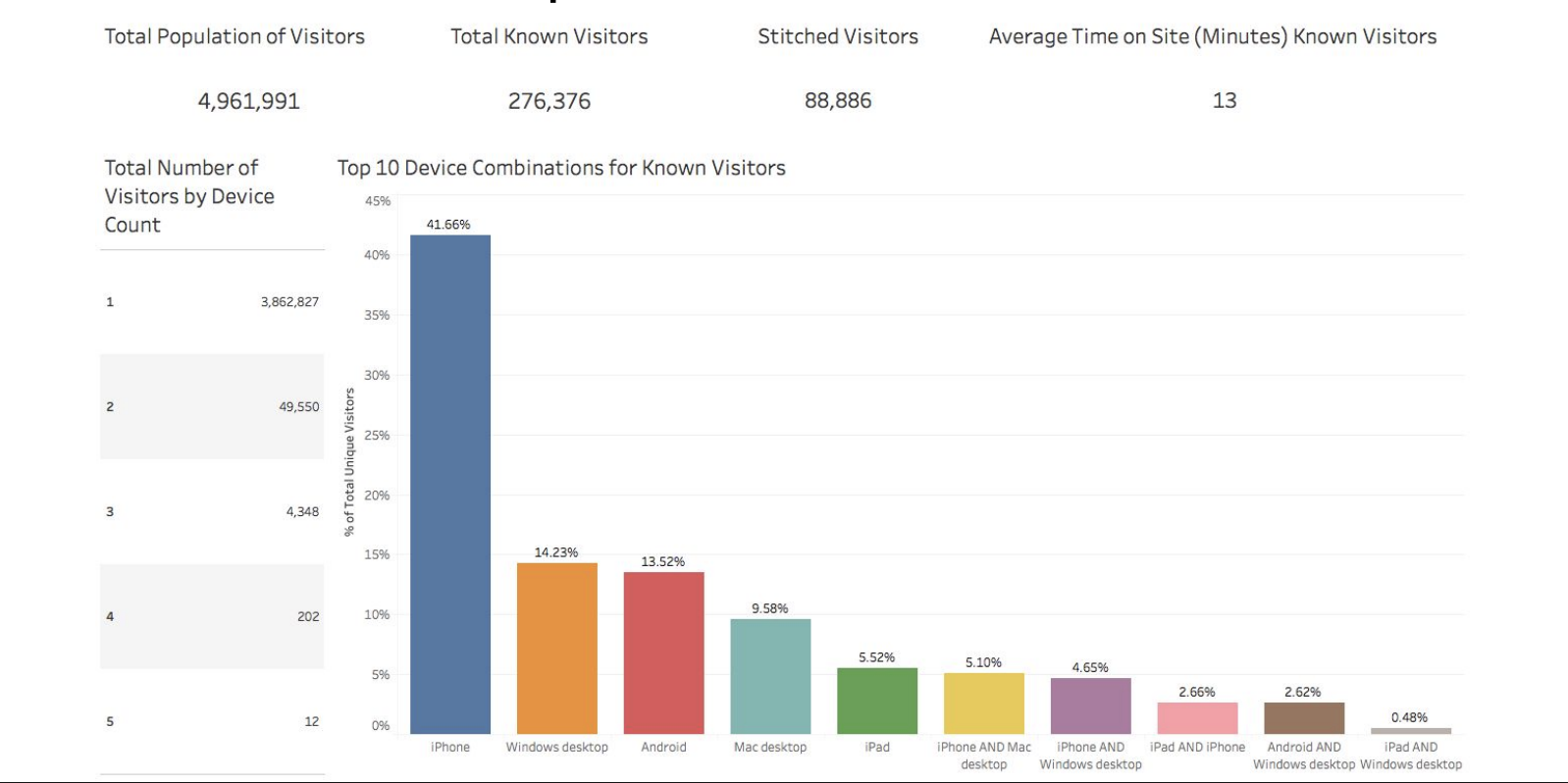
Percentage of known visitors
AudienceStream records stitched visitor identities in visitor_replaces_view. Run these two queries separately, then apply the formula. For more information, see Visitor stitching.
-- Known visitors
SELECT COUNT(DISTINCT "visitor - id") AS known_visitors
FROM ACCOUNT__PROFILE.visitor_replaces_view;

-- Total visitors
SELECT COUNT(DISTINCT "visitor - id") AS total_visitors
FROM ACCOUNT__PROFILE.visitors_view_normalized;
% known visitors = known_visitors / total_visitors
Total visitors with stitched identities
This query counts visitors that have at least one stitched identity in visitor_replaces_view.
SELECT
  COUNT(DISTINCT "ID")
FROM
(
  SELECT
    v."visitor - id"  AS "ID",
    COUNT(vr."visitor - id") AS "Total Replaces"
  FROM ACCOUNT__PROFILE.visitors_view_normalized v
  INNER JOIN ACCOUNT__PROFILE.visitor_replaces_view vr
    ON vr."visitor - id" = v."visitor - id"
  GROUP BY
    v."visitor - id"
)
WHERE "Total Replaces" >= 1;
Device distribution for known visitors
This query shows which device combinations known visitors use across sessions. Each row represents a unique device pattern, for example visitors who used both an iPhone and a Mac desktop appear in the "iPhone used" and "Mac desktop used" columns.
SELECT
  CASE WHEN patterns."Android" > 0
    THEN 'Android' ELSE ' ' END               AS "Android used",
  CASE WHEN patterns."BlackBerry" > 0
    THEN 'BlackBerry' ELSE ' ' END            AS "BlackBerry used",
  CASE WHEN patterns."Chromebook" > 0
    THEN 'Chromebook' ELSE ' ' END            AS "Chromebook used",
  CASE WHEN patterns."iPad" > 0
    THEN 'iPad' ELSE ' ' END                  AS "iPad used",
  CASE WHEN patterns."iPhone" > 0
    THEN 'iPhone' ELSE ' ' END                AS "iPhone used",
  CASE WHEN patterns."Mac desktop" > 0
    THEN 'Mac desktop' ELSE ' ' END           AS "Mac desktop used",
  CASE WHEN patterns."other" > 0
    THEN 'other' ELSE ' ' END                 AS "Other used",
  CASE WHEN patterns."Windows desktop" > 0
    THEN 'Windows desktop' ELSE ' ' END       AS "Windows desktop used",
  CASE WHEN patterns."Windows phone" > 0
    THEN 'Windows phone' ELSE ' ' END         AS "Windows phone used",
  CASE WHEN patterns."Windows tablet" > 0
    THEN 'Windows tablet' ELSE ' ' END        AS "Windows tablet used",
  COUNT(DISTINCT patterns."visit - visitor id") AS "Unique visitors"
FROM
(
  SELECT
    vs."visit - visitor id",
    SUM(CASE WHEN vs."visit - property - active device (46)" = 'Android'
      THEN 1 ELSE 0 END)         AS "Android",
    SUM(CASE WHEN vs."visit - property - active device (46)" = 'BlackBerry'
      THEN 1 ELSE 0 END)         AS "BlackBerry",
    SUM(CASE WHEN vs."visit - property - active device (46)" = 'Chromebook'
      THEN 1 ELSE 0 END)         AS "Chromebook",
    SUM(CASE WHEN vs."visit - property - active device (46)" = 'iPad'
      THEN 1 ELSE 0 END)         AS "iPad",
    SUM(CASE WHEN vs."visit - property - active device (46)" = 'iPhone'
      THEN 1 ELSE 0 END)         AS "iPhone",
    SUM(CASE WHEN vs."visit - property - active device (46)" = 'Mac desktop'
      THEN 1 ELSE 0 END)         AS "Mac desktop",
    SUM(CASE WHEN vs."visit - property - active device (46)" = 'other'
      THEN 1 ELSE 0 END)         AS "other",
    SUM(CASE WHEN vs."visit - property - active device (46)" = 'Windows desktop'
      THEN 1 ELSE 0 END)         AS "Windows desktop",
    SUM(CASE WHEN vs."visit - property - active device (46)" = 'Windows phone'
      THEN 1 ELSE 0 END)         AS "Windows phone",
    SUM(CASE WHEN vs."visit - property - active device (46)" = 'Windows tablet'
      THEN 1 ELSE 0 END)         AS "Windows tablet"
  FROM ACCOUNT__PROFILE.visits_view vs
  WHERE vs."visit - visitor id" IN (
    SELECT DISTINCT "visitor - id"
    FROM ACCOUNT__PROFILE.visitor_replaces_view
  )
  GROUP BY vs."visit - visitor id"
) patterns
GROUP BY
  "Android used",
  "BlackBerry used",
  "Chromebook used",
  "iPad used",
  "iPhone used",
  "Mac desktop used",
  "Other used",
  "Windows desktop used",
  "Windows phone used",
  "Windows tablet used";
Number of devices per visitor
This query joins visitors_view_normalized with visitor_tallies_view_normalized to count the number of unique devices each visitor uses, then groups visitors by device count.
SELECT
  "Unique Devices",
  COUNT("visitor - id") AS "Total Visitors"
FROM
(
  SELECT
    v."visitor - id",
    COUNT(DISTINCT t."visitor tally - lifetime devices used - key")
      AS "Unique Devices"
  FROM ACCOUNT__PROFILE.visitors_view_normalized v
  LEFT JOIN ACCOUNT__PROFILE.visitor_tallies_view_normalized t
    ON t."visitor - id" = v."visitor - id"
    AND t."visitor tally - lifetime devices used - value" != ''
  GROUP BY v."visitor - id"
)
GROUP BY "Unique Devices";
Average visit duration for known visitors with multiple devices
This query calculates the total visit duration and visitor count for known visitors who use two or more devices.
SELECT
  SUM("Total Duration"),
  COUNT(DISTINCT "ID")
FROM
(
  SELECT
    v."visitor - id" AS "ID",
    SUM(v."visitor - metric - average visit duration in minutes")
      AS "Total Duration",
    COUNT(DISTINCT t."visitor tally - lifetime devices used - key")
      AS "Unique Devices"
  FROM ACCOUNT__PROFILE.visitors_view_normalized v
  LEFT JOIN ACCOUNT__PROFILE.visitor_tallies_view_normalized t
    ON t."visitor - id" = v."visitor - id"
  WHERE t."visitor tally - lifetime devices used - key" != ''
  GROUP BY v."visitor - id"
)
WHERE "Unique Devices" >= 2;
Combining EventDB and AudienceDB
Use visitor_replaces_view to resolve visitor identities when combining EventDB and AudienceDB data.
EventDB events and AudienceDB visits tables don’t share a direct join key. To combine event-level and visitor-level data, join through visitor_replaces_view as shown below.
Join events to visitor profiles
This pattern resolves visitor IDs from the events table against the canonical visitor ID in AudienceDB, enriching event records with visitor attributes.
SELECT
  e.*,
  v.*
FROM ACCOUNT__PROFILE.events_view__all_events__all_events e
LEFT JOIN ACCOUNT__PROFILE.visitor_replaces_view vr
  ON e."event - visitor id" = vr."visitor - replaces id"
LEFT JOIN ACCOUNT__PROFILE.visitors_view_normalized v
  ON vr."visitor - id" = v."visitor - id";
Join visits to visitor profiles
This pattern joins visits to visitors within AudienceDB using the visitor ID.
SELECT
  v.*,
  vs.*
FROM ACCOUNT__PROFILE.visitors_view_normalized v
LEFT JOIN ACCOUNT__PROFILE.visits_view vs
  ON vs."visit - visitor id" = v."visitor - id";
Omnichannel queries
These queries use custom EventDB attributes to connect online behavior to offline conversions.
Offline purchases within one month of an online visit
This query identifies offline purchases that occurred within one month of an online visit, grouped by channel and date. It joins online event data with offline purchase records through visitor_replaces_view, using ADD_MONTHS to define the one-month attribution window.
SELECT
  LOWER(offline_online_combined_date."event - first party cookies - channel_name_cookie")
    AS channel,
  DATE(offline_online_combined_date."date")                AS date,
  SUM(offline_online_combined_date."Total Purchase Amount") AS total_purchase
FROM
(
  SELECT DISTINCT
    offline_online_combined."visitor - id",
    offline_online_combined."event - first party cookies - channel_name_cookie",
    DATE(offline_online_combined."purchase_date") AS "date",
    offline_online_combined."purchase_amount"     AS "Total Purchase Amount"
  FROM
  (
    SELECT DISTINCT
      DATE(e."event - time")                    AS "start_date",
      DATE(ADD_MONTHS(e."event - time", 1))     AS "end_date",
      vr."visitor - id",
      e."event - first party cookies - channel_name_cookie",
      offline_data."purchase_date",
      offline_data."purchase_id",
      offline_data."purchase_amount"
    FROM ACCOUNT__PROFILE.events_view__all_events__all_events e
    INNER JOIN ACCOUNT__PROFILE.visitor_replaces_view vr
      ON e."event - visitor id" = vr."visitor - replaces id"
    INNER JOIN
    (
      SELECT
        timestamp 'epoch'
          + CAST("event - omnichannel - createddate" AS BIGINT) / 1000
          * interval '1 second' AS "purchase_date",
        "event - visitor id"    AS "purchase_id",
        SUM("event - omnichannel - price") AS "purchase_amount"
      FROM ACCOUNT__PROFILE.events_view__all_events__all_events
      WHERE "event - omnichannel - createddate" IS NOT NULL
      GROUP BY "purchase_date", "event - visitor id"
    ) offline_data
      ON offline_data."purchase_id" = vr."visitor - id"
      AND offline_data."purchase_date" >= DATE(e."event - time")
      AND offline_data."purchase_date" <= DATE(ADD_MONTHS(e."event - time", 1))
    WHERE
      "event - udo - order_grand_total" IS NOT NULL
      AND e."event - first party cookies - channel_name_cookie" != 'Direct Traffic'
  ) offline_online_combined
) offline_online_combined_date
GROUP BY
  offline_online_combined_date."event - first party cookies - channel_name_cookie",
  DATE(offline_online_combined_date."date");
Next steps
- Set up EventDB and AudienceDB. See Configure AudienceDB and EventDB.
- Export query results to a BI tool such as Tableau or Looker to build dashboards.
- Learn how visitor identities resolve. See Visitor stitching.
- Review available tables and fields in the EventDB data guide and AudienceDB data guide.
This page was last updated: April 22, 2026