Learn about the Tealium Collect extension for Adobe Experience Platform Launch.
Requirements
Tealium Collect extension
The Tealium Collect extension for Adobe Experience Platform Launch sends all your events and corresponding data to Tealium. The extension is a custom template that loads the Tealium Collect JavaScript file once per page.
For each triggered event, the Adobe Experience Platform tag automatically flattens the data layer enrichment object specified in the configuration into key-value pairs and posts the data to the Tealium Collect endpoint. A custom endpoint may be specified if you use first-party data collection.
For more information about how data layer variables are flattened, see Data layer.
Install
To install the Tealium Collect extension, use the following steps:
- Go to the Adobe Experience Platform Launch Marketplace.
- In the Extensions menu, click Catalog and search for the Tealium Collect extension.
- Click Install.
- Set the following configuration options:
- Tealium Account: (Required) Your Tealium account name.
- Tealium Profile: (Required) Your Tealium profile name.
- Data Source Key: (Optional) The data source key from your server-side Tealium configuration.
- Collect Tag URL: (Optional) Override the default Tealium Collect URL with your own custom first-party data hosted file URL. For example:
https://collect.example.co.uk/collect.min.js. - Endpoint: (Optional) Override the Tealium Collect endpoint with your first-party data collection endpoint. For example:
https://collect.example.co.uk/event. - Data Object: (Optional) The name of a JavaScript variable to use as the data layer enrichment object. For example, enter
digitalDataif you use this as your data layer enrichment object. The extension automatically uses the second parameter in a_satellite.trackcall for Direct Call events. - Add Event Listener for adobeDataLayer: (Optional) For use with the Track Event action only: Automatically track events in adobeDataLayer. Tracks both default and custom Adobe Client Data Layer events.
- Click Save to Library
Actions
The extension provides two action types for sending data to Tealium Collect. Each can be added to a rule in Adobe Launch depending on your site’s data-layer strategy.
Track Event with the Adobe Client Data Layer (ACDL)
The extension supports a dedicated action for rules triggered by the ACDL. When you select this action, the pushed object (event.message) is passed directly to Tealium Collect.
How it works
The action reads the event object from ACDL and sends it to Tealium Collect. The event name is resolved in the following order of priority:
tealium_eventevent- Launch rule name
typeeventName
This action provides full rule-level control, including conditions and exclusions. It also ensures tighter alignment with the ACDL event model.
When to use
Use this action in the following scenarios:
- Your site uses the Adobe Client Data Layer (ACDL).
- You want more granular control over which pushes are sent to Tealium Collect.
- You prefer using ACDL triggers instead of a global event listener.
Example usage
Configure a rule based on ACDL data pushes to trigger the Track event through ACDL action.
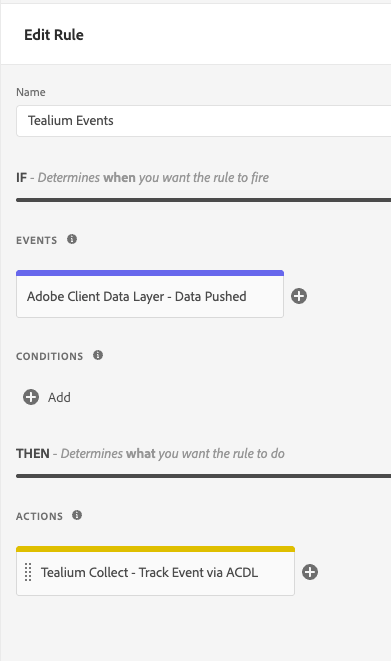
Track event
This action sends event data to Tealium Collect when a rule condition is met. It uses the Adobe Launch event framework and can optionally listen for data layer pushes.
How it works
The action runs whenever its rule is triggered (for example, on a page load or click event). Configure the Add event listener option to automatically listen for and forward events from your site’s data layer. The extension loads Tealium Collect once per page and queues additional events until it’s ready. This approach works independently of the ACDL and is best suited for sites using a custom or non-ACDL data layer.
When to use
Use this action in the following scenarios:
- Your site pushes data directly to a JavaScript object or custom data layer.
- You want to send events defined entirely in Adobe Launch rules (for example, DOM Ready, Link Click, or
_satellite.trackevents). - You don’t need to filter or manage ACDL events individually.
Example usage
Configure a rule to trigger the Tealium Collect extension. The following example runs the extension for the page view event.
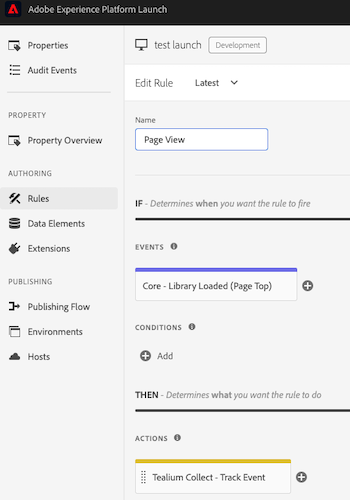
Direct calls
The direct call events from _satellite.track are processed by Tealium Collect when using the Track Event action. The first parameter is set to the variable tealium_event in the data layer. The second parameter contains the additional data layer attributes sent to the Tealium Collect endpoint.
The following example is a direct call for the event contact_submit. We recommend that you use a data layer of key-value pairs, but you may also pass a nested adobeDataLayer object.
_satellite.track("contact_submit", { "name": "John Doe" });
The resulting event in Tealium Collect resembles the following:
{
  "tealium_event" : "contact_submit",
  "name" : "John Doe"
}
In addition to the event parameters, the values found in _satellite.buildInfo are also included in the data layer for direct call event tracking:
turbineVersion: "14.0.0",
turbineBuildDate: "2016-07-01T18:10:34Z",
buildDate: "2016-03-30T16:27:10Z",
environment: "development"
Source code
If you are a developer and require a custom implementation, download the extension code and modify it as needed.
This page was last updated: November 17, 2025