Action frequency capping and prioritization
This article describes how to use action frequency capping and prioritization to control when actions trigger and which actions take priority.
How it works
By default, actions trigger as soon as their conditions evaluate to true. Depending on the connector configuration, actions can trigger when a user joins or leaves an audience, or when a user is in an audience at the beginning or end of a visit.
Frequency capping helps control how often actions can trigger. Use it to prevent actions from triggering too frequently or competing with each other. When multiple actions qualify at the same time, prioritization ensures that only the most important action triggers.
Frequency capping is available only for audience-based connector actions. It does not apply to event-only actions.
Prioritization
Assign a priority number to frequency-capped actions and optionally configure delays.
The action with the highest priority number runs first. For example, a priority of 2 is higher than a priority of 1.
Actions without frequency capping enabled trigger independently and are not affected by cooldown groups.
If two actions in the same cooldown group have the same priority, only one action triggers. If both actions must trigger, assign them to different cooldown groups.
Cooldown with frequency capping
Cooldown groups limit how frequently actions in the same group can trigger.
When a visitor qualifies for multiple actions in the same cooldown group, the system compares their priority numbers and triggers the highest-priority eligible action. After the selected action triggers, a cooldown period begins for that group.
During the cooldown period, other frequency-capped actions in the same cooldown group are suppressed. Suppressed actions are not queued to run when the cooldown expires. They trigger only if their conditions evaluate to true again after the cooldown period ends.
If frequency capping is disabled, the action does not participate in cooldown behavior and triggers whenever its conditions evaluate to true.
How actions are evaluated
The following diagram shows how actions are evaluated when you enable frequency capping and prioritization.
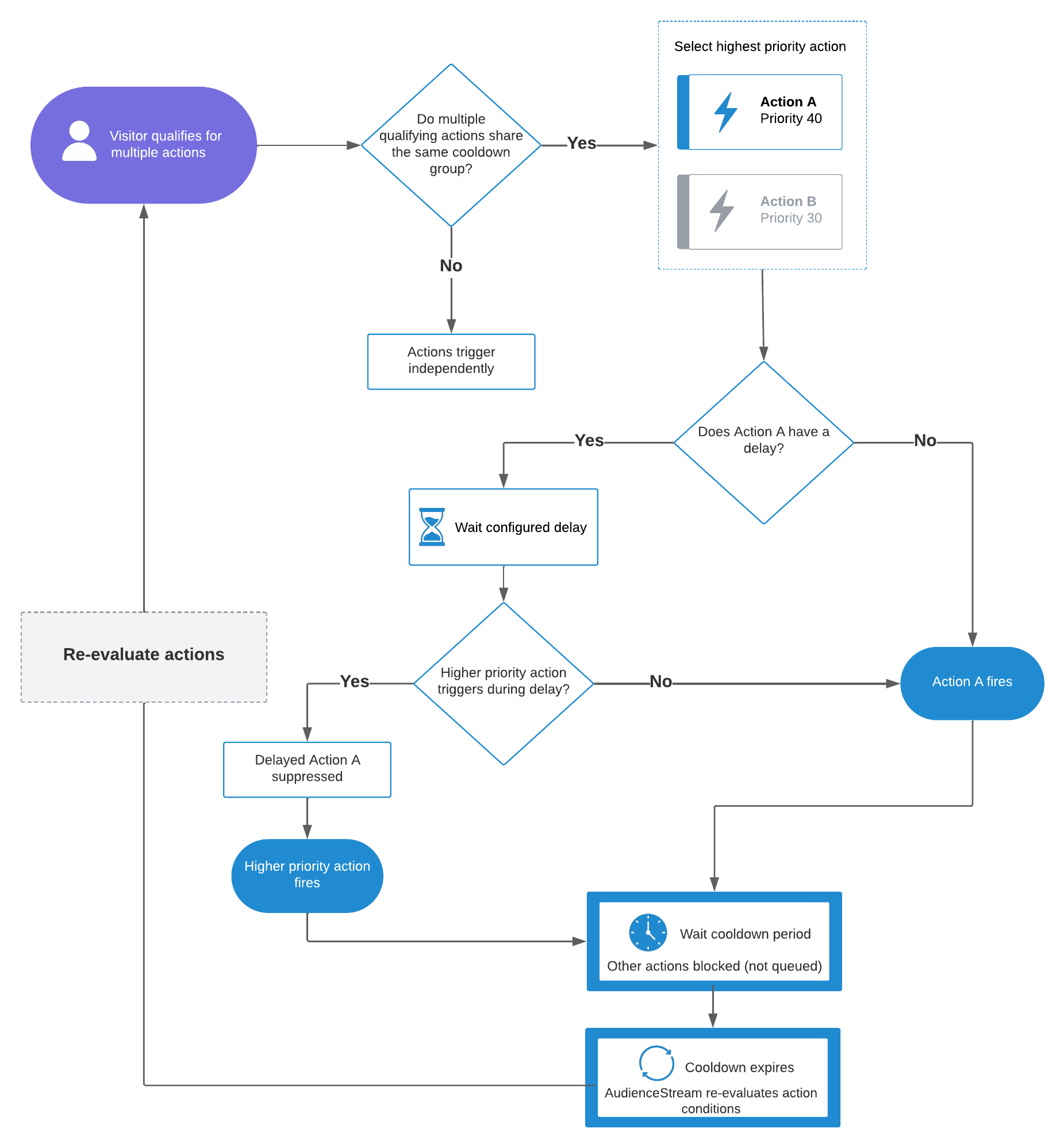
The workflow operates as follows:
- The system evaluates the conditions for all actions in a cooldown group.
- If only one action condition is true, that action triggers.
- If multiple actions qualify at the same time, the system evaluates their priority numbers and selects the highest-priority action.
- If the selected action has a delay configured, the system waits for the delay period.
- After the delay expires, the action triggers and the visitor enters the cooldown period for that group.
- If a higher priority action triggers before the configured delay expires, the cooldown takes effect and suppresses the delayed action.
- During the cooldown period, other frequency-capped actions in the same group are suppressed.
- When frequency capping is in progress, non-capped actions are not affected by the cooldown and trigger independently.
- When the cooldown expires, the system reevaluates the visitor conditions and starts over from Step 2.
Disabled actions or connectors during cooldown
Cooldown is tracked at the visitor level for each cooldown group.
If a visitor enters a cooldown period and the action or connector that triggered the cooldown is later disabled, the cooldown continues until it expires.
During the cooldown period:
- Other frequency-capped actions in the same cooldown group remain suppressed.
- Actions in different cooldown groups are unaffected.
- Actions without frequency capping continue to trigger normally.
When the cooldown expires, the system reevaluates the visitor against the current action configuration.
This page was last updated: March 16, 2026