This article lists the operators available when building conditions for audiences and rules.
Condition operators
Some operators apply only to specific attribute types, as indicated in the Applies to column.
| Operators | Description | Applies to |
|---|---|---|
| array contains | An item in the array is an exact match to the value you specify. True ["iOS", "Android"] array contains “Android”False ["Women's Clothing", "Shoes"] array contains “Women” | Array |
| array does not contain | No item in the array is an exact match to the value you specify. True ["iOS", "Android"] array does not contain “Samsung”False ["Women's Clothing", "Shoes"] array does not contain “Shoes” | Array |
| contains | Attribute value includes the value you specify. True "user@tealium.com" contains “tealium”["iOS", "Android"] array contains “Android”False ["Women's Clothing", "Shoes"] array contains “Women” | Array String Tally Visitor ID |
| contains (ignore case) | Attribute value includes the value you specify. | String Visitor ID |
| does not contain | Attribute value excludes the value you specify. | Array String Visitor ID Tally |
| does not contain (ignore case) | Attribute value excludes the value you specify. | Array String Visitor ID Tally |
| contains partial string | Attribute value partially matches the value you specify. True ["Women's Clothing", "Shoes"] array contains “Women”False ["Women's Clothing", "Shoes"] array contains “Tops” | Array Tally Visitor ID |
| contains partial string (ignore case) | Attribute value partially matches the value you specify, regardless of case. | Array Tally Visitor ID |
| equals | Attribute value matches the whole value you specify. True "purchase" equals “purchase”equals 0 False "Luggage" equals “luggage”equals 1 | Number String Visitor ID |
| equals (ignore case) | Attribute value matches the whole value you specify. | String Visitor ID |
| does not equal | Attribute value does not match the whole value you specify. | Number String Visitor ID |
| does not equal (ignore case) | Attribute value does not match the whole value you specify. | String Visitor ID |
| less than | Attribute value is less than the value you specify. | Number Date |
| less than or equal to | Attribute value is either less than or equal to the value you specify. | Number Date |
| greater than | Attribute value exceeds the value you specify. | Number Date |
| greater than or equal to | Attribute value either exceeds or equals the value you specify. | Number Date |
| is assigned | Attribute exists, but may or may not have a value. True "Shirts" is assigned["iOS", "Android"] is assigned[] is assigned"" is assigned is assignedIs VIP is assigned | Number Timeline List Badge String Tally Visitor ID Date |
| is not assigned | Attribute does not exist. | Number Timeline List Badge String Tally Date Visitor ID |
| is empty | Tealium iQ variable does not contain any value (for example, value is undefined, null, or blank string). True { page_name : undefined }{ page_name : null }{ page_name : "" }{ product_id : [] } | Imported from Tealium iQ Tag Management |
| is not empty | Tealium iQ variable contains any value. For example, a string containing one or more characters, a number with a value (including 0), or an array with one or more items.True { page_name : "Title" }{ page_num : 1 }{ product_id : ["WidgetXYZ"] } | Imported from Tealium iQ Tag Management |
| is true | Boolean value equals True. | Boolean |
| is false | Boolean value equals False. | Boolean |
| occurred less than | Date value is not yet past the number of minutes/hours/days/weeks/months you specify. | Date |
| occurred more than | Date value is past the number of minutes/hours/days/weeks/months you specify. | Date |
| is started | Funnel is initiated for the visitor/visit. | Funnel |
| is completed | Funnel has ended for the visitor/visit. | Funnel |
| step completed | Step is successfully completed for the visitor/visit. | Funnel |
| step not completed | Step is not completed for the visitor/visit. | Funnel |
| is executed | Tag has successfully fired on the page. | Tags in your Tealium iQ Tag Management profile |
| matches regex | Lets you use regular expressions (regex) in rules, enrichments, and audiences. For more information, see Regular expressions | String |
Unassigned attributes in Excluding conditions
When an attribute used in an Excluding condition is unassigned, the result depends on the operator.
| Operator | Result | Visitor outcome |
|---|---|---|
| array does not contain | true | Retained |
| does not contain | true | Retained |
| does not contain (ignore case) | true | Retained |
| does not equal | true | Retained |
| does not equal (ignore case) | true | Retained |
| is not assigned | true | Retained |
| step not completed | true | Retained |
| contains | false | Excluded |
| contains (ignore case) | false | Excluded |
| array contains | false | Excluded |
| equals | false | Excluded |
| equals (ignore case) | false | Excluded |
| is assigned | false | Excluded |
| step completed | false | Excluded |
| is completed | false | Excluded |
Number attributes
Number attributes handle unassigned values differently. When an unassigned number attribute is the first operand in a comparison, Tealium evaluates its value as 0.0.
For example:
equals 0evaluates totrue.- Other numeric comparisons evaluate the attribute against
0.0. does not equal <value>evaluates totruefor an unassigned number attribute.
The 0.0 default applies only when the unassigned number attribute is the first operand. If the second operand is an unassigned number attribute, the condition matches no visitors.
Using an extended rule condition for a tally attribute
For a tally attribute, you can use the contains operator to check for a specific key and then evaluate the value associated with that key.
This extended rule condition is available only with the contains operator.
To create an extended condition for a tally attribute:
- Go to Transform > Rules.
- Add a rule or select an existing rule to edit.
- Under Conditions, select the tally attribute to evaluate.
- Select the contains operator.
- Select Custom Value.
- Enter the tally key to evaluate.
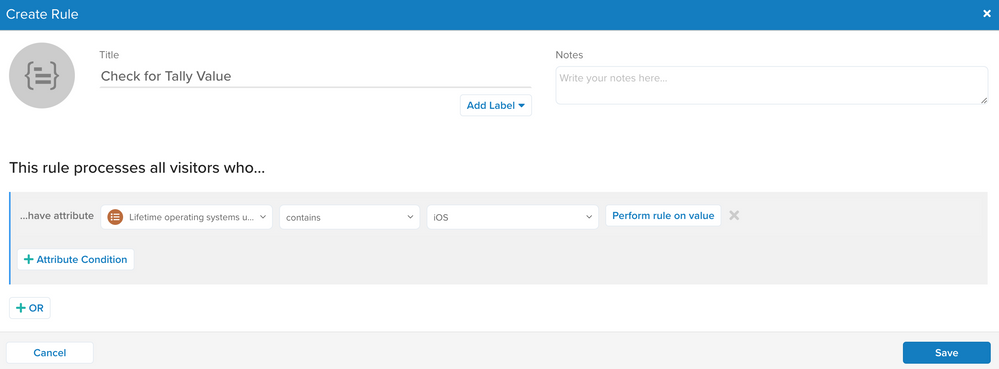
- Click Perform rule on value, and then select the operator to use to evaluate the value associated with the key.
- Specify the value to compare. You can select an attribute or enter a custom value.
- Click Save.
Regular expressions
The matches regex operator is available only for string attributes. The condition returns true when any part of the attribute value matches the regular expression.
Enter the regular expression without forward slashes (/). For example, to match the entire value abc1234567890, enter ^[a-z0-9]{13}$.
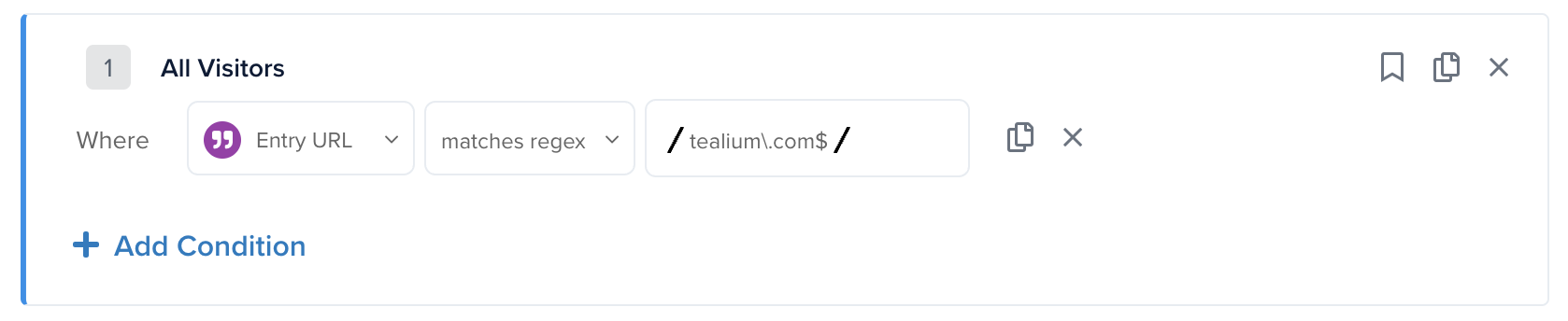
The matches regex operator provides the following options:
- Multiline Mode: Matches
^and$at the beginning and end of each line instead of only at the beginning and end of the entire string. - Case Insensitive: Ignores letter case when matching the regular expression against the attribute value.
The following examples show the results of common regular expressions for the value abc1234567890:
| Regex | Return value | Description |
|---|---|---|
\d{3} | true | Matches three consecutive digits anywhere in the string. |
^abc | true | ^ matches the beginning of the string. |
\d{3}$ | true | $ matches the end of the string. |
^[a-z0-9]{13}$ | true | ^ and $ match the entire 13-character string. |
^[a-zA-Z]{4} | false | The string does not start with four consecutive letters. |
[a-zA-Z]{4}$ | false | The string does not end with four consecutive letters. |
^[a-z0-9]{15}$ | false | The string is not 15 characters long. |
This page was last updated: September 22, 2026