About data record functions
This article provides an overview of data record functions in CloudStream.
To enable CloudStream functions, go to Admin menu > Server-Side Settings > CloudStream Connectors, set Activate CloudStream Connectors to On, and click Save.
How it works
Functions in CloudStream run within the CloudStream data pipeline and have access to the queried data records from your cloud data sources. Use functions within a CloudStream profile to retrieve data from other systems, augment your data, or send data to other endpoints.
Adding and managing CloudStream functions is the same as managing other functions, with the following exceptions:
- When creating a custom action function, instead of selecting an audience or an event, you select a cloud data source and a segment.
- Each CloudStream function can only use data from one data source. If you want to activate data from additional data sources, configure a separate function for each one.
- If a segment contains attributes mapped from multiple data sources, only the attributes from the selected data source are available in the function.
Triggers
Data record functions execute before and after the data record is processed.
Transformations
Transformation functions execute before the data record is processed, as shown in the following data pipeline diagram:
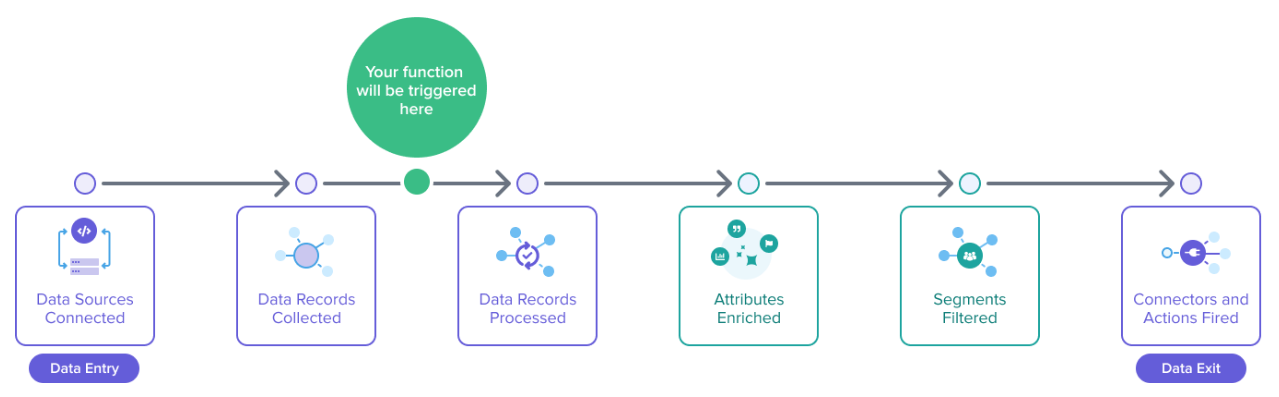
Use functions at this point in the pipeline to transform the data record object and its values before it’s processed.
For more information, see About data transformation functions.
Custom actions
Custom action functions execute after the data record is processed, as shown in the following data pipeline diagram:
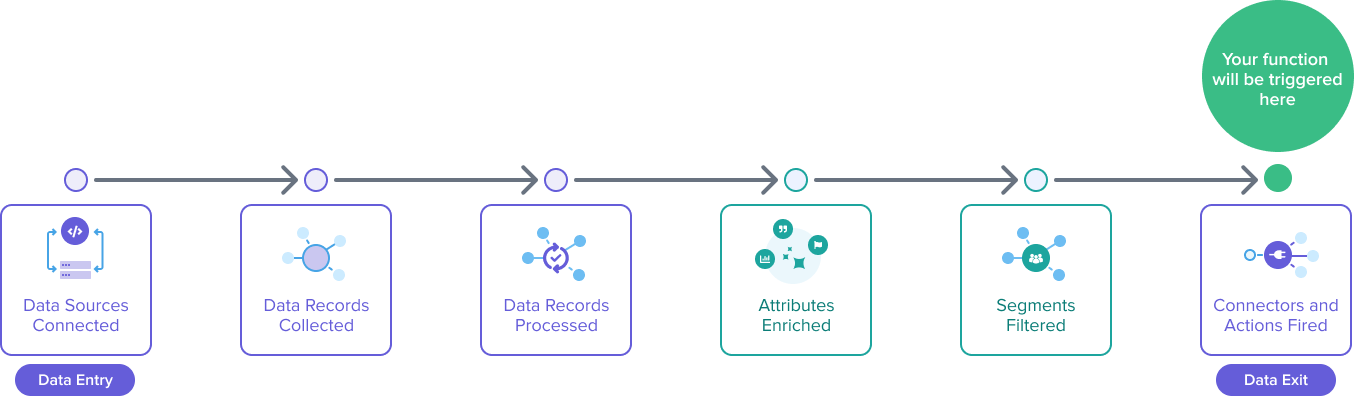
Use functions at this point in the pipeline as activations to send the data record to other systems.
At this point in the data pipeline, modifications to the dataRecord object have no effect on other parts of the system.
Runtime version
The runtime version for data record transformation functions is the same as for event data, but includes the following changes:
- The
crypto-eslibrary is removed and replaced withtealium/crypto.
The runtime version for custom actions is the same as event and visitor functions V3, but includes the following changes:
- The
tracklibrary has been removed. - The data record cannot be sent back to Tealium as a new event.
transform() function
When you create a transformation data record function, the $.dataSourceId field must be used as a condition for the trigger rule. Use this condition to reference the data source key from a cloud data source.
Example:
After you select a cloud data source and set the trigger rule, the following default code appears in the Code tab of the functions code editor:
import flatten from "tealium/util/flatten/v2";

// "transform" function allows you to access data record and apply changes
transform((dataRecord) => {
    // change are applied via the mutation of the original record
    console.log(JSON.stringify(flatten(dataRecord), null, 2));
})
activate() function
When you create a custom action data record function, the default code is shown in the Code tab of the functions code editor:
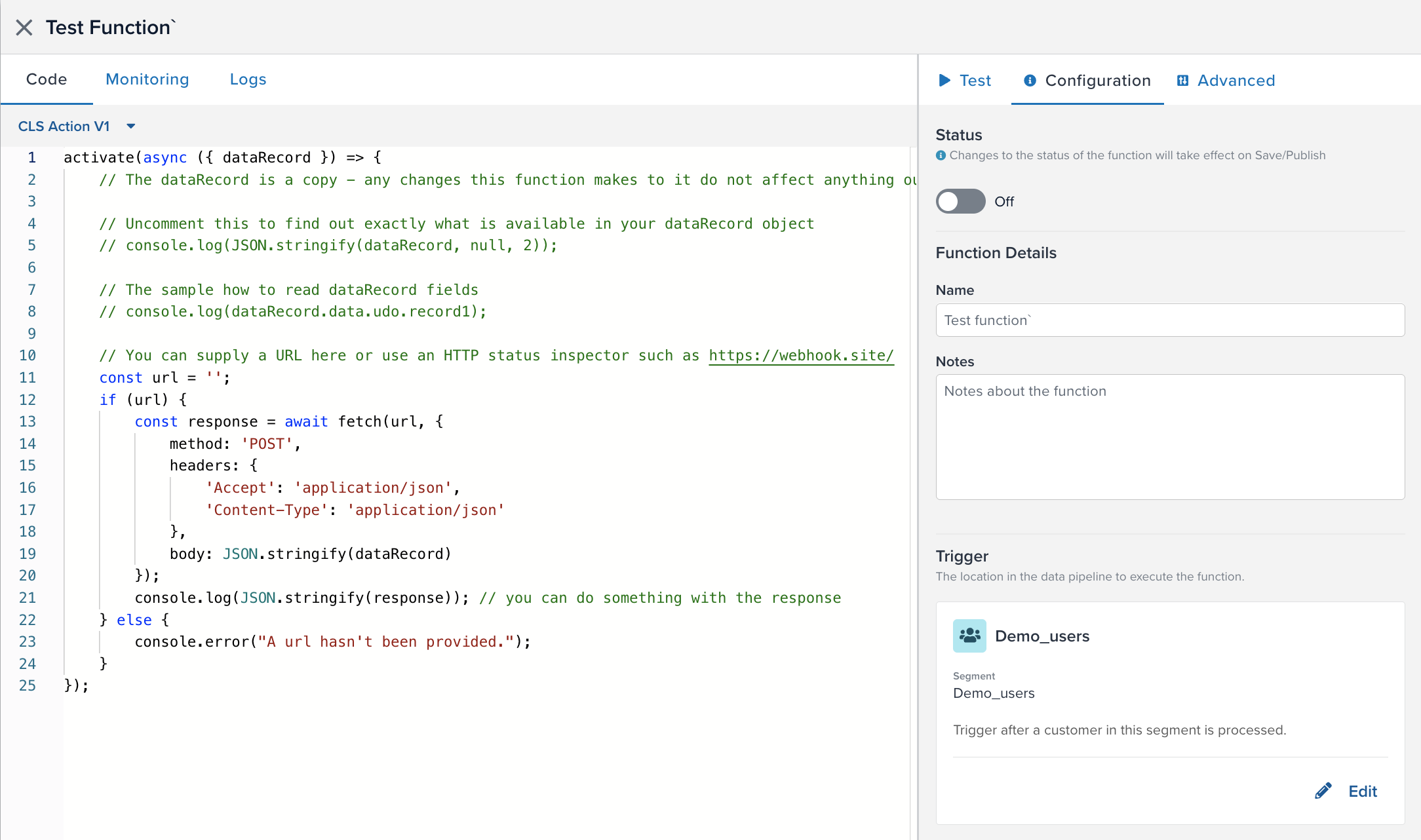
This code contains the activate() function and its input parameters.
activate(async ({ dataRecord, helper }) => {
  ...
});
Data record functions have a dataRecord object and helper object.
The helper parameter provides helper.getAuth() and helper.getGlobalVariable() for getting authorization and retrieving global variables. For more information, see Helper object.
Authentication tokens can only be referenced by a function within an HTTP request. If you try to reference the token outside of an HTTP request, the token is replaced by a UUID placeholder.
Data record object
For transformation functions used with Tealium Collect, see Event parameter.
The dataRecord object is available for CloudStream functions and cloud data sources and contains the following properties:
| Property | Data type | Description |
|---|---|---|
account |
string | Tealium account name. |
data |
object | The data record queried from the cloud data source, referenced at dataRecord.data.udo. |
event_id |
string | Tealium event ID. |
post_time |
number | Timestamp indicating when the data record was queried. |
profile |
string | Tealium profile name. |
dataSourceId |
string | The ID of the data source. |
Example data record object:
{
  "account": "your-account",
  "profile": "your-profile",
  "data": {
    "udo": {
      "CDW_Column1_Timestamp": 1753077016157,
      "CDW_Column2_Id": 10,
      "CDW_Column3_EmailAddress": "user@example.com",
      "_dc_ttl_": 60000,
      "tealium_datasource": "abcdefg",
      "tealium_event": "data_ingestion"
    }
  },
  "dataSourceId": "abcdefg",
  "event_id": "cf8bd406-787b-4fe9-8b45-7782e6663708",
  "post_time": 1753774131897,
}
Example
This is an example data record function that uses the Tealium Crypto library to hash an email address attribute (CDW_Column3_EmailAddress) from the data record and then send the data record to a webhook.
import C from "tealium/crypto";

const send = async (data) => {
        console.log("Sending: " + JSON.stringify(data, null, 2));

        return fetch("https://example.com/example-webhook/", {
        method: 'POST',
        headers: {
            'Accept': 'application/json',
            'Content-Type': 'application/json'
        },
        body: JSON.stringify(data)
});
}

activate(async ({ dataRecord }) => {
    const data = { ...dataRecord.data.udo  };

    data.tc_email = C.SHA3(dataRecord.data.udo.CDW_Column3_EmailAddress).toString(C.enc.Hex);

try {
    await send(data);
    } catch (e) {
        console.error("Failed to send the data. " + e);
    }
});
This page was last updated: May 1, 2026