Webhook authentication
This article describes how to configure different authentication methods for the HTTP-based webhook connector.
BasicAuth
Use the BasicAuth webhook for integrations that use a basic HTTP authentication with the HTTP header field Authorization. The credentials are passed as a Base64 encoded string of {username}:{password}.
Use the following settings for BasicAuth authentication:
| Setting | Description |
|---|---|
| Name | (Required) A descriptive title for the webhook. |
| BasicAuth Username | The username for the webhook authentication. |
| BasicAuth Password | The password for the webhook authentication. |
OAuth2 (3-legged)
Use the OAuth2 3-legged webhook for integrations that require a user-consent authorization flow. This method redirects the user to the provider’s consent page, obtains an authorization code, and exchanges it for an access token. The webhook then uses that token to authenticate requests on the user’s behalf.
The OAuth2 methods support server-side applications only.
You must register your web application with an OAuth 2.0 service and configure it to allow the redirect URL: https://my.tealiumiq.com/oauth/webhook/callback.html
Use the following settings for OAuth2 (3-legged) authentication:
| Setting | Description |
|---|---|
| Name | (Required) A descriptive title for the webhook. |
| Client ID | (Required) The client identifier assigned to your application from the OAuth service. |
| Client Secret | (Required) The client secret assigned to your application from the OAuth service. |
| Scope | The type of permission you want to request to access the application. |
| Authorization URL | (Required) The URL where you want to redirect the user after authorization. |
| Authorization URL Query Parameters | Enter one or more name-value pairs for the authorization URL. Separate multiple pairs using an ampersand (&). Do not use an ampersand (&) at the start. Correct: access_type=offline&prompt=consent Incorrect: &access_type=offline&prompt=consent |
| Access Token URL | (Required) The token URL to get the refresh token. |
| Authorization Token Location | Specify where to place the authorization token. |
| Authorization Header Prefix | Default value is Bearer. Specify a new value to override (only required for some OAuth2 services). |
OAuth2 (2-legged)
Use the OAuth2 2-legged webhook for integrations that rely on server-to-server authentication without user involvement. This method exchanges client credentials (client ID and secret) for an access token directly from the provider. The webhook then uses that token to authenticate requests to your system.
Use the following settings for OAuth2 (2-legged) authentication:
| Setting | Description |
|---|---|
| Name | (Required) Enter a descriptive title for the webhook. |
| Access token URL | (Required) Enter the API endpoint URL to request an access token. |
| Client ID | (Required) Enter your web application client ID. |
| Client Secret | (Required) Enter your web application client secret. |
| Username | Enter your username. Username is required if using Password grant type. |
| Password | Enter your password. Password is required if using Password grant type. |
| Client Authentication ID | The client ID to send as part of the authorization header. |
| Client Authentication Secret | The client secret to send as part of the authorization header. |
| Scope | Select the scope of permissions to request (only required for some OAuth2 services). |
| Extra Authorization Parameters | Add extra authorization parameters (only required for some OAuth2 services). Separate multiple parameters with &. |
| Authorization URL | (Required) An API endpoint URL to request an authorization code from. |
| Authorization Token Location | Specify where to place the authorization token. |
| Authorization Header Prefix | Default value is Bearer. Specify a new value to override (only required for some OAuth2 services). |
| Custom Headers | Specify comma-separated key-value pairs with the custom headers that you want add to the authentication call. For example: 'header1:value1','header2:value2','header3:valuex,valuey'. |
| Custom Body Values | Define comma-separated key-value pairs. For example: 'var1:value1','var2:value2','var3:varx,vary'. They will be used in the body following the format set in the Body Content Type field. |
| Body Content Type | Specify the body content type. |
| Authorization Values Location | Specify the location of the authorization values (Client ID, client secret, username, password, and scope). |
JWT
Use the JWT webhook for integrations that authenticate using a signed JSON Web Token.
Use the following settings for JWT authentication:
| Setting | Description |
|---|---|
| Name | (Required) Enter a descriptive title for the webhook. |
| JWT Token | Enter the JSON web token. |
Access tokens for OAuth2
Webhook requests using OAuth2 must supply the access token in the request. The token generated by your OAuth2 connection is provided by the connector in a template variable named {{webhook_access_token}}, which is passed differently between each API. In the following example, it is expected in the header as Authorization: Bearer TOKEN_HERE.
Use the following steps generate and map this header:
- Create a template named
auth_templateusing the following example:
Bearer {{webhook_access_token}} - In the Headers section, map this template to Authorization.
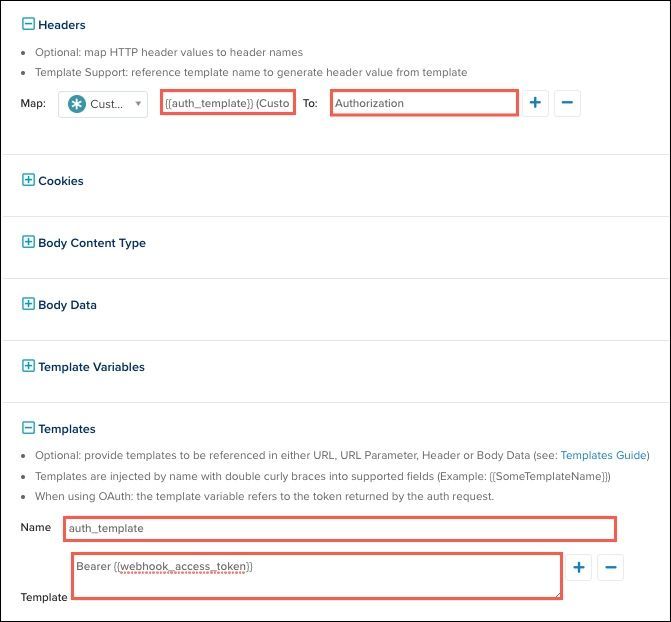
- Click Save.
- Save and Publish your changes.
HTTP response cookies
Cookie-based session management is generally discouraged in server-to-server environments that communicate with stateless APIs. For that reason, the webhook connector does not track cookie-based sessions and effectively ignores Set-Cookie header values in HTTP responses.
This page was last updated: December 10, 2025