Event specifications
Event specifications are a way to validate the quality of incoming data.
How it works
Event specifications (also referred to as “event specs”) represent your data layer for events. Event specifications allow the data quality of your events to be validated in real-time using the live events chart or event specification detail view.
Event specifications contain a set of definitions, which consist of:
- The
tealium_eventattribute, which represents the name of the event and the specification associated with it. For example, if thetealium_eventattribute has a value ofvideo_complete, the system looks for an event specification with the namevideo_completeto validate the incoming event against. This allows you to categorize and manage your events based on their purpose and expected data structure. - A list of attributes that describe the data expected for that event. Attributes are individual pieces of information, such as
video_id,video_length, orvideo_platform. By defining these attributes, you create a clear expectation of the data your system should receive. This helps teams maintain consistent data structures, reduce errors, and simplify troubleshooting. - Their expected data types, such as string, number, or boolean. Defining data types helps ensure that each attribute contains the correct kind of information. This reduces errors, improves data consistency, and makes it easier to validate and process events across different systems.
- Whether they are required for a valid event. Required attributes must be present in an event for it to be considered valid. This ensures that critical information is always included, which is essential for accurate analysis and decision-making.
Event specifications do not filter out data. Even if an event is invalid, the system still processes the event.
Example event specification
For example, a video_complete event contains the following attributes and data:
{
    "tealium_event"  : "video_complete", // name of event and specification
    "video_id"       : "xWlEk2i9r5Q",
    "video_length"   : 300,
    "video_name"     : "How to track videos in Tealium",
    "video_platform" : "YouTube",
}
An event specification for this video_complete event contains the following:
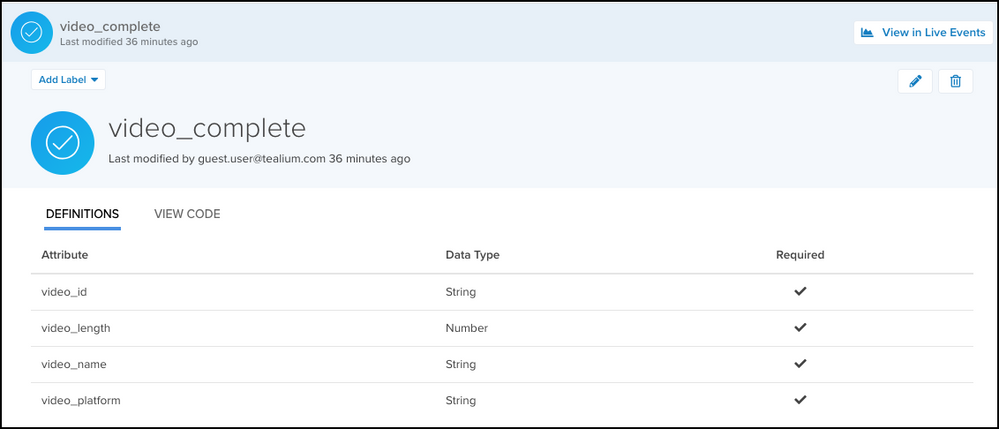
- The
tealium_eventattribute identifies the event asvideo_complete. - The Definitions table provides contextual information about the event and defines the required attributes, their expected data types, and whether they are required for a valid event.
Benefits
Event specifications provide two primary benefits for data management:
- To standardize the implementation of events across all platforms.
- To evaluate the data quality of incoming events.
View event specification statistics
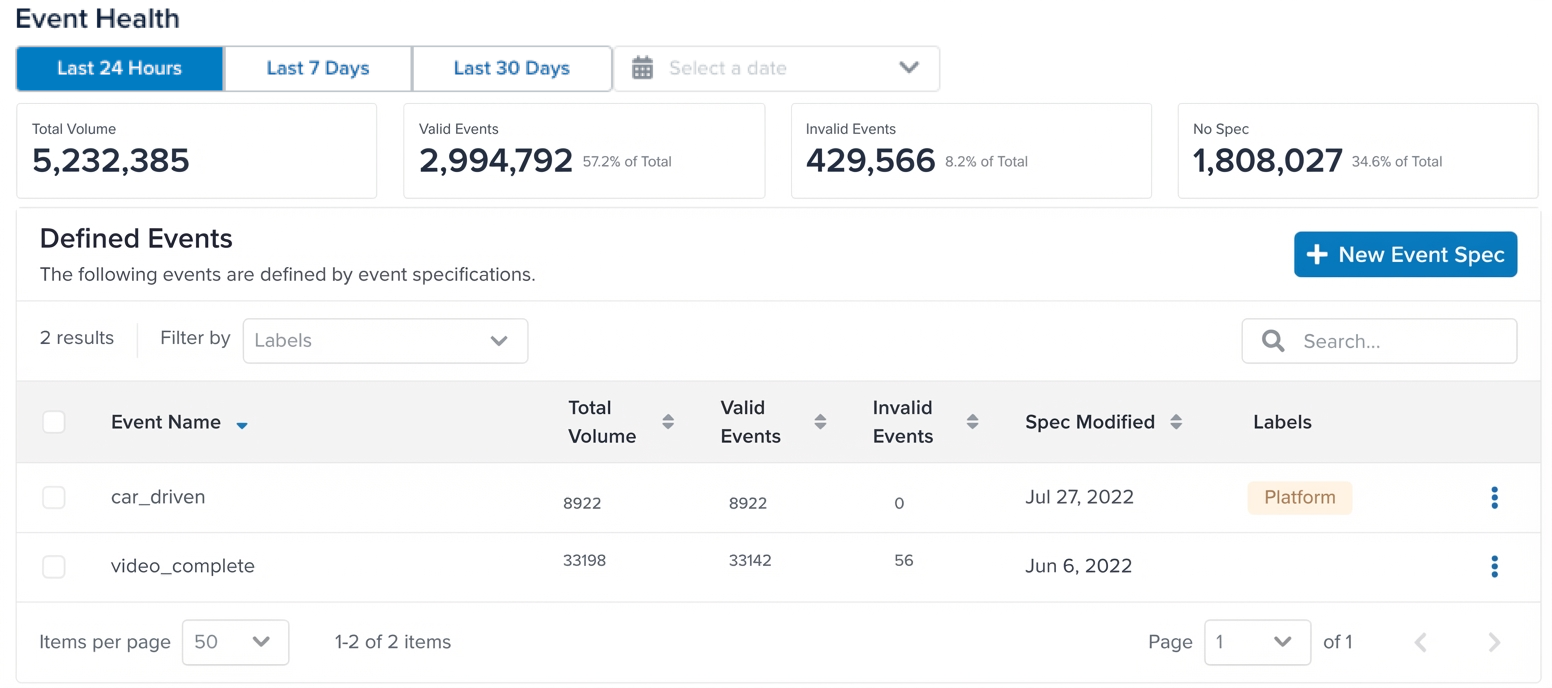
The Event Health window displays the total statistics for all event specifications. The table shows the statistics for each individual event specification. You can select a time frame to view the statistics for that period.
The following statistics are displayed:
- Total Volume
The total number of events received in the selected time frame. - Valid Events
The number of events that satisfy the requirements of an active event specification. This means that the events have a known value for thetealium_eventattribute and all the required attributes from the specification. The more valid events you see, the better your data quality. This means your installations are sending the data expected in your specifications. - Invalid Events
The number of events that match an event specification, but do not have the required attributes. This means that the events have a known value for thetealium_eventattribute, but they are either missing required attributes or the attributes contain unexpected values. These issues can be resolved by fixing the installation code that is sending the events or adjusting the event specification. - No Spec
The number of events that do not have a matching event specification. This means that the events either do not have thetealium_eventattribute or the value does not have a corresponding event specification.
The Defined Events table lists all existing event specifications and these statistics for each event specification.
View event specification details
Click any event specification in the Defined Events table to view its details.
Statistics about the event specification are displayed at the top of the page, including the total volume of events matching the specification, the percentage of valid events, and the percentage of invalid events.
The Definitions table provides contextual information about the event and defines the required attributes, their expected data types, and whether they are required for a valid event.
Code sample
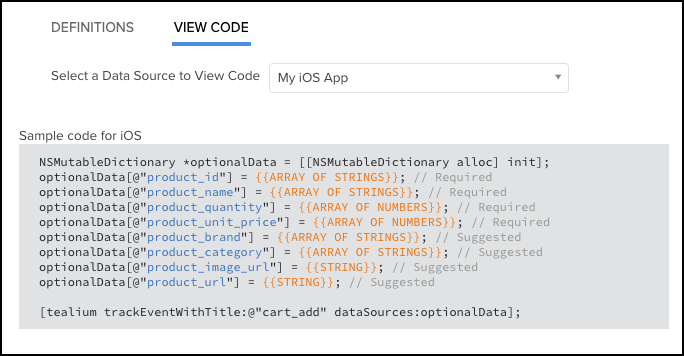
From the event specification details window, click Code and select the data source you are using to display the base code and examples to use for this event specification.
The following code sample demonstrates the tracking code for the video_complete event for a data source named My iOS App:
Event specifications in live events
Once an event specification is created and the tracking code is implemented, use the live events chart to view incoming events in real-time to evaluate their data quality.
For more information, see Live events.
This page was last updated: March 30, 2026